

 Come together with the global Drupal community in Rotterdam, 28 Sept – 1 Oct 2026. Sessions, contribution, connection, and Early Bird savings until 8 June.
Can you create a tutorial to show how to use this feature?
| Comment | File | Size | Author |
|---|---|---|---|
| #5 | slideshow.jpg | 82.65 KB | SchwebDesign |
| #5 | slideshow2.jpg | 172.84 KB | SchwebDesign |
| #1 | slideshowcs_conf.jpg | 69.46 KB | davebv |



Comments
Comment #1
davebv commentedI'm sorry, I've been very busy lately and just read your post. My time on working on this will be very reduced until the next weekend.
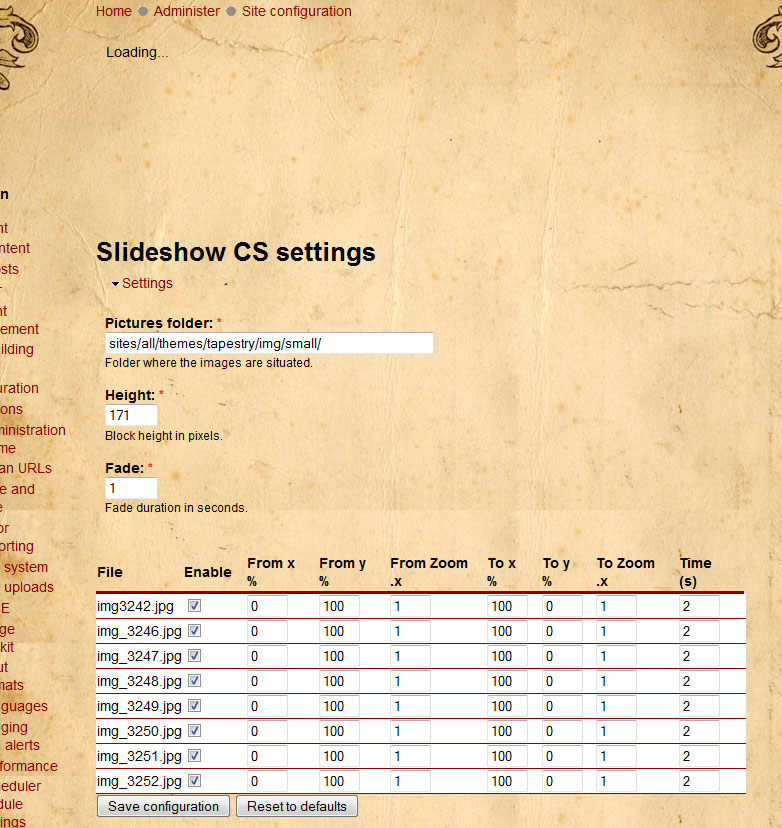
By now, to make it work you just to upload the images in a given folder (with public access permission).
Then, go to admin/settings/slideshowcs and set the folder of the images you wan to display.
Once the folder is set properly, they should appear the images you have in it like the screenshot.
You can also tweak the height of the block (which will expand to the width of the div you are embedding it)
Fade parameter indicates the duration of the transition between pictures.
If you do not want all the images to do the slideshow, just uncheck the "enable" checkbox.
Then you can tweak the rest of the parameters:
Once you have configured these parameters, you can go to admin/build/block and select "Slideshow CS block" to put on the region you want.
Hope this makes a little bit more clear the use of this module.
Comment #2
SchwebDesign commentedhas anyone successfully gotten this to work on their Drupal install? I've tried it on two different drupal 6.4 installs (one tweaked and one right out of the box) on two different servers and no dice. All config seems to work but the actual slideshow never actually shows up.
What am i missing?
Thanks
Comment #3
paddy_mul commentedHey,
I got this working just now using 3 images 800x600 pixels. With the setup in the configuration page set to the same as in the screenshot provided. The images do seem to disappear when you play around with the settings though so my guess is to try using the settings in the screenshot and work backwards from there...hope that helps
Comment #4
davebv commentedThat's strange, could you post your settings? I've tried with 6.4 and it works ok for me. What kind of file system are you using? public or private? Do you get the pictures listed?
Comment #5
SchwebDesign commentedYes I get the pictures listed.
Here's info for the first site it's not working at (GoDaddy):
Drupal 6.4
Access to update.php Protected
Configuration file Protected
Cron maintenance tasks Last run 2 min 5 sec ago
You can run cron manually.
Database updates Up to date
Drupal core update status Up to date
File system Writable (public download method)
GD library bundled (2.0.34 compatible)
Module and theme update status Up to date
MySQL database 5.0.67
PHP 5.2.5
PHP memory limit 64M
PHP register globals Disabled
Unicode library PHP Mbstring Extension
Update notifications Enabled
Web server Apache
jQuery Update 1.2.6
Here's info for the second site it's not working at (Host Monster):
Access to update.php Protected
Configuration file Protected
Cron maintenance tasks Last run 22 hours 36 min ago
You can run cron manually.
Database updates Up to date
Drupal core update status Up to date
File system Writable (public download method)
GD library bundled (2.0.34 compatible)
Module and theme update status Up to date
MySQL database 5.0.45
PHP 5.2.6
PHP memory limit 32M
PHP register globals Disabled
Unicode library PHP Mbstring Extension
Update notifications Enabled
Web server Apache/2.2.9 (Unix) mod_ssl/2.2.9 OpenSSL/0.9.8i DAV/2 mod_auth_passthrough/2.1 mod_bwlimited/1.4 FrontPage/5.0.2.2635
jQuery Update 1.2.6
This one is using the basic Garland theme.
You can see it at http://www.schwebdesign.com/cms/drupal/
Check it out... it just says "loading..." (at the bottom of the content region)
I"m wondering if I missed something or if i need to do something special for the jQ, jQuery Update, or jQ Plugin modules that Slide Show CS depends on. ... other than installing via the modules page in Drupal. I consulted their readme.txt's but they had no explicit steps for me to follow.
I will try paddy_mul's suggestion and use the numbers from the tutorial screenshot.
I do get the pictures listed just fine on the http://www.schwebdesign.com/cms/drupal/admin/settings/slideshowcs page (same deal with the GoDaddy hosting). Yet the do not show in the slideshow block. See the file attachment to this post for a screen shot of that working (but not the actual slideshow) on each of my servers.
Any thoughts? Any more information i can share to help figure this out?
Thanks, by the way, for this great module. If i can get it to work it will be a great addition!
Comment #6
davebv commentedFirst of all, I'm sorry for not including real info in the README file.
Your problem seems to me like a permission problem. Could you try to do this?
Upload your pictures to a subfolder of the default files folder (which is the one you set in admin/settings/file-system)
Check if that works.
I just tried to set a folder into the themes folder, and inspite of the pictures are listed in the settings page, the module did not work for me either so must be a problem with file permissions. To be honest, I am not an expert programmer and I had a look at this problem but do not know why this happens.
Comment #7
davebv commentedShould be fixed in version 1.2. Please, report any problems.
If this works, I will close the issue. Thanks.
Comment #8
SchwebDesign commentedThis works great! Thank you very much! Nice work.
Comment #9
SchwebDesign commentedI apologize, but i spoke too soon. it still doesn't work if pointed to the folder /sites/all/themes/tapestry/img/small
However, I am happy having the pictures in the sites\default\files folder... at least it works this way.
Comment #10
davebv commentedCould you save your html page and attache it? I would have to look what happens with the js Drupal.settings variable. Right now, I set my folder as sites/all/themes/davebv02/images and it works, maybe is the first slash?
Could you try to write sites/all/themes/tapestry/img/small instead of /sites/all/themes/tapestry/img/small (no initial slash)
Comment #11
davebv commentedI found when I put the slash, the "the directory .... does not exist" error show up. Do you get that error?
Comment #12
davebv commentedI summited a new release, please check it and tell me if that finally works. I found the problem was the initial slash, so either way I trim it so whenever you write /path/to/pictures or path/to/pictures, the result is the second one.
Thanks for submitting the bug.
Comment #13
SchwebDesign commentedYes i did get the "the directory .... does not exist" error, so i tried it without the leading "/" and i had thought it still didn't work.
Just now i tried it again - and i haven't upgraded to the latest Slide Show CS version yet ( i still have 1.2 installed)
AND IT WORKS!!
I was baffled. I could have sworn it didn't work the other night when i tried. The only conclusion i can come to is that it was just taking a large amount of time to load all the images for the .js animation. Thus i can only conclude that my previous statement "I apologize, but i spoke too soon. it still doesn't work if pointed to the folder sites/all/themes/tapestry/img/small" in post #9 probably resulted from my refreshing the page and simply not waiting long enough for the javascript animation to finish loading and run. It of course, was taking longer because i had about 3 times as many pictures in my sites/all/themes/tapestry/img/small location as in my sites/default/files/slideshow location.
I apologize from leading you astray in this respect.
Thank you for updating your release to accommodate for the leading "/"
In summary, this module works great now for me whether pointed to sites/default/files/slideshow or sites/all/themes/tapestry/img/small !
THanks!
Comment #14
davebv commentedThanks to you for reporting the bug. Hope you enjoy the module!
Comment #15
davebv commentedComment #16
davebv commentedComment #18
-Anti- commentedI had this problem too.
File were in: sites/all/themes/aboutpeople/img/banners
The images are listed in the block settings page.
The message 'loading...' appears, but the images never load.
I moved the images to files/banners, and it is working.
Thanks for this module. I was using the 'JW Image Rotator' (which is also very good),
but this gives a smoother motion and loading, and it is easier for the site owner to
add more images (JW uses an xml file that needs to be updated).
EDIT1:
> but this gives a smoother motion and loading
I spoke too soon. In firefox it is good. In IE7, it is quite 'jerky', which ruins the desired effect of smooth, calm, serene transitions. Maybe it is the image size (690x150 50kb). Maybe it is because I have set the transitions so slow (10 seconds with a 9 second fade).
I can't use it for the main header/banner, but perhaps I'll still use it in a small block somewhere.
Thanks again.
EDIT2:
I decided to use it anyway because it still has great advantages:
· The 9 second fade is very nice, and actually less distracting without the 'ken burns' effect, and it works fine on IE7.
· It is easy for the site owner to update the images.
· I love your hyperlink feature; after adding text, the banner effectively becomes a menu of sorts.
· The user doesn't get any SWF message when right-clicking the image.
· The loading of images is smoother than the JW rotator.
So, a final thanks!