

 Come together with the global Drupal community in Rotterdam, 28 Sept – 1 Oct 2026. Sessions, contribution, connection, and Early Bird savings until 8 June.
I have tries Commerce Stripe 7.3.0-alpha with various versions of the library and when trying to make a payment I get the following 2 error messages on the page:
"There are errors on the page. Please correct them and resubmit the form."
"Error making the payment. Please contact shop admin to proceed."
In Drupal's suite reports I get:
"Failure to load Stripe API PHP Client Library."
Anyone know how to get past this please? Or can someone at least tell me a working combination of module + library versions please so that I at least know I have the right ones installed.
Cheers.
| Comment | File | Size | Author |
|---|---|---|---|
| #20 | 2017-11-10_172046.png | 4.83 KB | jnrfred |
| #17 | Screenshot_14.png | 93.26 KB | TylerMarshall |
| #11 | 2901172-commerce_stripe-library-11.patch | 4.64 KB | torgospizza |


Comments
Comment #2
torgospizzaI've tested the module and made it compatible with 3.x and 4.x versions of Stripe's PHP library. You'll need to make sure the library is in the
/sites/all/libraries/stripe-phplocation.Aside from ensuring the files exist, ensure your server has access to execute that folder, and everything should be good. But we might need to know more about your environment if we need to debug further.
EDIT: Also, give the -dev version a try. There have been a lot of fixes since then (and we are using it in production now with no issues).
Comment #3
bharat.kelotra commentedI also have same issue.
For me it was that the same library with old version was present in /sites/default/libraries/stripe-php
I removed the library from default folder and uploaded 4.x to /sites/all/libraries/stripe-php
And it worked.
Comment #4
torgospizzaThanks, @Bharat!
@bobfries Please let me know if you're still having this issue.
Comment #5
cprofessionals commentedIn my case I tried:
I saw in the module code that the max supported version was stripe-php-3.23.0 and this was the only one that worked for me.
Am I right? Are we losing anything by being on this version vs. the newer releases?
On the module page it mentions "2. Download the latest Stripe PHP release from GitHub." this is the reason why I started with 5.2.3. You may want to change this verbiage and state the max compatible version.
Thanks for this module!
Comment #6
Sylvebois commentedHello,
If you want to use a more recent stripe-php version, you have to modify commerce_stripe.module :
I'm testing the dev-version of the module with the 5.2.3 version of the library and it seems to work
Comment #7
torgospizzaHere's a patch which updates the
$maximum_versionvariable, as well as the drush command line for downloading the PHP Library. Please give it a try against current -dev.Comment #8
torgospizzaSorry, forgot to change the regex. New patch attached.
Comment #9
torgospizzaIt looks like my Regex was breaking actual version detection.
Here's a new patch, which does the following:
- Fixes the regex to correctly detect minor versions
- Updates the latest tested version to 5.5.0.
- Fixes the Requirement error to a warning, as other versions of the library should work
- Adds other parameters to the version arguments callback
- Removes the errors from the hook_libraries_info() callback, because it was repetitive.
Things I'd like to do still:
- Remove the version declaration in the Drush library download command to use --latest or similar
- Add better handling of multiple versions/variants, although not sure if that's critical
This was rolled against the latest dev but should work for current alpha. Testing and feedback appreciated.
Comment #10
torgospizzaWhoops, forgot the changes I made to the requirement messages. Try this one instead
Comment #11
torgospizzaSorry for the spam. Just tested with a correct version and it still saw it as a mismatch. Fixed patch attached.
Comment #12
torgospizzaStripe released v5.6.0 of their stripe-php library on October 31st.
This patch does a lot of good things, and there hasn't been any feedback here in awhile, so I may just commit this (and a few other well-tested patches) to -dev soon so that I can cut another alpha release.
Comment #14
torgospizzaCommitted to dev, and before doing so I bumped the max version to 5.6.0. Please test out dev and let me know if you run into any trouble. Please reopen this issue, if so.
Comment #15
TylerMarshall commentedHey there,
So with D 7.56, latest version of this module and stripe 5.6 (as followed from the installation instructions) we are getting the same error. Failure to load Stripe API PHP Client Library.
I am wondering if I have something messed up with the versioning? My server is all set up properly permissions wise.
Comment #16
torgospizza@Tyler_Marshall: That is strange. Are you using the latest alpha, or the latest Dev? These changes were made in -dev, and I have not yet released a new alpha. If you could, please give the dev version a try.
Do you also have the Stripe module installed? (Currently Commerce Stripe does not require it, but perhaps I should make that happen sooner or later to avoid any potential Library conflicts.)
EDIT: Also, are there any additional logs in Watchdog / syslog?
Comment #17
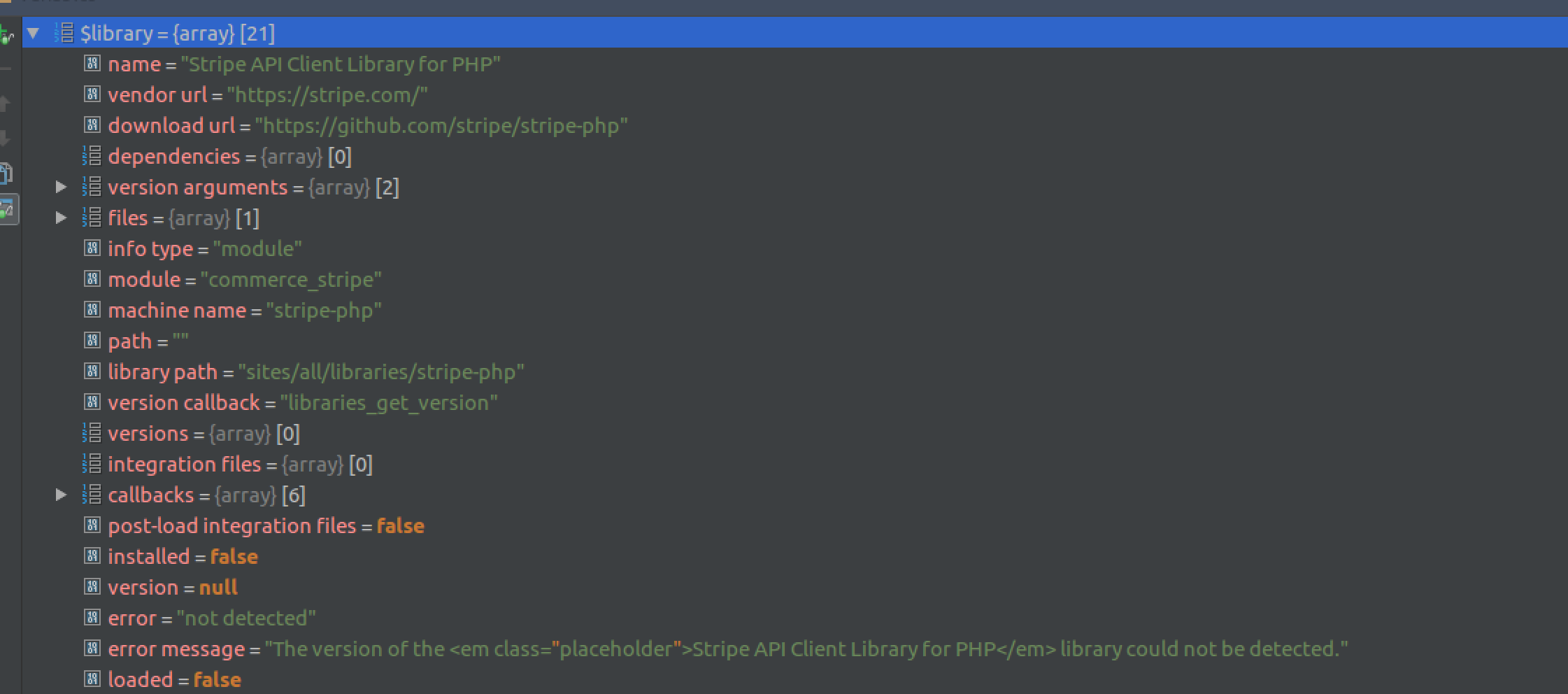
TylerMarshall commented@torgosPizza I will give that a shot.
Here is a snap I got right before the WD message:
Comment #18
torgospizzaYes, so the library version detection was fixed in the latest Dev. You'll need to run
drush cc librariesafter the upgrade. (I'll add an update hook to do this, too.)I just tested myself and can confirm that this happened to me:
1. Installed current alpha
2. Cleared caches
3. Tested things such as updating a Cardonfile, confirmed error with v5.6 of Stripe Library (detection was broken in Alpha)
4. Upgraded to latest Dev
5. Did not clear caches
6. Tried to update a cardonfile, received "Unable to load Stripe PHP Library" error as mentioned above
7. Cleared libraries cache
9. Retried saving Cardonfile, was successful
I will work to get a new Alpha released so folks can upgrade the module properly.
Comment #20
jnrfred commented@torgosPizza
I followed your instructions ^ above
(Upgraded to latest dev. 7.x-3.0-alpha2+1-dev) but I get Error making the payment. Please contact shop admin to proceed.
Error log shows: Failure to load Stripe API PHP Client Library. Please see the Status Report for more.
See attached for screenshot of the status page.
Comment #21
torgospizza@jnfrfred: Can you tell me what version of the Library you're using? Do you have any other Stripe modules installed?
Also, did you run the Update.php script (or drush updb) after upgrading?
Comment #22
jnrfred commented@torgosPizza I am using stripe library v5.6.0. I don't have any other stripe module installed as well. Yes, I did drush updb after upgrading module
Comment #23
torgospizzaConfirmed, I can see this happening too. What's weird is I thought I'd fixed this. Sorry about that..
working on a fix now. Thanks for the help, @jnrfred!
Comment #24
torgospizzaSo, I tested a bit again this morning, and I am still unable to reproduce the issue.
1. I had to download Alpha3 from the drupal.org site, as the command
drush dl commerce_stripedownloaded alpha1 for me, for some reason.2. After upgrading the Commerce Stripe version and removing the old v4 Stripe PHP Library, I get this screen:

3. After extracting the v5.6.0 library (and renaming the
stripe-php-5.6.0/direectory tostripe-php, refreshing the Status Report page showed me the same error as @jnrfred. That is, the file '/lib/Stripe.php' was detected, but the version is not:4. Then, after running the command
drush updband clearing my caches, the library shows up with the correct version detected:The only other thing I can think of is that something else is preventing the library from being loaded. Right now I'm only able to reproduce this by a) upgrading my modules and library, but b) NOT clearing the caches afterward. Once caches have cleared, the problem goes away for me.
@jnrfred: Can you verify that all of the files are in your
stripe-phpdirectory? Somehow I had a few files go away at one point, probably as a result of a wrong rename operation. Also, if you can try doing a "clear all caches" and see if that resolves the issue, that'd be super helpful.Failing that, feel free to ping me in Drupal Slack, I'm in the #support and #commerce channels. I'd be happy to try and work on this in real-time.
Thanks!
Comment #25
jnrfred commented@torgosPizza Works perfectly now. What I did:
1. Downloaded stripe library 5.6.0 again and renamed the folder to stripe-php (Probably I missed some files earlier as you mention)
2.Upgraded module to the latest dev version
3. Run drush updb
4. Cleared cache
5. Checked status page (reports/status): Library installed, Library version:5.6.0
Thank you @torgosPizza for the review and fix.
Comment #26
TylerMarshall commentedCan confirm is working for me as well.
Thank you!
Comment #27
torgospizzaPhew! I'm so glad you guys got it working. I was starting to worry :)
I found a module the other day that auto-downloaded the Library dependency into its correct location, and I'm considering making the same feature available in Commerce Stripe. That would help avoid some confusion, since Stripe's PHP libraries do not automatically extract into
stripe-php/but rather e.g.stripe-php-v5.6.0/.I'll mark this as Fixed, and spin off a child task for the above feature. I'll also make sure our documentation is clear on this point.
If anyone runs into additional errors please feel free to reopen this issue.