

 Come together with the global Drupal community in Rotterdam, 28 Sept – 1 Oct 2026. Sessions, contribution, connection, and Early Bird savings until 8 June.
How on earth do I do that?
I received the error:
The provided OAuth access token has expired. You must renew the access token via the Renew Access Token endpoint
I've updated the Application Secret value in Square and replaced it in my module (rule) and have now been told to perform the OAuth flow. I don't have any idea how to actually do that. If it's common knowledge, I have a gap in my knowledge and I can't find anything online to help me.
| Comment | File | Size | Author |
|---|---|---|---|
| #15 | Screen Shot 2017-11-10 at 1.58.06 AM.png | 42.95 KB | rogernyc |
| #11 | access_token_renewal-2898767-11.patch | 5.97 KB | mglaman |
| #11 | access_token_renewal-2898767-11.patch | 5.97 KB | mglaman |

Comments
Comment #2
mglamanI will review. We'll but updating the form in D7 to make this easier.
Comment #3
mglamanThe form has been updated to make this flow easier to work with. Instead of having to perform the OAuth flow after saving the payment method, it is now done during the main settings form. The docs need to be updated.
Comment #4
rogernyc commentedHaving the same issue. Drupal 7. Core and all modules up to date.
Error on Home » Administration » Store » Configuration » Payment methods » Editing reaction rule "Square":
[HTTP/1.1 401 Unauthorized] {"errors":[{"category":"AUTHENTICATION_ERROR","code":"ACCESS_TOKEN_EXPIRED","detail":"The provided OAuth access token has expired. You must renew the access token via the Renew Access Token endpoint."}]}
Updated Personal Access Token and Application Secret on connect.squareup.com and in Drupal with no luck.
Am able to select a Sandbox location, though not a Production location (one is set up at square) at 'Payment methods » Editing reaction rule "Square"'
Am able to complete cart process in sandbox mode, but not in production mode. Process breaks after entering credit card info. Submissions stopped going though around 9/20/17.
thanks.
Comment #5
rogernyc commentedComment #6
rogernyc commentedWhere to add the 'Personal Access Token' from Square with Commerce Square Connect 7.x-1.0-beta6?
Comment #7
rogernyc commentedSeems I got it. After trying numerous approaches I ended up (backing up and then) deleting the row in the Drupal 7 'variable' table where the 'name' column was set to 'commerce_square_settings'. Then re-entered all the square info at 'store >> configuration >> square settings' and everything reset nicely.
Comment #8
mglamanSorry about this! I was slow to get around, client work and recovering from DrupalCon has thrown off schedule. I'm going to make an adjustment that we always refresh the token when saving the main form.
I'll also document, in the README how to programmatically set the token to your personal access token.
Comment #9
mglamanCurrently we are only refreshing tokens when they expire, right at the thirty day mark. This should be at 15 days before they expire.
https://docs.connect.squareup.com/api/oauth#post-renew
Comment #10
mglamanI read that wrong. Tokens expire on 30 days, but can be renewed for 15. I found a bug in
commerce_square_renew_access_tokenwhere it isn't passing the client secret as an Authorization header.Comment #11
mglamanPatch to:
* Allow admin form to always get new token.
* Fix cron run.
Comment #13
mglamanFixed and released.
Comment #14
mglamanComment #15
rogernyc commentedhi again.
The form has stopped connecting to Square again. After entering credit card info and clicking 'continue to the next step' it just hangs up with the load icon spinning indefinitely.
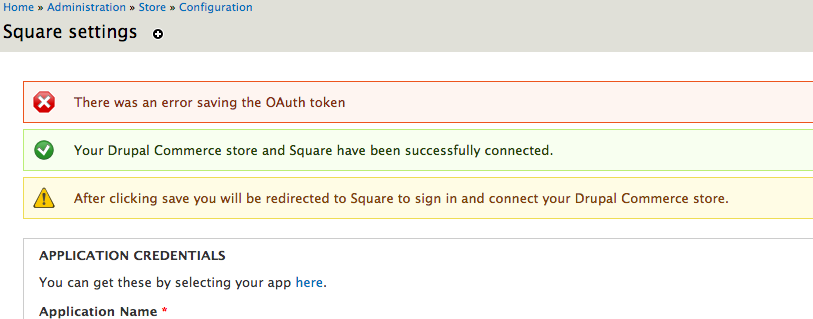
This happened before and after updating the the commerce_square module, double checking all the settings for the module and at Square. Resetting tokens etc at Square and re-entering them for the module. The module showed a "Your Drupal Commerce store and Square have been successfully connected." message on saving new settings - though the "After clicking save you will be redirected to Square to sign in and connect your Drupal Commerce store.' was also still there after saving. I click 'save configuation' again and now a "There was an error saving the OAuth token" message appears above the other two. (See screenshot).
thanks
Comment #16
rogernyc commentedComment #17
rogernyc commentedJust got things working using a different credit card than we'd been using (the other one worked previously).
thanks
Comment #18
bloomt commentedI am getting the same error as #15 is there any solution?
Comment #19
mglamanbloomt to which error? can you open a new issue please so we can resolve
Comment #21
ryanfc78 commentedI am getting the same issue as #15 as well. Square says everything is correct with the info and it says it connected but I get the OAUTH error. When I enable Square in the payment settings and then try to check out it just hangs between the screen where you enter your billing info and the screen where you enter your CC info. Has anyone found any solutions to this yet?
Comment #22
ryanfc78 commentedI have uninstalled deleted and reinstalled this module 4 times now. This last time I created a new Application on the Square end and tried again. It says it connected fine and did not get the OATH error but when you go to checkout and try and go from the Billing/Shipping Info page to the Credit Card page where the user enters their CC info it just hangs between those two screens. Anyone else have this issue? Did you find any solution that fixed it.
The site works fine with the Authorize.net module but cannot get the Square payment module to work. Thanks for any thoughts or help I may get.