

 Come together with the global Drupal community in Rotterdam, 28 Sept – 1 Oct 2026. Sessions, contribution, connection, and Early Bird savings until 8 June.
In v1.5
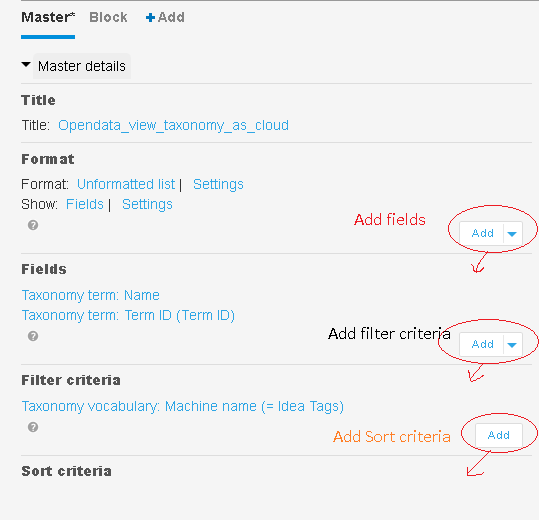
edit an existing view or create a new view the "add" button is above the section it applies to.
In v1.3 the add button was in the correct place.
Suspect that this is due to some css changes made to wetkit_wetboew ?? or wetkit_omega ??
Workaround: no workaround yet.
| Comment | File | Size | Author |
|---|---|---|---|
| #1 | views_admin_css_wetkit_omega_theming.png | 11.46 KB | joseph.olstad |


Comments
Comment #1
joseph.olstadComment #2
joseph.olstadComment #3
joseph.olstadComment #4
joseph.olstadMore testing.
On a fresh install the add buttons in views is in the correct row/location .
So this might only be affecting upgraded sites or in particular our individual site (to be determined)
Comment #5
joseph.olstadComment #6
joseph.olstadWeird, another test and the same problem exists in a vanilla fresh install environment 5 minutes after playing with it.
So it fresh installs are affected by this issue, not just our site.
Comment #7
gdaw commentedactually it's the admin theme responsible for this problem
Comment #8
gdaw commentedProblem can be resolved by editing the style.css in ember theme
(profiles/wetkit/themes/ember/styles) and commenting out min-height: 2.3 em;
Comment #9
sylus commentedThanks gdaw for the css recommendation. I modified it slightly to be limited to just views-displays and assigned min-height: inherit in wetkit_ember.