

 Come together with the global Drupal community in Rotterdam, 28 Sept – 1 Oct 2026. Sessions, contribution, connection, and Early Bird savings until 8 June.
Hi,
When i click the previous or next button nothing happens on the front end.
No errors either.
On the backend it works..
anyone?
| Comment | File | Size | Author |
|---|---|---|---|
| #12 | availability-calendars-htmlattribute-1891390-11.patch | 1.21 KB | kevinquillen |
| #11 | availability-calendars-htmlattribute-1891390-9.patch | 1.26 KB | kevinquillen |
| #2 | settings availability.PNG | 40.07 KB | harings_rob |

Comments
Comment #1
fietserwinStart by comparing the settings.
Comment #2
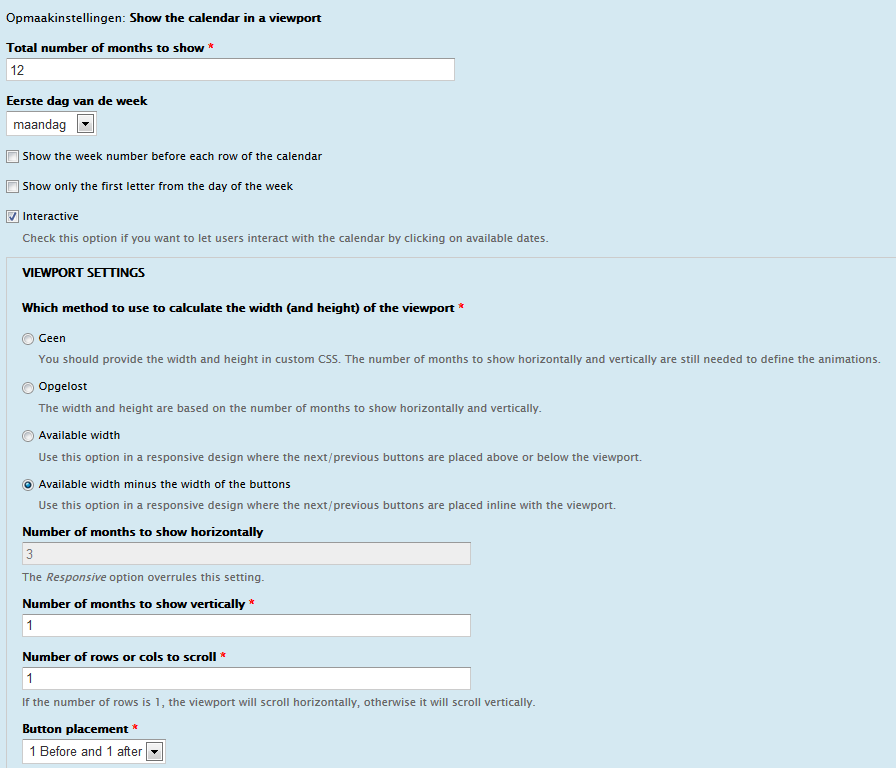
harings_rob commentedWhat settings?
In the attachment are my current ones:
Comment #3
fietserwinOK, your settings seem fine. I guess that there is some javascript error on your page that prevents the code that reacts to button clicks from being run.
Check with firebug that you don't have any javascript error on your page.
Comment #4
fietserwinDid I guess correctly? If not, please feel free to reopen this issue.
Comment #5
harings_rob commentedHi,
I checked on everything disabled every js file and still not works.
Reopend
Comment #6
fietserwinDo not disable js files, but check with firebug (being active before loading the page!) that you don't see any errors on the console tab. If no js error gets listed, you will have to debug the js code. Set breakpoints at the 1st, 2nd and 3rd line of function initHandlers() in availability_calendar.viewport.js to see if these lines get reached at all.
Let me know your findings.
Comment #7
harings_rob commentedHi,
There are no errors when viewing in firebug.
I'll try the breaks tonight
Comment #8
kevinquillen commentedI have this same issue when using the twitter Bootstrap theme. The javascript is firing and I can see the DOM adjusting the element positions of the viewport, but the month itself is not sliding to the next or previous month. No js errors in the console. The events are firing.
Comment #9
fietserwinFor me it works fine with jQuery 1.8 in both Bartikand Seven.
Does the Bootstrap theme set the dir attribute? (see e.g. issue #1732772: Add html tag to html.tpl.php)
If so, can you check the dimensions calculations?
- Starting at line 91 of availability_calendar.viewport.js (that is within function initSettings())
- continuing in function calculateDimensions() at line 103 of that file
do you see any strange things, e.g. the jquery.actual plugin returning 0 at some point?
Note: does it occur both in viewing and editing?
Comment #10
kevinquillen commentedI see the issue, I will attach a patch.
Comment #11
kevinquillen commentededit: scratch this, wrong patch attached
Comment #12
kevinquillen commentedHere is the correct patch.
This will default to isLtr true if the html tag has no dir attribute defined, otherwise it will evaluate the dir value.
I tested this without a dir tag, and with a dir tag, with the dir tag as ltr, rtl and got the expected behavior.
This really threw me because (I am not so familiar with Bootstrap) but it was hard to track down.
Comment #13
fietserwinThanks. I think it is better to follow your suggestion, even though I do consider this an error in bootstrap. But I guess that most sites are LTR and that it should be seen as default if the attribute is missing.
Drupal themes really should set the dir attribute as Drupal supports sites in 1 language that differs from English and multilingual sites with both LTR and RTL languages. So good behaving contrib modules and themes should cater for that as well. So, I suggest you also post an issue in the Bootstrap theme issue queue!
I will fix and commit it later today. I will then also set it to fixed again. OP: please feel free to reopen if this still does not solve your problem. But as you can see, I do need more info from you in that case: theme, jquery version, what do the (above mentioned) calculations result in, etc.
Comment #14
kevinquillen commentedI do as well (Bootstrap issue)- none of the usual Drupal attributes are on the HTML tag at all. Thats a first for me to see in many years, was hard to see that at first.
Comment #15
fietserwinFixed and committed.
The actual change is even simpler:
The jQuery docs state that
So I guess that before 1.6 it returned the empty string or something like that and because 1.5 is still the "official" version for Drupal, I decided to test like I do above.
Comment #16
kevinquillen commentedGood reduction!