
Recovering access
Please use the following trouble-shooting guide to re-gain access to the user 1 account.
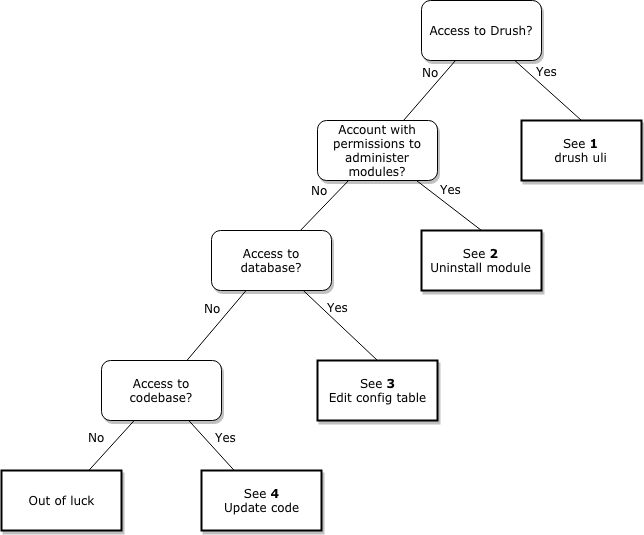
1. Using Drush
Simply use the Drush "user:login" command to generate a one-time-login link by invoking:
drush user-loginOr use the Drush alias:
drush uliAlternatively you can also set the module status to disabled.
drush php:eval "\Drupal::configFactory()->getEditable('stop_admin.settings')->set('disabled', FALSE)->save(TRUE);"In case you still can't login, you can disable the module entirely with the following Drush command:
drush pm-uninstall stop_admin2. Uninstalling module
If you still have a user account with permissions to administer modules, you can simply go to admin/modules/uninstall and uninstall the Stop Administrator Login module.
3. Disabling module from database
You can also disable the module by altering the system database table.
WARNING: Altering your database directly may end you up corrupting your database and breaking it beyond repair. It's recommended that if you are going for this approach to first take a complete database back-up and put your site into maintenance mode.
For Drupal 8
- Manually edit the
configtable wherename = 'core.extension'and remove the module from the data blob which is a serialised array. - Be aware to decrement the module array length as well
(...s:6:"module";a:HERE;{...) - Truncate the
cache_configtable.
(Source)
For Drupal 7
You can manually edit the system database table and set the "status" field to 0.
UPDATE system SET status='0' WHERE name='stop_admin';4. Updating code
If you are still in a position to deploy code, you can put the line of code that adds the validation hook to the forms in comment like so:
if ($form_id === 'user_login_form' || $form_id === 'user_login_block') {
  //$form['#validate'][] = '_stop_admin_prevent_admin_login';
}
This will allow you to login as an administrator to fix your site. Note that you'll need to revert this line back to its original state. Otherwise you have a "hacked" module on your site.
If you want to edit this diagram, please see the attached (when clicking on the edit button) .zip file containing the resource files that can be imported on draw.io. Please also re-upload the zip file after you're done.
Or
Follow the same principal as in https://www.drupal.org/docs/8/modules/stop-administrator-login/custom-lo... to disable the logic.
Help improve this page
You can:
- Log in, click Edit, and edit this page
- Log in, click Discuss, update the Page status value, and suggest an improvement
- Log in and create a Documentation issue with your suggestion
