
Overview of the NTLM & Kerberos Authentication Protocol
Overview:
Kerberos is an authentication protocol for client/server applications. For authentication purposes, tickets are granted to the clients via the Kerberos Key Distribution Center (KDC). The Kerberos ticket is presented to the servers after the connection has been established. Kerberos authentication tickets represent the client’s network credentials.
Windows New Technology LAN Manager(NTLM) is a challenge/response authentication protocol that utilizes a three-way handshake to authenticate the user on networks that include systems running the Windows operating system and on stand-alone systems.
Windows authentication uses either the Kerberos authentication protocol or the NTLM authentication protocol, depending on the client and server configurations.
NTLM Authentication Protocol:

- The NEGOTIATE_MESSAGE defines an NTLM Negotiate message that is sent from the client to the server. This message lets the client specify its supported NTLM options to the server.
- The CHALLENGE_MESSAGE defines an NTLM challenge message that is sent from the server to the client and it is used by the server to challenge the client to prove its identity.
- The AUTHENTICATE_MESSAGE defines an NTLM authenticate message that is sent from the client to the server after the CHALLENGE_MESSAGE is processed by the client.
Kerberos Authentication Protocol:
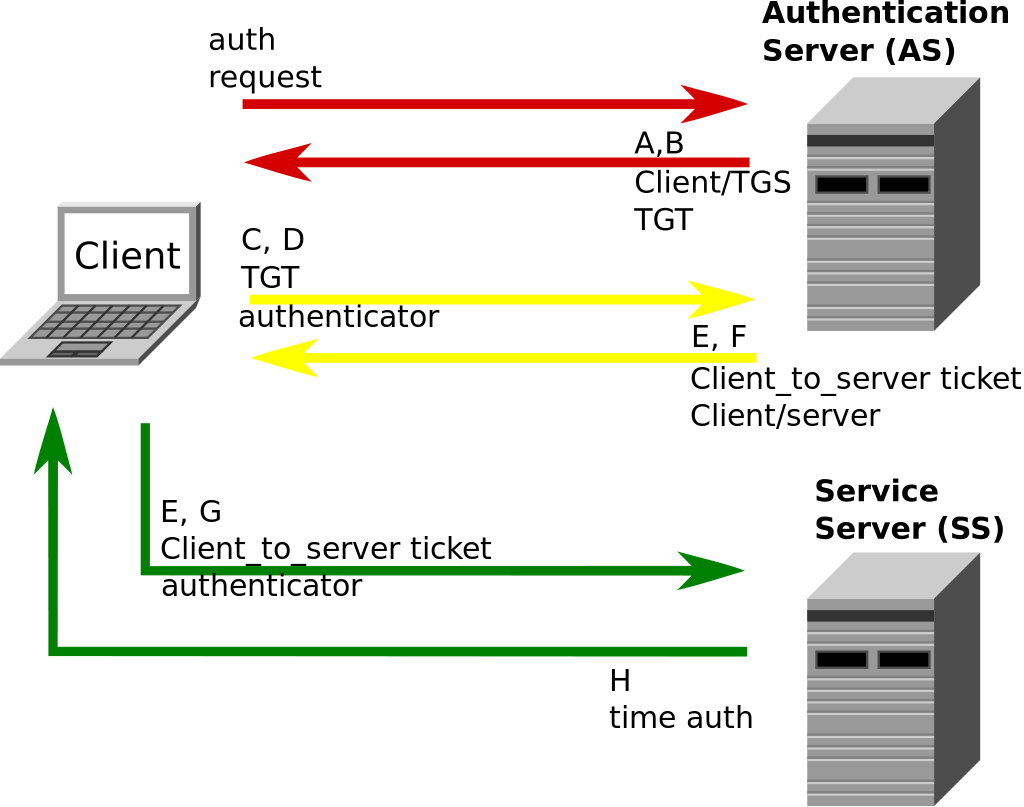
- Message A: Client/TGS Session Key is encrypted using the secret key of the client/user.
- Message B: Ticket-Granting-Ticket is encrypted using the secret key of the TGS.
- Message C: This message is composed of the TGT from message B and the ID of the requested service.
- Message D: Authenticator is encrypted using the Client/TGS Session Key.
- Message E: client-to-server ticket is encrypted using the service's secret key.
- Message F: The client/Server Session Key is encrypted with the Client/TGS Session Key.
- Message G: A new Authenticator, which includes the client ID, and timestamp and is encrypted using Client/Server Session Key.
- Message H: The timestamp found in the client's Authenticator is encrypted using the Client/Server Session Key.
Where to go from here:
Follow the Kerberos Authentication Setup Guide to set up the Kerberos SSO for your Drupal site.
 Back to top
Help improve this page
You can:
- Log in, click Edit, and edit this page
- Log in, click Discuss, update the Page status value, and suggest an improvement
- Log in and create a Documentation issue with your suggestion
