
Different consent modes for Klaro!
You can choose between the following options in the form General > Consent > Klaro! Dialog Mode (/admin/config/user-interface/klaro):
- Silent (no dialog, only modify attribute and block sources)
- Notice dialog
- Notice dialog as modal
- Consent dialog modal
These are described in detail below.

Silent (no dialog, only modify attribute and block sources)
This is the default mode. With this mode, all external resources will be blocked (if possible):
- External javascript will not be loaded.
- External / embedded content will be blocked and a placeholder shown.
The user can allow loading external content in the placeholder dialog.
If you need to load external scripts (e.g. for tracking), consider activating the "toggle" button or choose one of the other consent modes.
Notice dialog
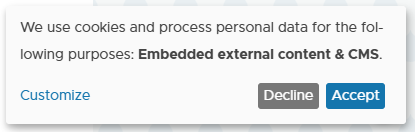
Show notice dialog if no decision has yet been made. The dialog does not open in modal and visitors can use the page normally.
Notice dialog as modal

Show notice dialog as a modal if no decision has yet been made. The visitor must decide before the site can be used.
Consent dialog modal

If no decision has yet been made, the consent dialog modal is shown. The visitor is forced to make a decision before the page can be used.
Option: Show Toggle Button
If activated, a flying toggle button gets added to the page to open the consent dialog.
Help improve this page
You can:
- Log in, click Edit, and edit this page
- Log in, click Discuss, update the Page status value, and suggest an improvement
- Log in and create a Documentation issue with your suggestion
