
OAI Harvester module - a developer's guide
Introduction
The OAI Harvester module collects metadata records from OAI-PMH data providers through the OAI-PMH protocol v2.0. More about the protocol see http://www.openarchives.org/OAI/2.0/openarchivesprotocol.htm. The harvester simply harvests: it does not store the records, because there are many possible ways to store such records in Drupal. There are hooks which the OAI harvester invokes and with which it sends the data to the implementers of that hooks. The XC Drupal Toolkit contains one module, which implements these hooks (xc oai harvester bridge module). This module can be used as an example for writing your own module. The OAI Harvester module itself is independent from other XC modules.
The two parts of OAI Harvester Module:
- The database structure and user interface, which helps to harvest data.
- The hooks, which helps to store or index data coming from a repository.
The concepts of the OAI harvester
Repository
Repository is an OAI-PHM data provider. It supports one or more XML formats (identified by a metadata prefix), and may support one or more sets.
Schedule
A process of harvesting a single repository. The protocol only supports a single format and one set at a time. So if we would like to harvest multiple sets or formats, it should be split into multiple single processes.
A single process
Get all records matching one set of initial parameters (one format and set from and until parameter). First, it requests an initial URL consisting of initial parameters. If there are more records than the number allowed in single OAI response, the repository sends resumptionToken information with which we can continue the harvesting. The resumptionToken is a kind of session identifier, so we don't need to resend the initial parameters again, only the actual resumptionToken. The end of the single process is identified when there is no resumptionToken information returned in the response.
From the perspective of the requester, the process is as follows:
a) Issuing an initial URL
b) Find out whether there is a resumptionToken in the response
c) If there is, issue a resumptionToken URL and go to b)
d) If there is not, then finish
An initial URL
An initial URL contains the base URL of the repository, one format and may contain a one set parameter. It may contain from and until parameters to select a given date range. We use it when we harvest the same repository with the same parameters the second time and so on, so then we harvest only the incrementation. If the repository supports deleted records, it provides information about the deletions as well.
A resumptionToken URL
The resumptionToken URL is the type of URL we request from the repository from the second request on. resumptionToken is a kind of session identifier, and using this we don't need to use the initial parameters. The resumptionToken identifies the next records in the sequence.
Processing a single request
A single OAI-PMH request issues an initial or a resumptionToken URL, and processing its response.
OAI harvester calls the following hooks:
- hook_oaiharvester_harvest_starting - harvest is starting
- hook_oaiharvester_batch_started - a batch operation is started
- hook_oaiharvester_request_started - a single OAI-PMH request is started
- hook_oaiharvester_process_record - provide a record to be processed
- hook_oaiharvester_request_processed - a single OAI-PMH request has been processed
- hook_oaiharvester_step_processed - a step (a harvesting of a given set in a given metadata format) has been processed
- hook_oaiharvester_batch_processed - a batch operation has been processed
- hook_oaiharvester_harvest_finished - the schedule has been finished
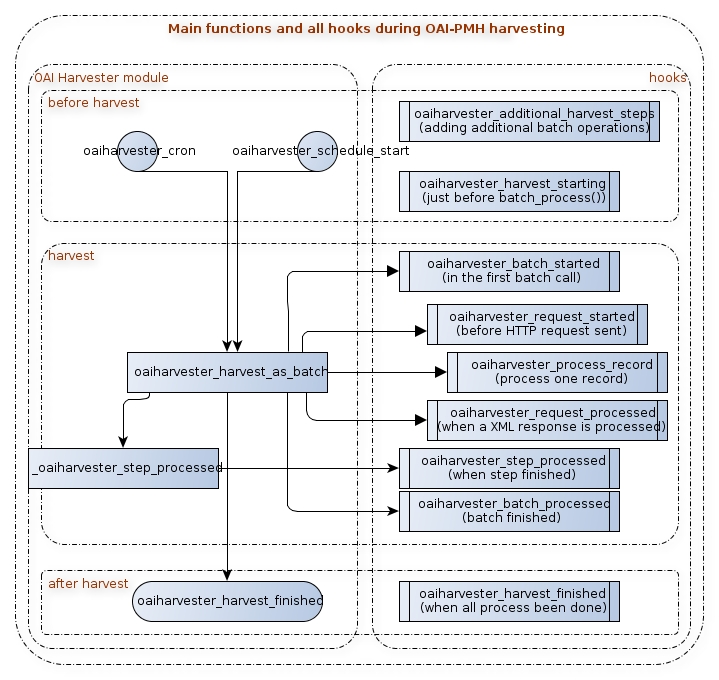
The xc_oaiharvester_bridge module (part of the xc module) implement almost all of these hooks. If you are unsure about the usage, you can get examples from that module.
hook_oaiharvester_harvest_starting
Signature:
hook_oaiharvester_harvest_starting($schedule_ids)
Purpose and time of event:
The even is called just before the batch starts to run. Your module can run some initialization tasks, clearing caches and others before the harvest would start.
Parameter
$schedule_ids The identifier(s) of the schedule or the schedules. (It is possible, that when launching by a cron job, multiple schedules will run in the same batch job).
hook_oaiharvester_batch_started
Signature:
hook_oaiharvester_batch_started($parameters);
Purpose and time of event:
Triggered when the batch has been started
Parameter:
$parameters (array) The harvest parameters.
hook_oaiharvester_request_started
Signature:
hook_oaiharvester_request_started($parameters);
Purpose and time of event:
Response to the event that a single OAI request is issued.
Parameter:
$parameters (Array) The OAI request parameters
hook_oaiharvester_process_record
Signature:
hook_oaiharvester_process_record($record)
Purpose and time of event:
This hook is triggered inside an iteration of every harvested records, so it calls on each record sequentially. If you want to do something with the record (usually: storing and indexing for search), implement the hook. The record is a complex structure: it is an array created from the XML element of OAI-PMH response. The actual metadata part is built as DOMElement.
Parameters:
$record The harvested record in an OAI-PMH response to the ListRecords verb request
The record is a complex array with the following internal structure:
$record['header'] - the header part of the record
$record['header']['identifier'] - The record identifier
$record['header']['datestamp'] - The time of the last modification or the creation
$record['header']['setSpec'] - The identifier of the sets in which the record take place
$record['about'] - information about the record
$record['metadata'] - the metadata part of the record. It could be in one of several metadata formats (like Dublin Core, MARCXML, EAD etc.
$record['metadata']['namespaceURI'] - the namespace of the metadata format
$record['metadata']['childNode'] - the content of the metadata. It is in DOMElement object
hook_oaiharvester_request_processed
Signature:
hook_oaiharvester_request_processed()
Purpose, time of event:
This hook is triggered after a single OAI request processed. Do not confuse with hook_oaiharvester_harvest_finished which is triggered after all requests are processed
for a given initial URL.
Parameters:
no parameter currently
hook_oaiharvester_step_processed
Signature:
hook_oaiharvester_step_processed($has_errors, $parameters, $start_time);
Purpose, time of event:
Triggered after a step (a pair of set-metadata format) has been harvested. OAI-PMH data providers might split the collections into parts, for example a library may have 'books', 'journals'. The OAI-PMH protocoll calls them 'sets'. According to the protocoll it is not possible to request multiple sets in one harvest, so if you want to harvest multiple sets, Drupal Toolkit will create "steps" at the background. Each steps harvests one set. So if the admin select "books" and "journals", Drupal will harvest books, then trigger this hook, then harvest journals, and trigger this hook again, and finally, since this was the last step it calls hook_oaiharvester_batch_processed.
Parameters:
$has_errors (boolean) Flag denoting whether there were any error during harvesting process.
$parameters (array) The associative array of the harvest parameters.
$start_time (int) Timestamp of harvest start time.
hook_oaiharvester_batch_processed
Signature:
hook_oaiharvester_batch_processed($sets, $current_operation, $schedule_id);
Purpose, time of event:
Triggered after the whole harvester batch has been processed (all steps of the sets-metadata formats pairs has been harvested). So this hook is invoked only one time.
Parameters:
$sets (array) All the batch sets. Each set is an array with two elements, where the first element is the name of the function, the second element is the list of parameters as an array.
$current_operation (array) The current operation's identifier, which actually is the index of the operation in the sets array (the firt parameter of this function).
$schedule_id (int) The schedule ID
hook_oaiharvester_harvest_finished
Signature:
hook_oaiharvester_harvest_finished($success, $results, $operations);
Purpose, time of event:
Triggered after a schedule is finished (successfully or not). A schedule may contain multiple initial URLs.
Parameters:
$success Boolean value designating the success of the harvesting
$result An array containing information about the process
$operation Currently unused parameter
Post-harvest steps
You may want to do some other tasks immediately after harvesting. To achieve this goal you have to modify the schedule editing form, and provide some form elements, with which the administrator can add different parameters your module can use during the harvest, or it can add additional tasks, which will run immediately after the harvesting phrase.
Modifying the schedule form
We do not provide another hook for this, you can simply use Drupal's hook_form alter. The schedule form's id is 'oaiharvester_schedule_multiform' or 'oaiharvester_schedule_edit_form'. Since this is a multipage form, we suggest you to alter last page of the form. Don't forget to register the validator and submit functions. An example:
function mymodule_form_alter(&$form, &$form_state, $form_id) {
  if (($form_id == 'oaiharvester_schedule_multiform'
      || $form_id == 'oaiharvester_schedule_edit_form')) {
    if ($form_state['storage']['step'] == 3) {
      ... // your modufications goes here
      $form['#validate'][] = 'mymodule_schedule_validate';
      $form['#submit'][]   = 'mymodule_schedule_submit';
    }
  }
  // modifications of other forms
}

function mymodule_schedule_validate($form, &$form_state) {
  ... // form validations goes here
}

function mymodule_schedule_submit($form, &$form_state) {
  ... // saving form's values
}
hook_oaiharvester_schedule_view
Purpose, time of event:
When you made modification of the schedule's form, you would like to view your properties and their values at the schedule properties page (admin/xc/harvester/schedule/%schedule_id). This hook returns additional properties of the schedule as an array of label-value arrays.
Signature:
hook_oaiharvester_schedule_view($schedule_id);
Parameters:
$schedule_id The identifier of the schedule
An example for the return value:
  return array(
    array(t('Storage locations'), theme('item_list', $location_links)),
    array(t('Is Solr running?'), theme('item_list', $ping_report));
    array(t('Run \'preparing metadata for search\' step?'), $steps_label)
  );
hook_oaiharvester_additional_harvest_steps($schedule_id)
Purpose, time of event:
If your module would like to add additional task into the harvesting process which will run after the schedule, it can be done with this hook. The structure is similar as the input parameter of the batch_set() function. The oaiharvester module will use only the operations. To keep track of the whole batch process, oaiharvester module will add $saved_batch_id (the identifyer of the oaiharvester_batch record, which stores information about the harvest) and $operation_id (the count number of the function among all steps) as additional parameters for the original functions, so if you implements additional steps, please add this two parameters to the subscription of your functions.
Signature:
hook_oaiharvester_additional_harvest_steps($schedule_id);
Parameters:
$schedule_id The identifier of the schedule. Drupal adds batch sets to this schedule. The sets will run after the schedule's main operations.
Return value:
An array of a batch sets. Each batch set is an array of operation, title, initial message, progress message, and name of function which runs when the set finished its operations. If you don't want a finishing function, give a NULL value.
Running order of the functions is the following:
- the main batch operations (oaiharvester_harvest_as_batch)
- 1st step's operations
- ...
- Nth step's operations
- The main batch finishing function (oaiharvester_harvest_finished)
- 1st step's finishing function (if any)
- ...
- Nth step's finishing function (if any)
hook_oaiharvester_harvest_report_view($reports)
Purpose, time of event:
Extends the harvest report with additional information. Called when a report is beeing displayed (in admin/xc/harvester/schedule/[schedule id]/batch/[batch ID]). A module can add additional keys to oaiharvester_batch record's "report" column (which is an associative array) during the harvest, containing different raw information regarding to the harvest (such as the number of records processed). The main purpose of this hook is formating those raw data.
Signature:
hook_oaiharvester_harvest_report_view($reports);
Parameters:
$reports (array): The content of oaiharvester_batch record's "report" column.
Guide maintainers

