
Sending custom events to Mixpanel using Rules
Last updated on
30 April 2025
If you know PHP and/or Javascript and can create your own modules, that is the preferred way to send events to Mixpanel. Please see Sending custom events to Mixpanel in a custom module for more details.
However, if you can't write code, sending events to Mixpanel via Rules is best option!
Step 1: Install the required modules
You'll need to install:
- Rules UI - comes with the Rules module
- Mixpanel Rules - come with the Mixpanel module
If you don't know how to install modules, please see Installing contributed modules (Drupal 7).
Step 2: Create a new Rule
- Go to: Configuration -> Workflow -> Rules
- Click on: Add new rule
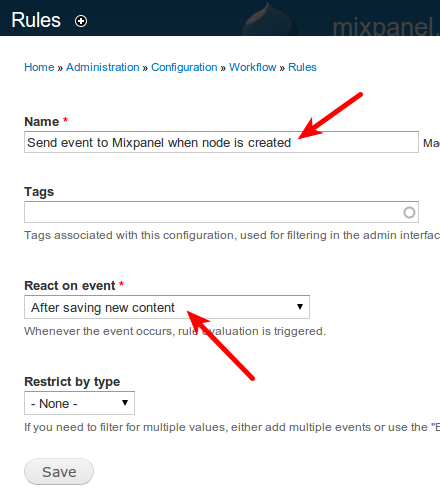
- Give it a name (for example: "Send event to Mixpanel when node is created")
- Select the event you want to react on (for example: Node -> "After saving new content")
- Click "Save"
Step 3: Add a "Track event on Mixpanel" action
- Click "Add action" below the "Actions" table
- Select "Track event on Mixpanel" from the list
- Give the event a name in the "Event name" field (for example: "node-created")
- Add some properties from the node to the properties table (for example, put the node:title in a property called "node-title")
- Click "Save"
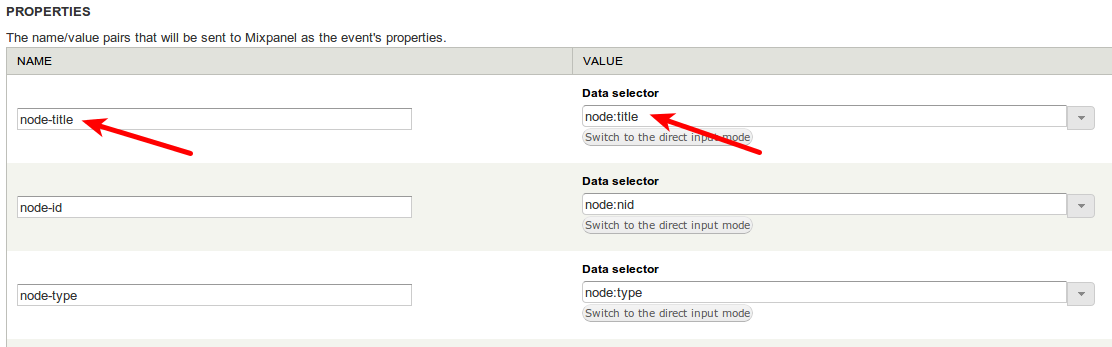
Now whenever a new node is created, a "node-created" event will be sent to Mixpanel!
Help improve this page
Page status: Not set
You can:
You can:
- Log in, click Edit, and edit this page
- Log in, click Discuss, update the Page status value, and suggest an improvement
- Log in and create a Documentation issue with your suggestion
