
Goodreads OAuth Under the Hood
If you are curious about what the Goodreads OAuth submodule is doing under the hood, read on. None of the information should be critical to just use the module.
If you aren’t familiar with OAuth, it was designed as an industry standard method for one website (a Provider) to share a User’s information with another website (a Consumer) without sharing the User’s Provider site’s username and password with the Consumer site, a sort of authentication Ménage à trios.
The way it accomplishes this relatively straightforward process involves keys, tokens, state machines, all designed to make the process secure, even across unencrypted linkages, since most web services are not protected by SSL. Like most web services, often knows as web APIs, the process involves what looks like “calls” to specific web pages which usually return XML or JSON instead of the HTML/CSS that we normally think of. So instead of a user typing a URL into their web browser and getting back a web page to look at, your website is sending a more complex URL to another website and getting back the answer in XML or JSON so it can be more easily processed by a program, your web site.
Because the spec is designed to keep your information secure, even without encrypted links, the protocol is quite complex requiring several exchanges of keys and tokens to ensure that the Consumer website is who they say they are, and that the User has authorized the sharing of their information.
For a much better, and more comprehensive description of how OAuth works, I’d recommend you read the short article “OAuth for Dummies,” at http://marktrapp.com/blog/2009/09/17/oauth-dummies. Once you have mastered that excellent tutorial, the most commonly referenced tutorial on OAuth is The OAuth 1.0 Guide, found at http://hueniverse.com/oauth/guide/ . Finally there is the Drupal documentation page “OAuth at http://drupal.org/node/349516, which is good although I wish the author’s had just focused on the current OAuth module’s implementation and skipped the cool-auth section. It also focuses on the web services data being passed than the PHP API calls. And if you really are interested the OAuth standard is at http://oauth.net/.
In more detail, the steps required to use the Goodreads OAuth API’s are:
- Register as a Goodreads developer at http://www.goodreads.com/api/keys. You need to be logged into Goodreads (which obviously means you need to join Goodreads). When you register, you will be given your developer key and secret. Enter these into the Goodreads module settings page. You needed to do this step to use any Goodreads API.
- Install and enable the Goodreads OAuth module. The Goodreads OAuth module will add a tab to the user profile page to allow a user to link their Drupal account to their Goodreads account. The module also creates a link, /goodreads/user/authorize, that you can use to start the Goodreads OAuth process in other places.
- When the link Goodreads account button or link is clicked, the module will get a request token from Goodreads using the developer keys from step #1 at the http://www.goodreads.com/request_token API URL.
- Then the Goodreads OAuth module will redirect the user’s browser to http://www.goodreads.com/authorize page with the request token as a URL parameter. That will display a page like
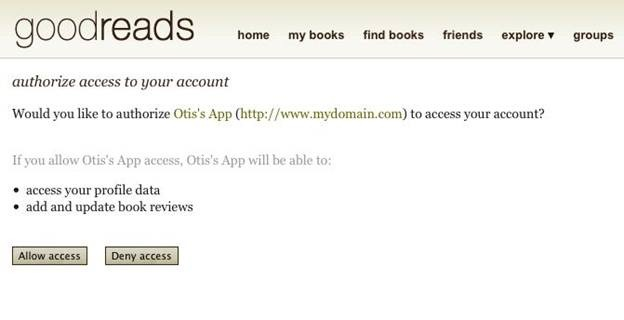
for the user to Allow access. - When the user has allowed access, Goodreads will redirect back to a callback URL given by the Goodreads OAuth module with the authorization token and the parameter “authorized=1.”
- The Goodreads OAuth module will exchance that authorization token for a “permanent” access token using the http://www.goodreads.com/access_token API URL. That access token, along with the user’s Goodreads user ID, will be stored in a goodreads_access_token table created when the module is enabled and used in all further OAuth required API calls.
Help improve this page
You can:
- Log in, click Edit, and edit this page
- Log in, click Discuss, update the Page status value, and suggest an improvement
- Log in and create a Documentation issue with your suggestion
