
On this page
Creating and Modifying Entities
The Entity API and the Entity System in general makes it really easy to deal with entities programatically.
For this example lets assume that we have an entity type "Vehicle" (machine name: vehicle) and a Bundle for this entity type, "Car" (machine name: car). This entity type has a property "model", and a text field "field_hello".
Creating an Entity
To create an entity of our entity type we simply call the method entity_create(), set up our properties and fields, and save the entity with the save() method.
  $entity = entity_create('vehicle', array('type' =>'car'));
  $entity->model = "Prius";
  $entity->field_hello = array(LANGUAGE_NONE => array(0 => array('value' => "Howdy Partner!")));
  $entity->save();
  //Not all entities have a save method, in which case, use entity_save()
  //entity_save('vehicle', $entity);
We can see that entity_create() takes as its parameters the entity type, and an array of values to initialize the entity. Since we are initializing the values later, I gave the function an empty array.
All entity types created with ECK have a property "type". This property lets the system know what bundle this entity is a part of. The bundle determines which fields are attached to our entity, so in our case the field "field_hello" is a field attached to the "car" bundle.
After we set up which bundle this entity is using, we can start setting up our properties and fields.
Our only property is called "model", and we can set it directly. Fields are more complicated structures than properties as they are trying to handle things like translation, multiple values, and general settings for the field all in one place. So, to try and make clear what is going on with the field, I will attempt to explain.
The first key is the language ('en', 'fr', etc). I have never dealt with multilingual sites, so for all my cases and many of yours, the constant LANGUAGE_NONE can be used. The language key points to another array, that will contain each of our fields. As you can imagine this is mainly relevant when you have multiple values for a field, but since the field_hello is not multi-value, we will be always dealing with index 0. Finally the index of each of the fields points to an array containing our actual field data. If you look at the db table for the "field_hello" (field_data_field_hello if it was created from the UI), there are two things that we can set up for the field: value, and format. Since I don't care about specifying a format for the field (the default can be used), I will just set the value and be done with it.
After that we simply call the save() method, and the entity should be saved.
Note: entity_create does not always return an object with a "save" method. (Notably, nodes, as of, at least, 7.31). If this is the case, you should use entity_save() instead.
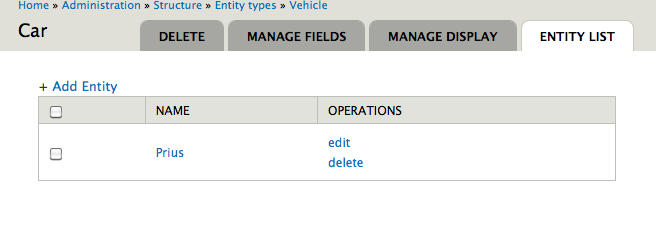
If you go back to the list of entities for that bundle provided by ECK you should see your newly created entity there.
Modifying an Entity
After creating the entity, we can modify it as easily as we created it. To get the previously created entity we use the function entity_load().
  $entities = entity_load('vehicle', array(3));
  $entity = $entities[3];
The entity_load() function takes the entity type, and an array of ids as parameters. Annoyingly enough, entity_load can only load multiple entities. The function entity_load returns an array of entities keyed by id, so to get the entity we want we have to get it out of the array.
If we print our entity with something like the dpm() function provided by the Devel module we can see that everything has been set correctly in our entity.

To modify any of the values already on the entity simply replace the values as it was done when creating the entity, and call the save() method after the changes have been performed.
Help improve this page
You can:
- Log in, click Edit, and edit this page
- Log in, click Discuss, update the Page status value, and suggest an improvement
- Log in and create a Documentation issue with your suggestion
