
Developer Module Documentation
Installation:
Please download project from https://drupal.org/project/developer_module. Extract project in modules directory. After that, we can see "Developer Module" in extends list. Please enable module and install module. If you find any issue regarding installation of any module then please do check for installation from https://www.drupal.org/docs/8/extending-drupal-8/installing-modules.
Basic usage:
Drupal 8 provide greater caching mechanism. For developer, one need to clear cache for changing any template or module file. In Drupal 7, there is theme suggestion option available in View. It is not available in Drupal 8 View. We require to do manage that configuration with manually configuration from services.yml. So, we have developed module for developer so theme developer can easily rectify theme and module developer can manage module easily by enabling "Enable theme" option and "Disabling cache during development" respectively.
After Installation:
You are able to see Developer Module link in Admin Configuration Page under Developer Section. You are able to see following image.
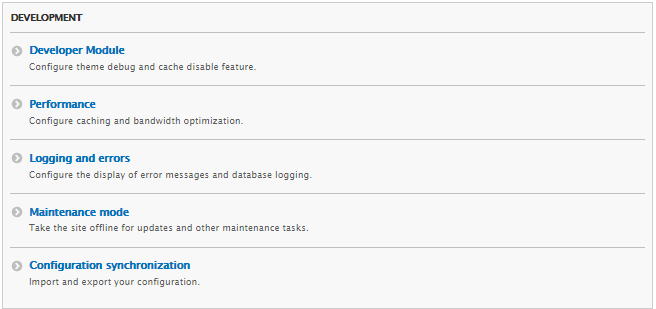
Developer Module in Development Section of Configuration Screen
Please click on Developer Module link, it will redirected to you to Configuration Page of this module. Please do check below image.
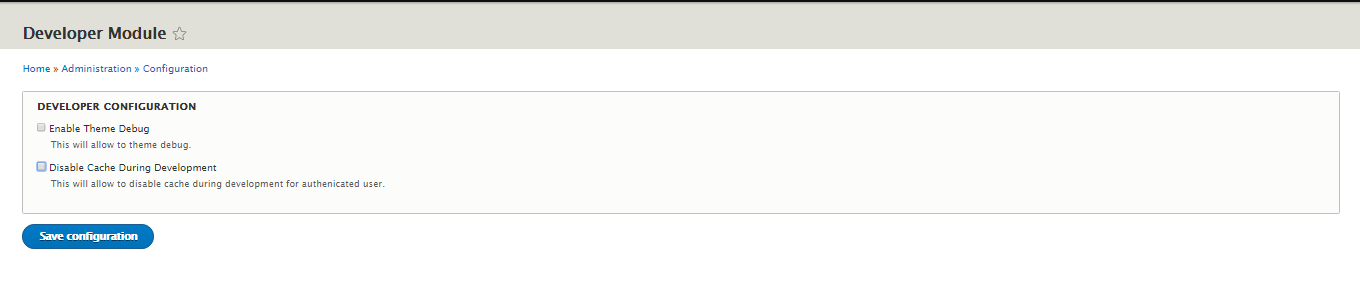
Configuration Form of Developer Module
There are two options available:
- Enable Theme Debug: When you enable this option, it will provide you theme suggestion to all section of websites. Please view source of web page. Otherwise, you can also check in Chrome for getting theme suggestion. Please do check below image.

Theme Suggestion
- Disable Cache During Development: When you enable this option, Developer can change twig file without clearing cache. This will be only managed when you are logged in as Admin/Authenticated user.
Security Review: This project is under security review. Please click on https://www.drupal.org/node/2891646.
Help improve this page
You can:
- Log in, click Edit, and edit this page
- Log in, click Discuss, update the Page status value, and suggest an improvement
- Log in and create a Documentation issue with your suggestion
