
 Come together with the global Drupal community in Rotterdam, 28 Sept – 1 Oct 2026. Sessions, contribution, connection, and Early Bird savings until 8 June.
Additional Settings
Smart Trim provides some addition settings:
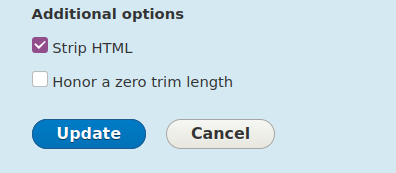
Strip HTML
Enabling this option will remove all the HTML tags in the text and display the text as plain text.
Example:
Here Lorem is wrapped in <h3> this is how content looks when strip HTML is disabled:

After enabling strip HTML:

Honor a zero trim length
By default if trim length is set to 0 the whole text of the field is displayed. If you don't want to display anything when trim length is 0 enable this option.
Example:
When trim length is set to 0 and Honor a zero trim length is disabled:

After enabling Honor a zero trim length:

Note: if this option is disabled, trim length is set to 0 and Use summary if present, honor trim settings is selected in summary settings, the whole summary will be displayed.
Replace Tokens before trimming
This is not pictured above however this feature will use the token module and insert any tokenized text and then trim as required.
Help improve this page
You can:
- Log in, click Edit, and edit this page
- Log in, click Discuss, update the Page status value, and suggest an improvement
- Log in and create a Documentation issue with your suggestion
