
Set title value of new content with "set data"
This is a basic reaction rule example that sets a new Title value for any new content of type Article. An HTML formatted system message, using a Rules token, is also displayed.
Here is the rules.reaction.set_article_title.txt configuration for importing.
1) Adding new Rule.

2) Adding Condition, Entity is of bundle.

3) Adding Condition. Note the ENTITY is using the "data selector" and TYPE, BUNDLE use "direct input".

4) When saving, don't forget to clear the cache.

5) Adding the first action, Set a data value.

6) When setting the Data selector, the values are dynamic and show if available. This area of the UI is tricky at first but works well once you understand its behavior. (Hint, type "node.", click out of the box, click back into the box to see the next available level.)

7) Adding second action, a system message.
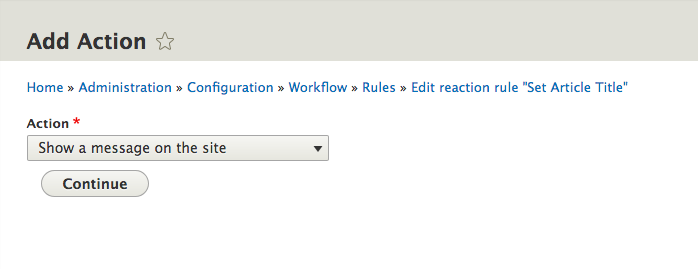
8) A Direct Input value can use Rules token replacement like {{ node.title.value }}.
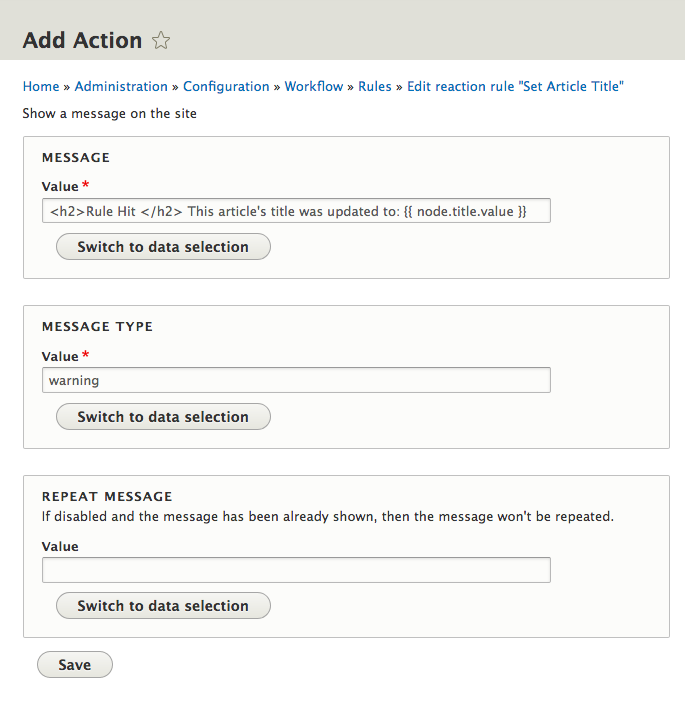
9) The final screen of this reaction rule.

10) Adding a sample Article with a title that will be replaced by the rule.

11) The final results when adding a new Article. The title has been changed to foobar.

Help improve this page
You can:
- Log in, click Edit, and edit this page
- Log in, click Discuss, update the Page status value, and suggest an improvement
- Log in and create a Documentation issue with your suggestion
