
Map Controls
Use default openlayers controller
Openlayers offer default implementations for controllers on the map.
Here is an example how to create a new controller taken from the default interaction
https://openlayers.org/en/latest/apidoc/module-ol_interaction.html
Go to admin/structure/openlayers/control/list
and select Add control to add a new control
Fill the form like in the following image

Note, the Namespace has to be settled to the correct namespace in openlayers, here we are using interaction because we are taking a default from the interaction module.
If we want to use one of the default offered from the control modue
https://openlayers.org/en/latest/apidoc/module-ol_control.html
the Namespace has to be settled to control.
The machine Name has to be the name of the control we want to provide.
In the case of the figure example the DragRotate element from the interaction openlayers module
Use a controller from external module
Here is an example how to use a controller provided from an external openlayers library.
In the example we will integrate the OpenLayers LayerSwitcher control using a custom module (MYMODULE).
We need a custom module to provide a path to the javascript files. Then we create the MYMODULE.libraries.yml file with the following content to define the library (see here for more explanation)
ol.control.LayerSwitcher:
  version: 1.x
  remote: https://github.com/ilpise/ol-layerswitcher
  license:
    name: MIT Licence
  js:
    /libraries/ol-layerswitcher/dist/ol-layerswitcher.js: {}
  css:
    theme:
      /libraries/ol-layerswitcher/src/ol-layerswitcher.css: {}
The way the library is defined has to be like the controller is called inside the javascript.
In the example the library is defined like ol.control.LayerSwitcher because on the javascript side the controller is added to the map this way
var layerSwitcher = new ol.control.LayerSwitcher({
    tipLabel: 'Légende', // Optional label for button
    groupSelectStyle: 'children' // Can be 'children' [default], 'group' or 'none'
  });
  map.addControl(layerSwitcher);
look at the way the controller is created new ol.control.LayerSwitcher , this is the class/function called to create the controller.
Then the controller is added to the map map.addControl(layerSwitcher)
Once the new module MYMODULE is activated then we can proceed using the Drupal interface like in the previous example with the following configuration.
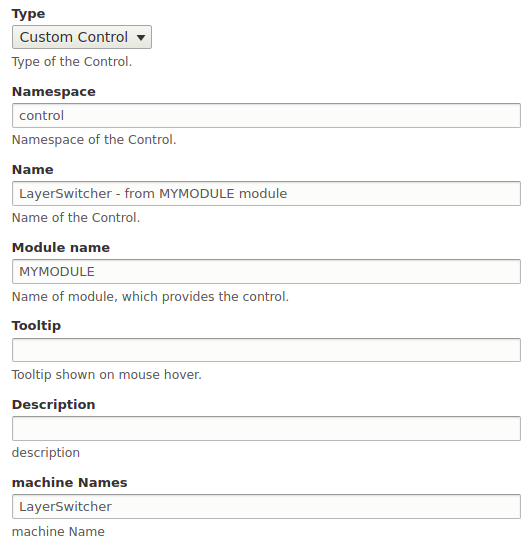
The parameters in the controller configuration will instantiate a new ol.control.LayerSwitcher when the map is rendered composing the given parameters to call the class.
The parameters are both used to compose
- the library path defined in yml file from Module name, Namespace and machine Names that will result in MYMODULE/ol.control.LayerSwitcher (the ol is statically added) on the php side to insert the javascript file/library that provide the class.
- the parameters Namespace and machine Names to compose the class name
ol.control.LayerSwitcherto instantiate the class on the javascritp side.
Help improve this page
You can:
- Log in, click Edit, and edit this page
- Log in, click Discuss, update the Page status value, and suggest an improvement
- Log in and create a Documentation issue with your suggestion
