
 Come together with the global Drupal community in Rotterdam, 28 Sept – 1 Oct 2026. Sessions, contribution, connection, and Early Bird savings until 8 June.
On this page
Settings
This module's settings are associated with individual text formats. Navigate to Administration » Configuration » Content authoring » Text formats and editors and click "Configure" for any text format.
CKEditor CodeMirror's settings for the text format are located below the Toolbar configuration section. Click the "CodeMirror" box to access the settings:
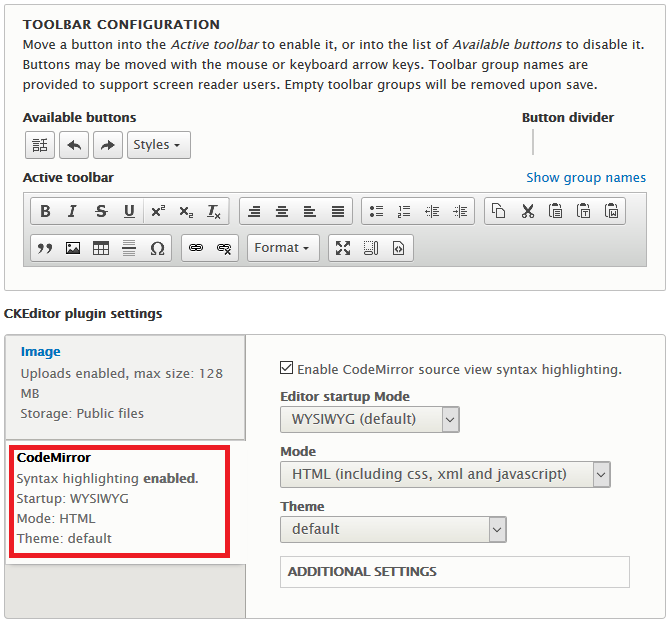
Basic Settings
Enable
Tick the Enable CodeMirror source view syntax highlighting to enable the functionality for this text format. If this box is not ticked, none of the other settings for the module will be applied.
Editor startup Mode
This setting can used to default CKEditor to source mode for the text format. Select Source to enable this behavior.
Mode
The default mode HTML (including css, xml and javascript) enables syntax highlighting for HTML and other inline languages. Select HTML only to only apply the highlight to HTML, PHP (including HTML) to include PHP highlighting, or Javascript only to only highlight Javascript code.
Theme
The CKEditor CoreMirror plugins provides many themes by default. See the CodeMirror theme demo for examples of all available themes.
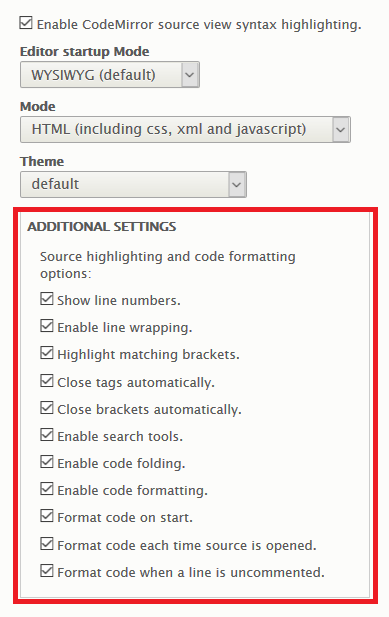
Additional Settings
Click "Additional Settings" to expand the full list of other available settings:
Help improve this page
You can:
- Log in, click Edit, and edit this page
- Log in, click Discuss, update the Page status value, and suggest an improvement
- Log in and create a Documentation issue with your suggestion
