

 The 2026 Drupal Business Survey is open. Your response will help shape the future of the Drupal business ecosystem.
Hi I am currently using the Oct Dev releases of Media and Media Gallery. Both enable fine without errors and the Media module tests fine by uploading images and adding them to an article (happy days). I can also create a gallery but the problem lies with trying to add images to the gallery.
You go through any process of upload or select from library but once you click Submit it takes you back to the home page and nothing is added to the library.
Also one thing to note is that none of the media forms are modal when using them through gallery administration but are when using media normally.
Cheers :-)
| Comment | File | Size | Author |
|---|---|---|---|
| #12 | media-browser-cannot-add-image-to-gallery-2145723-12.patch | 640 bytes | liberatr |
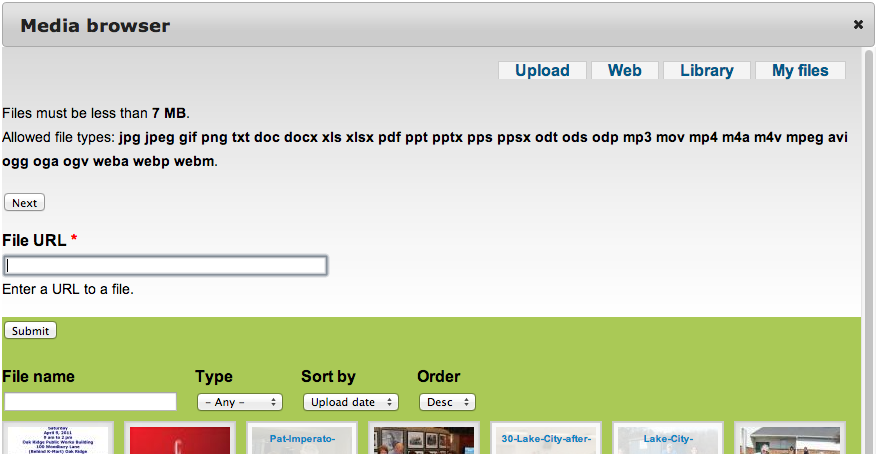
| #2 | MediaBrowser.png | 73.08 KB | tjtj |

Comments
Comment #1
discipolo commentedi have the same using my cutom foundation subtheme. does it work for you if you set your default theme to bartik?
maybe its this issue, https://drupal.org/node/2128335 try that patch
Comment #2
tjtj commentedI see something like this also. After clicking Add Media, the box I see is not like the ones shown on the Web videos. There is no way to browse either my desktop or the sites/default/files pictures. And the drag and drop interface seems to be missing also. Here is what I have installed:
A flexible gallery of media.
Requires: List (enabled), Field (enabled), Field SQL storage (enabled), Options (enabled), Number (enabled), Media (enabled), File entity (enabled), File (enabled), Chaos tools (enabled), System (enabled), Image (enabled), Views (enabled), Taxonomy (enabled), Multiple forms (enabled), Media Bulk Upload (enabled), Plupload integration module (enabled)
Required by: Media Gallery Extra (enabled), Media Gallery Directory (enabled)
Comment #3
suegmune commentedI'm having the same problem....
Comment #4
discipolo commentedits a small fix, something about a class .... field-items ... make sure the images are in a div with this class
Comment #5
drewscurachio commentedI'm having the same problem....
Discipolo: I don't understand your comment: "its a small fix, something about a class .... field-items ... make sure the images are in a div with this class"
Can you be more specific about this small fix?
Comment #6
drewscurachio commentedMaybe I should have been more specific about the problem I am having:
This is the problem I am having.
There is no way to browse either my desktop or the sites/default/files pictures
Comment #7
discipolo commentedi was answering the OP
that issue occured for me when the div containing the images was missing the class "field-items" (theme issue) adding that class fixed the modal file browser for me
Comment #8
enxox commentedSame for me with last dev of Media and Media Gallery
Comment #9
winnall commentedHas anyone solved this issue yet?
I'm running Drupal 7.31 with PostgreSQL 7.3.5 on an Ubuntu 14.04.1 LTS VM.
I've installed and enabled:
File entity 7.x-2.0-alpha3+37-dev
Media Browser Plus for Media 2.x 7.x-3.0-beta3+8-dev
Media Bulk Upload 7.x-2.0-alpha3+114-dev
Media Field 7.x-2.0-alpha3+114-dev
Media Gallery Directory 7.x-1.x-dev
Media Gallery Extra 7.x-1.x-dev
Media Gallery 7.x-2.x-dev
Media Internet Sources 7.x-2.0-alpha3+114-dev
Media Library 7.x-1.0
Media WYSIWYG 7.x-2.0-alpha3+114-dev
Media 7.x-2.0-alpha3+114-dev
Plupload integration module 7.x-1.6
Media Browser Plus works as far as I can tell: I can upload images to image/file fields and I can assign images from the library to image/file fields.
However when I create a Media Gallery, I get an empty gallery with a link "Add media". If I click on that I get the same UI dialogue from Media Browser Plus. However, after I select an image (to upload , or from the library) and click on "submit", nothing happens: the gallery remains empty.
I have read many remedies to this problem in various places:
1) disable the modules Contextual Menus, Jquery Update, Devel
2) add the class "field-items" to the
3) use a different theme (I have tried Bartik and Seven instead of my own Omega 4 based theme)
I have tried different browsers (Safari, Chrome, Firefox on the Mac, IE on Windows).
The result is always the same: nothing in the gallery.
I'd be really grateful for any hints on how to solve this.
Steve
Comment #10
liberatrWe are seeing something strange - looks like the tabs are not working. Very similar to what shows up in this issue #1974774: Media Browser renders all tabs visible but that issue is mega-old. I want to try the patch from #15 on that thread and see if that gets us any wins.
Comment #11
eshta commentedI'm also seeing issues that sound similar to this thread and am getting the a javascript error:
TypeError: undefined is not a functionhere:
in plupload.js (line 79).
Apparently "this" at this time is a reference to the window and therefore $this is undefined.
Comment #12
liberatrWe have a workaround for the media gallery. When you open the media browser popup without using the multiselect option, the tabs all render correctly. There is probably some deeper fix that can be made, but this is a "patch".
Comment #13
moloc commentedDo you have the plupload library installed? Not the module... the library?
I can only reproduce this behaviour, if i remove the plupload library.
Then the js-error mentioned in #11 also occures in the js-console.
Check the admin/reports/status page for information about plupload state.
Comment #14
liberatrFix: Download a fresh copy of PLUpload.
You are right there was something wrong with the library. We did have a version of the library in that folder, it must have been an old one.
The status message was not really jumping out at me. I'm used to red colored messages, this one was blue.