

Closed (outdated)
Project:
Feeds
Version:
7.x-2.x-dev
Component:
Code
Priority:
Normal
Category:
Bug report
Assigned:
Unassigned
Reporter:
Created:
17 Jul 2014 at 20:25 UTC
Updated:
9 Feb 2026 at 17:42 UTC
Jump to comment: Most recent, Most recent file

Comments
Comment #1
twistor commentedWhat time period do you have your Feeds Importer configured to run. It doesn't run every time cron does.
Are you sure that there are always new nodes to be created?
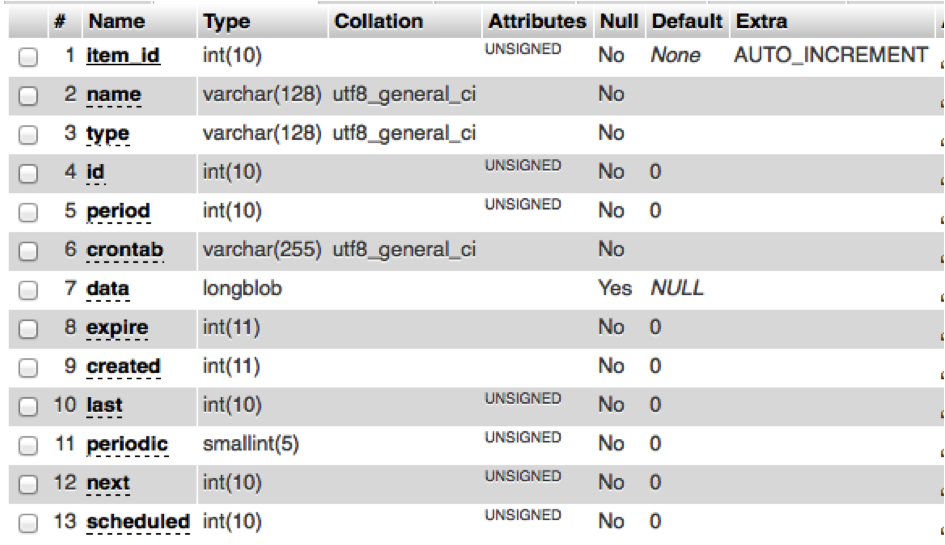
If these are both correct, can you check in your "job_schedule" table tell me what's in there?
Comment #2
Nicolino77 commentedTwistor, thanks a lot for responding.
- Feeds importer period: "As often as possible"
- I send a new mail from my drupal account registered e-mail address to the mailhandler address and I know the new mail lands "unread" in this mailhandler mailbox - in this case a new node should be created...
- Job_schedule table: phpmyadmin reports no data. I have to say I never cared for Job_schedule... are there settings to be set?
Thanks again for your help.
Comment #3
megachrizI moved a similar issue to the Mailhandler issue queue last week. In that issue was reported that mails do get imported when "Skip messages that fail authentication" is unchecked, but only sometimes when it is checked. Perhaps that issue is related: #2297527: Skip messages that fail authentication
Comment #4
twistor commented@Nicolino77, Job scheduler doesn't have any settings, it's just an API dependency on Feeds.
Here's a quick hack you can try.
This *should* make Feeds re-schedule the job. Can you tell me what's in the job_schedule table after you run this?
Comment #5
Nicolino77 commented@MegaChriz: I only have this setting "skip messages that fail authentication" when i go to "http://www.mydomain.com/?q=import". When I "force" the import that way, the node gets created everytime. However I want cron to do this...
@Twistor: Interestingly, I did your hack in #4 once and then everything worked fine. I then shut down the PC and the next day, I have the same problem again - no nodes at cron run. I even de-installed mailhandler and feeds module and re-installed and re-configured everything. Strangely, I very persistently am not able get nodes created.
Any other suggestions? To me this seems like a major bug...
Comment #6
Nicolino77 commentedAttached a file of my job_schedule table after I did #4.
Comment #7
Nicolino77 commentedStatus update:
I have further experimented and I have a stable solution (I hope this holds!) where nodes are importing, and it depends on the following two conditions:
- The content type of the to-be-created node must have a field called "Feeds", this field is automatically added by the system, under manage fields / field type it says: "Feeds module from elements". I think the Feeds importer example module added the "Mailhandler source" content type where this field is available.
- You have to manually import the node one time to get things going. Once I have done this, it will work automatically subsequently. I also have to do this each time I changed fields in my content type. By manual import I mean Feeds Importers / My Importer / Basic Settings / -> under "attached to content type" theres a link for the manual import.
Comment #8
sneakypooka commentedNicolino77,
Any word on whether this worked or not? I am having similar issues with getting Date_Ical feeds to run with a cron setting. The initial import works fine but then cron never runs again.
Comment #9
bluegeek9 commentedDrupal 7 reached end of life and the D7 version of Feeds is no longer being developed. To keep the issue queue focused on supported versions, we’re closing older D7 issues.
If you still have questions about using Feeds on Drupal 7, feel free to ask. While we won’t fix D7 bugs anymore, we’re happy to offer guidance to help you move forward. You can do so by opening (or reopening) a D7 issue, or by reaching out in the #feeds channel on Drupal Slack.
If this issue is still relevant for Drupal 10+, please open a follow-up issue or merge request with proposed changes. Contributions are always welcome!