

Closed (won't fix)
Project:
Simple hierarchical select
Version:
7.x-1.6
Component:
Code
Priority:
Normal
Category:
Task
Assigned:
Reporter:
Created:
1 May 2013 at 11:23 UTC
Updated:
12 Jan 2021 at 11:45 UTC
Jump to comment: Most recent, Most recent file


Comments
Comment #1
stborchertCouldn't you set the default value in the field configuration?
If you navigate to admin/structure/types/manage/{YOUR_CONTENT_TYPE}/fields/{YOUR_FIELD_NAME} and scroll down you should see a fieldset named "Default value" where you can preselect a value.
If this is not what you intended to do, please provided more details about it.
Comment #2
rabeto commentedHello thanks for your reply.
I need it for a exposed filter with views.
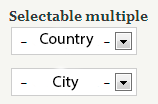
I've got the image 1 but i need something as image 2
I try with a hook_form_alter code :
but not work... :-(
Comment #3
stborchertThis won't work since the options for the visible dropdowns are inserted using javascript and not configurable in such a way.
Comment #4
b777 commentedI was trying to do the same thing. I have a Location and then a Cabin that users can filter results. I wanted some more descriptive text to inform them about the avaialble views filter.
I had to edit the modules/shs/js/shs.js file to get it to work.
Around line 139 of shs.js, I added a few if statements to check the value of the first option returned, and based on that, changed the text to say what I wanted.
So instead of
options[options.length] = new Option(Drupal.t('- Any -'), 0);i now have
Comment #5
rabeto commentedHello, i got to try it thanks!
Comment #5.0
rabeto commentedBetter explanation
Comment #6
cirrus3d commentedI can confirm #4 works. Thanks b777.
The only problem is that if the module is updated you will have to do this all over again. Also you will have to change this file if the order of the options change.
Comment #7
fra_ore_90 commentedHi, I don't undestrand what corrispond this: Lake Travis???
In my case always returns - Any - because i dont know how set the: data.data[0].label == ????
Comment #8
blackmyers87 commentedThe data.data[0].label is your first value of your field.
Comment #9
Siriki commentedHi b777,
I created select hierarchy ( taxonomy with 3 levels), but in default it shows only one level , how can I display all 3 level in default page?
Example: State,City,Branch
It was displayed default is country "None".
But I want to display all 3 fields defaultly None.
Please help me...
Thanks..!
Comment #10
fishfree commented@Siriki I have the same problem. Have you solved it?