Problem/Motivation
After a media image is translated to another language (by adding a translation to the alternative text of the image), the media library currently shows the same media item multiple times in the media library. This is caused by the fact that each translation is a unique record in the database.
This was already reported by @webchick, in #2954378: Use Media images in Umami demo

Proposed resolution
There are currently multiple parts of the media library.
- The admin overview on admin/content/media
- The grid display in the media library modal (when adding media inline from an article for example)
- The table display in the media library modal (when adding media inline from an article for example)
To start with the grid/table display when adding media inline. We want to solve this by adding a default_langcode filter to the views. This will make sure each media item is only shown once because we filter on the language the media item was created in. Users will always see a copy of each media item.
Before:
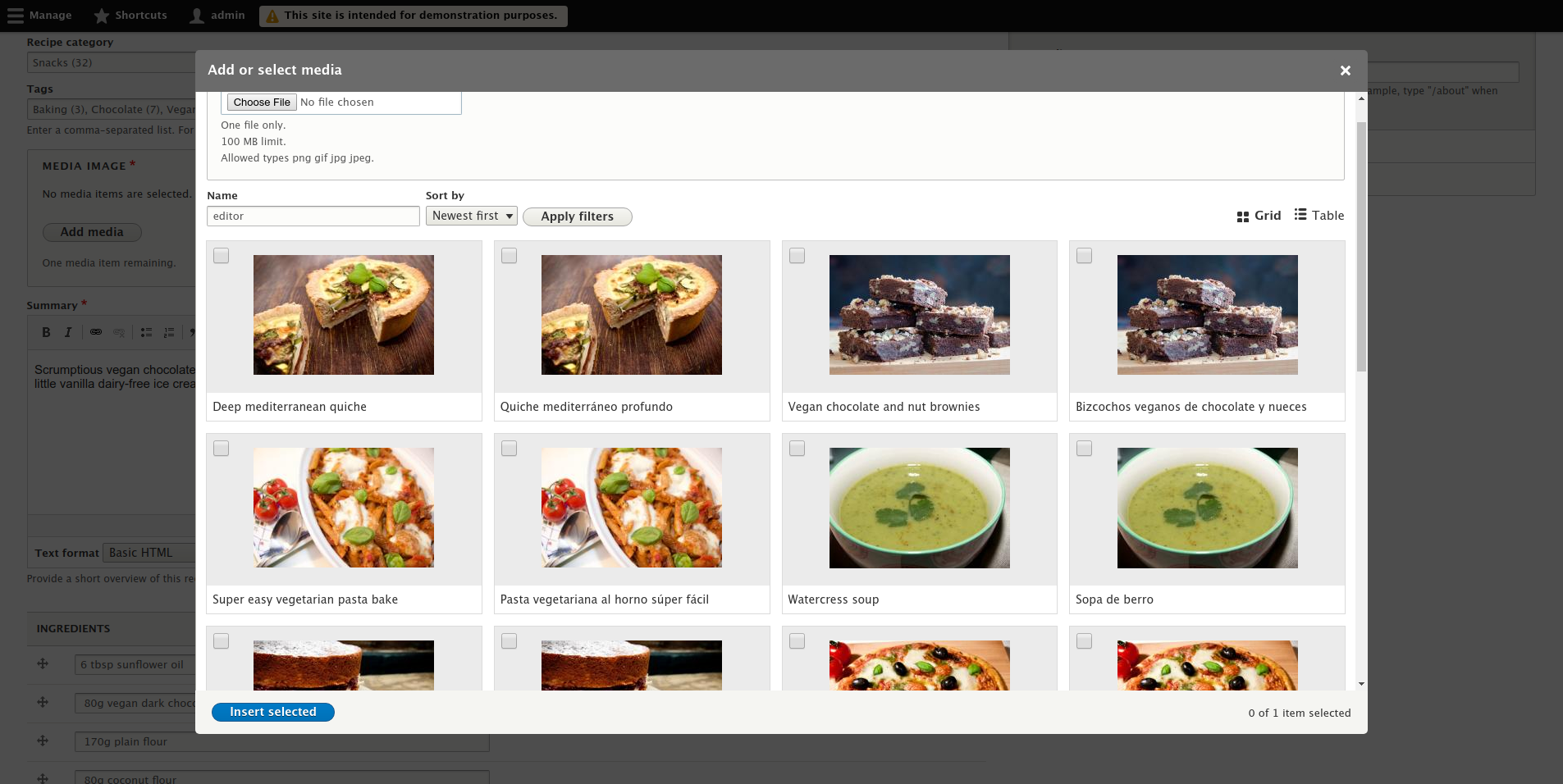
After:

For the admin overview on admin/content/media we want to add an exposed language filter, just like the exposed language filter on admin/content/media-table provided by the media view. This would not prevent duplicate rows, but might be less of a problem since the purpose of this screen is different.
Before:

After:

For reference, the table display of the media library overview is shown below. This also has the exposed language filter and the same problem with duplicate rows.

Remaining tasks
User interface changes
API changes
Data model changes
Release notes snippet
Changes have been made to the default Media/Media Library views for better consistency and to better support multilingual sites. See https://www.drupal.org/node/3087129 for more details.






Comments
Comment #2
shaalChanging priority to Major::
1) Because @webchick said so ;)
2) It's now under 'must have' in #2834729: [META] Roadmap to stabilize Media Library
Comment #3
seanbWe first have to define how we want to fix this. We have a couple of cases:
The UX of this could get tricky though. I have seen a lot of editors unaware of the fact media can even have a language, even though they are trained. That could mean untranslated content only shows up under certain conditions, and things not showing up in the media library is something we should be really cautious about, even though there are probably a lot of sites that need exactly that.
Not sure if there are good examples out there of how and where to select the language for the library and how to let users know that things they expect to be there might not be because they are not translated?
Comment #4
gábor hojtsyI think there is a question first of how are media items configured. If media items re only translatable on the metadata level, then I don't see a reason ever to display multiples of them in the view. Of the media itself may be different per language, then they would need to appear individually in all languages. Not sure how to make this distinction in the views configuration but that is where it would need to be done.
Second, the question of where the media library is invoked from.
1. Entity reference (media) field.
There is the same problem with regular entity references. I could not find the Drupal 8 core issue, but this Drupal 7 contrib module gives you an idea: https://www.drupal.org/project/translated_entityreference -- some filtering would be applied to the media items if the field is translatable. Eg. if you are editing a Spanish entity translation, then you would likely want to refer Spanish (or language neutral) media.
2. WYSIWYG button.
In this case, we don't have a "field translatability" setting directly. Maybe we should take the translatability setting of the field that produced the textarea?
Comment #5
phenaproximaI discussed this with @seanB and @chr.fritsch in Slack. This is the first time I'm really trying to load this issue into my brain, so forgive me if I'm repeating points that have already been made.
The trickiness here, it seems, is the possibility that, in certain use cases, displaying multiple translations of the same item in the media library might be exactly what you want. And it's hard to know when that should happen.
My feeling, based on no research at all, is that we shouldn't try to implement differing behavior for an entity reference field vs. an editor (or whatever the opener happens to be). Instead, I think we should add an exposed "Language" filter to the media library view, and then ensure that it has a sane default value whenever the media library is opened.
What should that sane default be? In my opinion, whatever language the user is currently looking at, is what the default should be. That, to me, is in keeping with the principle of least surprise. So, for examples:
1) Let's say you are an editor and your default interface language is Portuguese. You create a new page (which, since it is new, does not have a language yet). When you open the media library, either from a field or from an editor, the media library's Language filter is set to Portuguese by default, and it's only showing media items that are either explicitly in Portuguese, or language-agnostic.
2) Now, let's say you're the same Portuguese-speaking editor, using your Portuguese interface. You are editing the Chinese translation of some page. So, presumably, you're seeing two languages on the screen: the Chinese content of the page, and the Portuguese wording of the interface. Which language should the media library default to? This is a total guess, but I would think that if, say, you opened the library from within an editor, you'd expect it to filter by the Chinese language by default, since the editor is displaying Chinese content. Or let's say you opened it from an entity reference field; I'd hazard a guess that you'd still expect the library to open in Chinese, since the content is explicitly in Chinese.
So, what would this look like from an implementation standpoint?
Comment #6
gábor hojtsyI've been thinking about this a bit since you posted your suggestion @phenaproxima. Here are three thoughts:
A. You wrote either explicitly in Portuguese, or language-agnostic but then the actual implementation with the language filter does not back that up. You would need two options selected in the filter for that to work(?)
B. Are language specific metadata fields required on all media types? If not, then there may be media types that don't have a language (eg. embed video?) that would need to show up regardless of language conditions otherwise.
C. I don't necessarily agree that its a good assumption that media items should not show up if their metadata is not yet translated. That means when you upload a kitten photo in French, you could only use it in Spanish by default once you translated its metadata. Is that intuitive? I am not sure. I understand the language filter exposed would allow to pick that kitten photo regardless but it will be "missing" by default. Let's discuss that and make a conscious decision.
Comment #7
shaalI think that by default, media-library should populate a list that is similar to the list media provides without media_library, it will be a nice addition to also be able to select other languages/options.
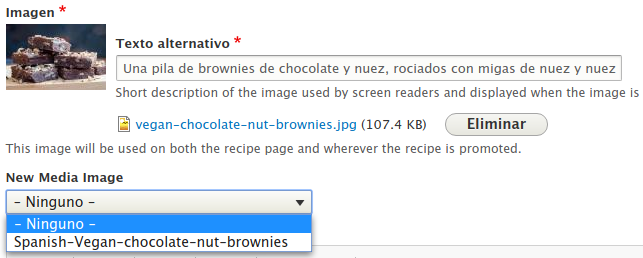
@phenaproxima and @seanB asked about the behavior of adding a multilingual media image without media_library module.
When adding a new (or editing an existing) English recipe, I get a select-list of only the available English media images -

When adding a translation in Spanish, I get a select-list of only the available Spanish media images -

Comment #8
plachIMHO every site should be configured to match its use cases, e.g. what @Gábor Hojtsy was mentioning above that every language has different media is a legit scenario, although maybe not the most common one. Some data would help make a decision here, but, lacking that, personally I would expect the media library to be filtered by the parent entity form language and falling back to untranslated items, not sure about exposing the language filter.
Comment #9
gábor hojtsy@plach: yeah the problem then is the name filter would sometimes apply to a variant of the entity not shown, due to the rendering process.
Comment #10
shaalI think I found a nice solution, using good ol' Views.
Similar to what we did on #3068721: Umami demo views should display items from all languages, a not-used-enough functionality (probably because it's not easy to find) on multilingual Views, is "default translation" set to True.
The result of using it, is a list of items, from any language, where each item is one shown only once (if available in your current language it will be shown in your language, otherwise it will use fallback languages)
It's easy to test it using Umami with (upcoming, almost ready) latest patch from #2954378: Use Media images in Umami demo
Here's a screenshot of how selecting a media image look like in Spanish (and I added an image that is available only in English)

Comment #11
seanbThis implements exactly what plach suggested in #8 right? We still have the issue Gabor mentions in #9, but I'm not sure how big this problem is. Personally I think it should be fine as a default. It would be worse if you wouldn't find media. In my experience editors sometimes accidentally switch to a different language, and not finding media because of it could be more confusing.
It would be great to describe how this works a bit better. So let’s say you have 4 media items:
What do you see in the English interface language?
What do you see in the Spanish interface language?
We should probably also do something similar in the tests for this.
Comment #13
seanbAfter talking about this on Slack with shaal and berdir, we came to the conclusion that the default translation filter only shows rows where default_language is 1. The option to try and render a row in the interface language is where the fallback language magic happens.
Since the default translation filter would only allow users to search for media in the language it was created in, I don't think we can use this unfortunately. Eg. a user that created a picture named 'Horse' translated to 'Caballo', can only be found by searching for 'Horse' (even when the interface language is Spanish).
The option to render a row in the current language looks promising though, that means we only have to figure out how we can search both languages, while only showing 1 row per media item. The 'distinct' setting should be able to do that, but then we have to remove some fields from the select query (for example the created/updated date).
Comment #14
shaalI removed the Views changes I made for media module (the original table list of media content), so now it doesn't have "default translation" filter, and editor can choose which language of content to view.
I kept the Views changes I made for media_library, because in the grid page display (or widget display, both table and grid) there is no language dropdown so the confusion we discussed on #13 is no longer confusing :)
Comment #16
seanbI tried to sum up what I think we should try to implement. Hopefully this helps evaluating solutions:
Maybe not all these things are "must-have", it would be good to know that as well.
Comment #17
berdirI don't think those goals are very realistic in that combination and goes beyond this specific issue, as it is just one content list of many. While it might be more confusing on the media list because of the more obvious duplication of the pictures, all content lists are IMHO struggling with what makes sense to show, duplicates vs meaningful filters and having language filters/fields (there is an issue to add a language filter/filed that only shows up if you have multiple languages for example).
IMHO there are only two easy approaches, one is to filter by translation, optimally with an exposed filter that defaults to the current language (that needs a filter capable of that that can also hide itself: #2473989: Lack of dynamic language field / filter makes shipping core views hard to be both compatible with mono and multilingual) so that users can switch.
The other is filtering on the default translation and living with the filter limitations, aka dropping point 5 above. I guess for a media view, that would make more sense as a default.
I'm not sure about the exact status of this issue and what it blocks and what not, but FWIW, as someone who works a lot with multilingual sites and related problems (we probably have 10+ patches related to access/UI problems with translations, don't even want to count), I don't think being able to achieve the goals in #16 should block neither using media in umami nor media_library becoming stable :)
Comment #18
lendude+1 to #17, was going to post the same link :)
In essence the content overview has the same problem, see #2582535: Duplicated rows on admin/content if author is translated, so this is not a media issue I think.
I've not been able to think of a solution purely within Views for this either (My hacky-mysql-only workaround is usually to just query_alter a group by ID into it).
Looking at the content overview in Umami, the main reason I see that it is a bigger problem in the Media Library is that there is no way to distinguish between the two (the content overview has the title row going for it), so adding the language or the alt text would also help the Media Library (but the lack of space comes into play again then of course)
Comment #19
berdirWriting down my closing comment in the call that we just had.
The option b (hidden filter on default translation) that I described above has three useful advantages compared to the alternative that we discussed (that hopefully someone else will document here).
a) It's trivial. Add one condition to the view, done.
b) It's hidden and on single-language sites, it doesn't show up without having to solve the issue above or adding custom code.
c) It's only configuration and easy for sites to customize if they can't live with the drawback (filters not working as users would expect). They can replace it with the language filter instead. The good thing about that is that most of the problems with that folder when adding it by default can quite easily be worked around when customizing the view for a specific site. For example you can use the standard views feature to only show some options (e.g. current language and all the real languages) and default to the current language.
I think the drawback only affects sites that create original content in more than one language, which is not that common, IMHO at least 80% of the sites should be fine with that default (drupal.org is *not* the 80% use case of drupal sites, for the record ;))
Comment #20
plach💯
Comment #21
shaalTrying to fix failing tests.
Comment #22
webchickA group of us (@Berdir, @plach, @xjm, @Gábor Hojtsy, @phenaproxima, @seanB, and myself) met today to talk over the various options. Here's my attempt at a summary. :)
Since no matter what we do here, it’s going to not be good for someone, here are some user stories to help ground the solution-eering:
Spoiler alert: It is NOT possible to fulfill all of these use cases! :P (Womp-womp...)
We initially went down the road of adding the same Language filter that’s on the Content overview page to this view, but changing its default to instead of showing ALL languages, to instead only show the currently logged in user’s language. This would entail the following:
This approach has the advantage of supporting use case #3: if the Spanish-speaking content author searches for “gato”, and there’s a Spanish-translated media item of an English cat, they will see it in the list. Hooray! But, the supreme disadvantage is that use case #2 is violated under this model. :( Seeing all images, involves manually futzing with the Language drop-down, which will not be intuitive for content authors to discover. Hence the last requirement, which would cause this issue to go down a design rabbithole to resolve it, as well.
It’s also questionable how many people in practice will want to go to the level of translation of hidden alt/title attributes on their media items, vs. the article(s) to which it’s attached instead. This means an increased likelihood in seeing fewer (and possibly much, MUCH fewer) media items than are generally available with this approach.
@plach pointed out that a common translation workflow would be:
...which all around just further seems to enforce the idea that “content authors want to see all the images by default.” If the Spanish-speaking content author searches “gato” and doesn’t find it, but sees a bunch of English crap in the initial list, they will be much more inclined to try “cat” at that point. (In an ideal world, they would see Italian images where Italian versions were available, and fall back to the site’s default language where not, but that’s unfortunately not an option for well-articulated reasons that I unfortunately forget.)
-----
SO. In the interest of “the simplest thing that can possibly work,” there seemed to be consensus around @Berdir’s proposal in #19. That get us a workaround for the issue, while not leaving site builders stranded if they want to change that defalut to something that works better for their own unique use case.
Comment #23
shaalI have an idea how we can handle another use case, while keeping the interface simple.
Using patch #21 (default translation=true) we already get any item appear once, following language fallback.
But (in Umami for an example) you can search for 'soup' and get a result, but if you try searching in Spanish for 'sopa' you will get no results.
My idea is to add no results behavior, "view area", that will display the following new view:
it will be called "results in any language" (without any exposed filters), but it will have a contextual filter for the name of the image.
If that new view display doesn't find anything - it will display the message "no media found".
Now searching for 'sopa' - will find the soup image.
If anyone can help me figure out how to add a contextual filter that search for the name of the image, I'll appreciate it!
Comment #24
seanbAttached is a patch to add the default_langcode to the media library and media views, with update path and tests.
Can we create a followup for this? It would be great to get the "easy" fix in first and try to improve on that in separate issues.
Comment #25
seanbWhoops, forgot to add the default langcode to the media view config.
So one thing that I noticed because of this, is that the media view has a langcode filter on
admin/content/media-table, but the media_library view onadmin/content/mediadoes not. We can't have both an exposed language filter AND the default langcode filters on. They don't work well together. We also want to keep theadmin/content/mediaandadmin/content/media-tablethe same as much as possible since they are supposed to be a grid and table view of the same content.So, the question is how we want to deal with this:
admin/content/mediadisplay in the media library view to make it consistent with the media view.The most important thing is consistency, so I could live with either option. That being said, personally think we should go for option 2. This has the advantage that most editors working with media from the widget will only see their media once. For the administration page we then have the language filter, which enables users to have more control while searching for media. With the added benefit that we don't have to touch the media view.
Comment #26
seanbOk, while creating a patch for option 2, I found a nasty issue. For some reason the rendered entity in the grid view doesn't respect the option
Rendering Language: Content language of view row. This means even if you show the title of the media, you still see the exact same media item twice. This is obviously no bueno.Attached are patches for option 1 and 2. I wrote the test for option 2 as I expected it to work. So that will fail because it doesn't :(
Comment #27
seanbD'oh! I uploaded the interdiff twice... Here is the correct patch for option 1 in #25.
Comment #30
gábor hojtsyI just had a quick chat with @seanb and @phenaproxima. We agreed that the language filter should be removed from the media table view which already had it exposed for consistency with how the media library view will works. Doing it the other way around to introduce an exposed language filter on the media library view would (a) render entities in the same language multiple times due to a views entity view mode rendering bug (b) it would always be displayed even for single language sites. I asked for the issue to be opened for (a) because it would affect other rendered entity view results as well. (There may already be an issue that @berdir will tell us about :).
So adding a non-exposed language filter on the media library view looks like a good 80% default and removing the exposed language filter in favour of a non-exposed one in the table view makes sense based on the above.
We also discussed upgrade path consequences, and the matter of fact is users may intentionally have the language filter in the table view, so even if we don't install it for new sites, we should not automatically remove it on old sites. My understanding is that will not make the behaviour more broken than it already is for those sites.
Comment #31
phenaproximaIt turns out there is an already-RTBC issue (#2925816: Views plugin "Rendered Entity" must add langcode in render function) to fix the bug @seanB found in #26. If we can get that in, we can implement the nicer solution here.
Comment #32
gabesulliceI think I might have found a way to address all of the user stories in #22, but I think it would be derailing to this issue and is not feasible to achieve before the 8.8 commit freeze. I've created a possible, non-blocking follow-up for discussion when time permits: #3086347: Allow content authors to search all translations in the media library—without seeing apparent duplicates—and let them select them.
Comment #33
phenaproxima#2925816: Views plugin "Rendered Entity" must add langcode in render function landed, so we can go ahead with the second solution outlined in #25. Full steam ahead!!
Comment #34
seanbYay for #2925816: Views plugin "Rendered Entity" must add langcode in render function!
Here is a patch to do the following:
This has the following benefits:
Comment #35
gábor hojtsyDoes that mean now that *all sites* get a language dropdown in the media library? What are the options of that dropdown and is there a default selected?
Comment #36
seanbYes, all media library views will get the new langcode filters (langcode for the administration overview and default_langcode for the widgets).
The standard language filter options (same as the media view / content view):
- Site's default language (English)
- Interface text language selected for page
- English
- Spanish
- Not specified
- Not applicable
No, by default you see all media (just like the original media view). Th default is '- Any -'.
Comment #37
shaalScreenshots before/after patch #34 (together with latest patch from #2954378: Use Media images in Umami demo)

Before:
Grid:
Table:

After::
Grid:

Table:

Grid when editing Spanish node

(That's the compromise, media in widget will be displayed only in site's default language. But whatever image is chosen, it will be displayed in the correct language for the end-user)
Comment #38
berdirNote that admin/content has the same filter, always visible and if we fix the related issue then we fix it for both, automatically.
Comment #39
seanbHere are some screenshots of the media overviews where the langcode filter was added.
Table: admin/content/media-table (the media view) has the same before/after state since we didn't change it.
Grid: admin/content/media (the media_library view) before:
Grid: admin/content/media (the media_library view) after:
Comment #40
webchickI really appreciate all of the screenshots here, but I can't quite make out what exactly is changing here. Could we get an update to the issue summary that walks through what the proposed resolution is?
Comment #41
seanbThis should clear up the IS a bit.
Comment #42
webchickOh thanks, that is much easier to follow! :D
I think the direction outlined makes sense... admin/content/media is indeed a different beast than "add a media item HERE," so I think the diversion in behaviour (and the consistency with the existing admin screens) makes sense.
The only thing that really came up in testing is that even on admin/content/media you're immediately "walloped" with how broken it looks because of the emphasis of the imagery on Grid view. Just spitballing... what if we were to change the default at admin/content/media to "Table" view instead? Then it's more consistent with the other admin views in that section, and the "Wow, those things are obviously repeating!" is more obvious as to why, because the translated media titles are also as prominently featured as the image itself.
If this is annoying/stupid to do, then don't worry about it; we could always discuss in a follow-up.
Comment #43
berdir@webchick: I would definitely vote for a follow-up for that. Keep in mind that this extreme duplication is pretty much unique to umami, which is a problem for people trying out Drupal for the first time, but it will IMHO affect real sites not so much, because the duplications will likely be less obvious as translations will be created asynchronously in most cases.
Comment #44
seanbIf we show the table by default, that would mean we no longer have to do the funky customizations mentioned in #2981105: Media Library should not modify the media view. So we could use that other issue to remove all the menu link renaming magic. I would be all for it!
Comment #45
wim leersBut table by default makes for a far less visual experience. Won't that be a turn-off?
Comment #46
seanbI think managing media via admin/content/media is far less common than creating and referencing media via entity reference / ckeditor fields. So not sure how big that impact will be, but I can imagine most users won't notice or care.
One could argue that the table view is more appropriate for managing media, while the grid view is better for selecting media. Besides that, any site builder could easily change it if they want to.
Comment #47
phenaproximaPersonally, I am also +1 for the Table view being the default. This change would only affect privileged users who can administer media (actually the "access media overview" permission), not really content authors, and it immediately vaporizes #2981105: Media Library should not modify the media view. That issue just ceases to exist.
So, if the product managers want to make the Table view the default, then I'm heartily in favor of it.
If we insist on keeping the Grid view as the default, I have suggested a possible fix for #2981105-61: Media Library should not modify the media view, although that introduces some wrinkles of its own.
Comment #48
wim leersI agree this is a strong argument in favor of the proposal.
I'm fine with the path of least resistance here — just pointing out that the path of least technical resistance for us may not result in the best UX for end users. Only playing devil's advocate 😈
Comment #49
gábor hojtsyI agree the admin media view is more consistent with he rest of the admin views being a table as you may be more interested in metadata here as part of administration, eg. author or publishing status. Having a language column would help disambiguate this table even more but admin/content does not have it either. We cannot exactly add conditional columns and modifying views on existing sites with module installs is not very clean or even practical. So we can just default to the admin table view yeah.
Comment #50
phenaproximaCool beans. It sounds like we are in general agreement that the table view of media makes for a more sane default tab on the administrative side. That decision radically changes the scope of #2981105-63: Media Library should not modify the media view, and simplifies a lot of things going forward, which is fantastic news for that issue.
Comment #51
webchickOh, great. :) REALLY happy that a ux/product review resulted in less work, for once! :P
Comment #52
phenaproximaNit: Should be assertTrue, not assertTRUE.
Nits: No need for 'default' as the third argument to getFormDisplay(), it already defaults to that. Also, all of these calls can be chained: \Drupal::service()->getFormDisplay()->setComponent()->save().
Code looks okay otherwise. I don't feel qualified to RTBC this, though, because I'm not super comfortable with multilingual things...
Comment #53
seanbFixed #52.
Comment #54
berdir> because I'm not super comfortable with multilingual things...
super comfortable with multilingual things is a pretty high bar :)
$added_langcode true but $added_default_langcode_display empty can't happen? because that wouldn't save then.
is this just copied from somewhere, did we test that it is actually required? I remember that we cleaned up a few similar things when updating entity manager calls.
Specifically, enabling translation for a bundle shouldn't change anything about the entity type definitions and that's the only thing that is cleared by that clearCachedDefinitions() call.
Didn't review the patch too closely but looks good to me overall. Also tested a bit manually. In the call, we discussed a bunch of quick improvements, follow-ups for the language-filter approach, before we decided on using the default langcode filter. As we're now doing *both*, what's the status on that? I don't care about adding media library specific hacks to the language filter as it is now exactly the same as admin/content and I don't see why that shouldn't be acceptable for the media overview too. We already have the issue for the visibility of the language filter. Can we create a follow-up to improve the language filter options a bit, with some new checkboxes on that filter maybe to not change any existing view. And last, I guess switching Grid/Table needs a follow-up too? Would a CR makes sense for site builders?
Comment #55
seanbThanks Berdir!
#54.1. Good one. Fixed.
#54.2. We actually don't need it apparently. I copied it, yes :) #lazyprogrammer
For the followups:
Created #3086883: Improve the options in the views language filter.
We have #2981105: Media Library should not modify the media view for that.
Not sure, I can create one if needed?
Comment #56
berdirThanks.
I think we're good here, then? I'll leave the decision on having a CR or not to the core maintainers. Despite component being "media system", I think this is now media_library specific, which is still Experimental, so shouldn't really be necessary.
Comment #57
webchickOk, got a demo + a patch walkthrough from @seanB and @phenaproxima.
There's one outstanding change, also cleared with @Berdir, which actually satisfies all of the user stories in #22!! (Since we split the behaviour of the admin view + the widget view.)
And that is to change the widget view to include the Views language render setting for "Interface text language" (or something like that) BECAUSE. If you do that, you get what I hoped in my wildest dreams for back when creating this issue in the first place:
This is the media library view, triggered from editing a piece of content, in the Spanish interface, showing one copy of each media item, with Spanish labels where available, and only falling back to the site default language if that's unavailable (the Quiche picture, since we deliberately deleted the Spanish translation of that to see what would happen).
This way, our demo can successfully show off both multilingual and media capabilities in one fell swoop. Hooray!
Needs work for that, and the tests will need some light adjustments as well.
Otherwise, the patch looked great to me, so planning to commit it if it comes back green from testbot. Thanks SO much for all the great work on this one, folks!!
Comment #58
seanbUpdated the patch to include the rendering language.
One extra thing I had to change, since the update hooks are done in alphabetical order, the update hook to add the widget_table display
media_library_post_update_table_display()could run after our new update hookmedia_library_post_update_add_langcode_filters(). This means I had to change that update hook to also copy the rendering language of thewidgetdisplay to thewidget_tabledisplay. That way, it doesn't really matter which hook runs first. Our test directly proves that, so it was good we found it like this :)Comment #59
seanbAhh, still had the patch for #2954378: Use Media images in Umami demo applied so #58 contains those umami changes as well.
New patch attached. The interdiff in #58 was correct though.
Comment #60
phenaproximaOnly minor stuff, then this is re-RTBC. I grok the tests, I grok the update path...it passed WebchickTestCase...I can't wait to see this dragon slain.
This variable name is a bit unclear. Can it be $added_default_langcode_displays (plural)?
This logic is kinda messed up -- it's going to show the same message multiple times. It really should follow this sort of structure:
Why don't we also assertNull() for the default_langcode filter in the widget_table display?
Nit: There's an extra empty line above $this->runUpdates().
Comment #61
seanbThanks phenaproxima!
1. Fixed.
2. It returns in every if statement, so it can never return multiple messages right?
3. Fixed. Whoops!
4. Fixed.
Comment #62
phenaproximaLooks like all requested changes are made. I'm done with this dragon. RTBC once green on all backends.
Comment #64
seanbFixed the cache contexts on the view.
Comment #65
phenaproximaYup, I did my own separate debugging and arrived at the same interdiff. Then I gave it a manual test to confirm it worked as previously seen in Umami. It did.
This is back to happy fun time.
Comment #67
phenaproximaJust a reroll, now that #3049943: Media library should not use js- prefixed CSS classes for styling is in.
Comment #68
phenaproximaAnother reroll in the wake of #2981105: Media Library should not modify the media view.
Comment #70
phenaproximaWhoops! My bad; missed a spot in the reroll. This should pass on all backends, although the unexplained PostgreSQL failures are concerning.
Comment #71
phenaproximaTentatively restoring RTBC on the (perhaps vain) hope that PostgreSQL won't have a...seemingly unrelated failure.
Comment #72
webchickApplied this patch, as well as #2954378: Use Media images in Umami demo to easily replicate the issue.
...unfortunately, something is different from earlier versions of the patch, as the admin/content/media table overview now looks like this:
The Grid view, OTOH, at admin/content/media-grid, looks as expected:
I deleted the Spanish translation of vegan brownies, and go to es/node/add/article to add a media item:
As expected, media items are listed only once, and all in Spanish, except for the one whose translation I deleted, which falls back to English.
So, it is with heavy heart that I set this back to "needs work" for that default table view, but I really hope it's just like a 1-2 line interdiff to fix that up. After that, we look great here!! I reviewed the interdiffs since the earlier "deep dive" code review and found nothing of concern.
Comment #73
phenaproximaThe problem is coming from #2954378: Use Media images in Umami demo, not this patch.
First, I applied the patch from #70 and then ran:
It looked like this:
Hunky-dory. Filters are there on both "Grid" and "Table", as we'd expect.
Then I did the same thing with the latest patch from #2954378: Use Media images in Umami demo, and this is what it looked like:
I'm not sure why that happened, but this is not so hunky-dory. (I suspect it will actually be fixed when this issue lands, and that issue is rerolled on top of these changes. Media Library has undergone important changes tonight, all of which necessitate a big ol' reroll of that Umami patch.) But this patch is definitely not the source of the trouble.
So, @webchick, you may merrily commit this with a bounce in your step and a song in your heart.
As long as it's not Baby Shark.
Comment #75
webchick*forehead smack* Sorry, I should've thought to try that myself.
AWESOMESAUCE!
Committed and pushed to 8.8.x. YAYYYYYY!!
Tagging for release notes, since we change the way these views work compared to 8.7.
Comment #76
webchickOh. And for the record, it was “Don’t Go Breakin’ My Heart” by Elton John and Kiki Dee. ;)
https://www.youtube.com/watch?v=z0qW9P-uYfM
Comment #77
webchickAnd now that I had a couple hours of sleep, here's a change record https://www.drupal.org/node/3087129 and a release notes snippet.