

Closed (fixed)
Project:
Multiversion
Version:
8.x-1.x-dev
Component:
Code
Priority:
Normal
Category:
Task
Assigned:
Unassigned
Reporter:
Created:
24 Apr 2019 at 09:20 UTC
Updated:
28 May 2019 at 08:39 UTC
Jump to comment: Most recent, Most recent file




Comments
Comment #2
bahbka commentedSteps to reproduce:
1. Push one node or any other entity(that have aliases) from one workspace to another.
2. Disable multiversion support for that entity type.
Expected result: all data related to none default workspace will be deleted.
Actual result:
1. Node/Entity that belonged to default workspace was deleted and none default workspace entity is left and accessible.
2. Aliases records got duplicated.
Comment #3
railgun commentedWe assume that the issue described by @BAHbKA can be fixed by deleting all the entities that belong to non-default workspaces before doing the migration. @jeqq please review the patch I have attached.
Comment #4
jeqq commented@railgun Thanks for the patch! I think we should use another approach when fixing this.
We shouldn't delete any entities from non-default workspace because of that is taking care the Workspace module, when that module is uninstalled, it deletes all non-default workspaces and entities associated with them. After that the
url_aliastable contains only aliases for entities on the default workspace.We should fix this:
1. Make
aliasfield unique, after uninstalling multiversion2. Fix migration of the url aliases when entities are migrated back from the temporary storage on Multiversion uninstall. There is probably a way to not duplicate aliases, but replace or leave there those that already exist. If we make the alias filed unique it won't allow at all duplicate aliases and there will be an error when saving any duplicates - that is how it should work when Multiversion is not installed.
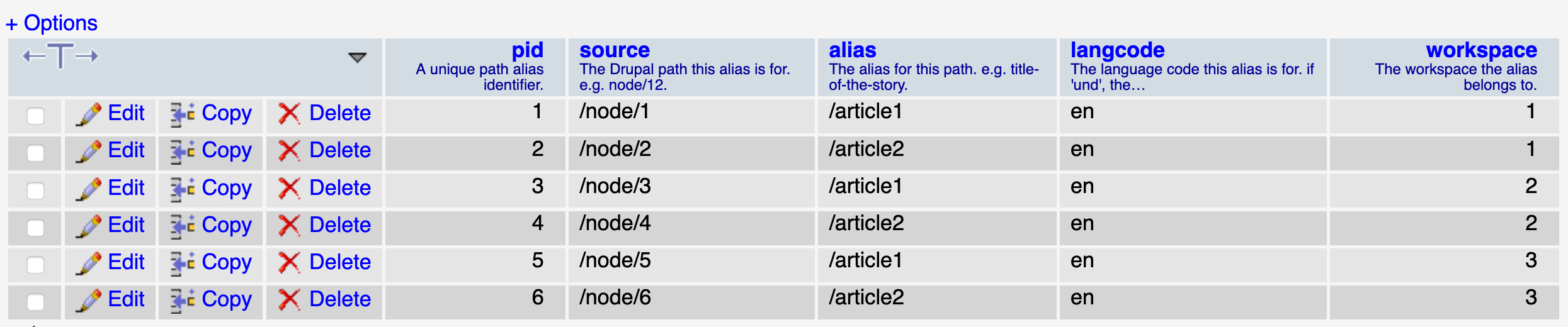
Explanation for 2.: when uninstalling Multiversion, it duplicates node url aliases because on migration it doesn't take into consideration already existing aliases into the database.
Steps to reproduce:
After deploying the 2 nodes to Stage and Test:

After uninstalling Workspace and before uninstalling Multiversion:

After uninstalling Multiversion:

Comment #5
bahbka commentedHi @jeqq, thank you for the review!
Here is scenario that we used to replicate #comment-13081172 issue:
As a result:
I believe that same issues will happen when you will run 'drush mun -y' as the first step will be to disable multiversion support and then delete workspace entities.
Comment #6
jeqq commented@BAHbKA I see, when using
drush mdt node -ycommand and Workspace module is not uninstalled then we can have multiple workspaces.Truncating entity tables was an improvement and I don't like the idea of deleting again every entity from the non-default workspaces (as we try to do in #3)- this is a performance downgrade, if we do this, then our fix from #3048954: An alternative approach to including/excluding content types into "multi-versioning". was work in vain.
A solution would be on uninstall (after migrating entities to temporary storage and before migrating them back) to just loop through the url_alas table values and delete from there all the entries where we have as source
/node/NODE_ID(maybe we have other possible cases?).Comment #7
bahbka commented@jeqq I see that my steps is a bit misleading e.g. disable node type with workspaces being enabled - doesn't make any sense. So I did the same as you in #4:
- drush si -y
- Created 2 nodes pushed them and edit them in different workspaced
- drush pmu deploy -y
- drush wun -y
- drush repun -y
- commented drush_module_uninstall(['multiversion']); in the drush command
- drush mun -y
After these steps I can see that:

- Proper version of a node is kept & displayed
- All none default workspace entities are deleted - as it should be
- And URL alias table is showing:
My proposed solution is to delete all records form url alias table with workspace == 0 right before dropping workspace column from this table e.g. multiversion_uninstall . @jeqq what do you think about this?
P.S. the only unique key in url_alias table is pid, so you can add as many aliases for the one source as you want using SQL queries.
Comment #8
bahbka commentedAttaching patch and interdiff for the proposed solution.
Comment #9
bahbka commentedComment #10
jeqq commented@BAHbKA You are right regarding, alias field not being unique, I got confused because I remembered that on node saving duplicate alias is not allowed, but that is restricted by the storage class, not database, sorry.
Will test the new solution I think it should work.
Comment #11
jeqq commented@BAHbKA Yes, that works, but I think it's still not the best solution. That because it creates unnecessary entries in the database, then we delete them. The best solution would be to control that on entity migration to multiversion/drupal storage, somewhere in a new process or destination plugin (Drupal\multiversion\Plugin\migrate\destination\EntityContentBase). On entity migration from the temporary storage it should do a check, if there exists already that alias, it shouldn't save a new one.
What do you think?
Comment #12
bahbka commentedHi @jeqq attaching new patch
Comment #13
jeqq commentedThanks @BAHbKA! Will review it tomorrow morning.
Comment #14
jeqq commented@BAHbKA This works perfectly when uninstalling the module, but when installing the module it still deletes existing aliases and creates new ones (with new PIDs). Could we keep path aliases on module install and avoid deleting them and creating again (as we do on uninstall)?
Comment #15
bahbka commented@jeqq Unfortunately with a current approach when we are installing a module it triggers entity delete method that's deleting everything connected to the entity e.g. no calls to the truncate function. Thats why pids are changed and this fix for the url aliases applied only when multiversion module gets disabled.
Comment #16
jeqq commented@BAHbKA Fair enough, thanks! I'll commit this.
Comment #18
jeqq commentedComment #19
gaydamaka commentedWe get a duplicate alias on migration if we have the "Pathauto" module on the site.

And we need to skip saving a new alias on migration.
Comment #20
spheresh commentedLooks good for me. It seems that patch #12 can be reverted if these changes are received.
Comment #21
jeqq commentedThank you for the patch!
This patch should leave in another issue, not here, this is already fixed and the change is already in the latest module release. Please create a new issue, with a proper description and upload the patch there. This issue fixed the problem without Pathauto module installed. Thanks!