Problem/Motivation
The Remote video media type is not responsive by default. Copy-and-pasting from #59:
In this example, the video is configured to be displayed at a resolution of 640x480. As always, there is an iframe which displays a Drupal-generated page which, in turn, simply displays the raw content from YouTube (which, in this case, is an iframe too -- so you're looking at a frame within a frame, which is absolutely normal and expected for remote videos). To demonstrate the problem, I have also artificially set the width of the containing div (the content region to an absolute width of 500px in all of these screenshots.
So, to start, here is the "control" -- you see the video, at the desired width. Because the outer frame does not have max-width: 100% applied, it overflows the content region, as you would expect:
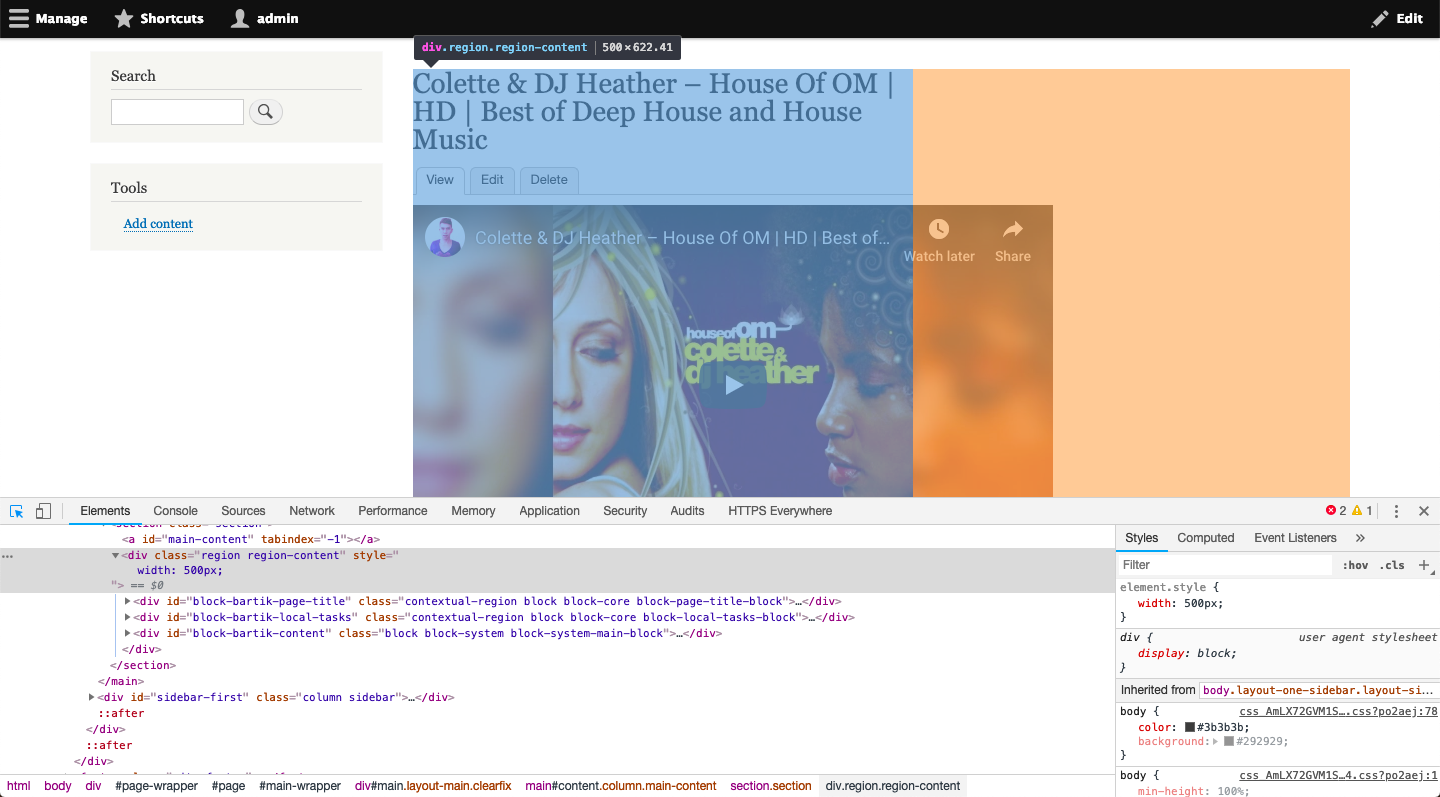
Now, I apply max-width: 100% to the outer frame. The outer frame scales down to fit inside the content region, but the inner frame is cut off (the "Watch later" and "Share" icons are no longer visible). This is the bug we're trying to fix here:

Proposed resolution
Add some CSS to the outer frame so that it respects the width of its container, and also add some CSS to the inner frame so that the oEmbed content itself can have the proper dimensions. The scaling is achieved by the addition of two new libraries: media/oembed.formatter, which targets the outer frame, and media/oembed.frame, which targets the inner frame. Since these are libraries, they can be overridden by themes to customize the CSS.
After applying the latest patch, the inner frame also scales down to the width of the outer frame, and everything looks right:

Remaining tasks
Commit the patch.
User interface changes
Remote videos will no longer be "broken" in responsive layouts.
API changes
None.
Data model changes
None.
Release notes snippet
Remote videos will now automatically respect the width of their containing element.








Comments
Comment #2
vood002 commentedI just ran into this issue as well.
It seems to me that the double iframe is kind of nasty, but I imagine it was done for a reason at the same time.
Getting this to work was tedious. I'm hoping there is a better method that can be rolled into core.
In my particular case, I always want videos to appear at 100% width in a responsive fashion, so this hack may not be useful for everyone.
1: In a custom module, override Drupal\media\OEmbedUrlResolver
To do so, you'll need to override the services definition in your custom module's services.yml file. My module is named ohf_media
Then, in this new file, make sure it extends the original OEmbedUrlResolver class. You only have to override the getResourceURL function, and I commented out lines 169-174 so it would not add the maxwidth and maxheight to the url
Step 2: Remove scroll bars on OEmbed iFrame
After this I had a problem with the outer nested iframe adding scroll bars on the node. So, you have to add the media-oembed-iframe.html.twig file, and add style="overflow:hidden" to the
# # #
Like i mentioned, pretty terrible. Would be lovely if a cleaner solution was supported out of the box, but if you need it to work this did it for me.
Comment #3
dnebrich commentedI ran into this same problem, thanks for this.
I got around it by installing video_embed_field/video_embed_media and creating a "Remote video 2" media type using video embed field as a media source. Then responsive just works.
Comment #4
maseyuk commentedComment #5
niklanI've created patch which adds checkbox to default oEmbed content widget settings. Which allows you to disable rendering in iFrame.
Comment #6
lamp5But core contributors have real reasons to show oembed media in iframes.
Check Oembed details
Comment #7
niklanBut working with this solution, epspecially styling, in his current state is pain.
E.g. YouTube video can't be responsive without custom JS that controls it, or some dirty code in iframe theme hook preprocessor. Styleing with
Comment #8
rajab natshahiframe inside of iframe
Thank you Nikita for the fix workaround fix
and Thank you lamp5 for the security hint
I think we could attach the following CSS in each inner iframe.
I'm borrowing from the Bootstrap library of embed-responsive
https://getbootstrap.com/docs/4.1/utilities/embed/
But in our new case
The following link in the iframe:
/dev/drupal861/docroot/media/oembed?url=https%3A//www.youtube.com/watch%3Fv%3DA7NViloMFqs&max_width=0&max_height=0&hash=M-aaYFtHNJpuZvXD4tAwupBgbIPSHbrFXGfC6jx3wtIWill call the following:
Which iframe space should have the following?
Root DOM will not work.
the inner iframe or the inner inner iframe
Comment #9
rajab natshahTesting this with many allocated and responsive media sizes
Before the fix:
VMI - Standard 16:9 - Episode - Horizontal Media
VMI - Standard 16:9 - Episode - Vertical Media
Comment #10
rajab natshahI have a basic patch to fix this.
I think we could copy the
media-oembed-iframe.html.twigfile to our theme and custom it for any oEmbed media typeComment #11
rajab natshahAfter the Fix:
VMI - Standard 16:9 - Episode - Vertical Media
VMI - Standard 16:9 - Episode - Horizontal Media
Mobile view - VMI - Standard 16:9 - Episodes - Horizontal Media
Comment #12
rajab natshahComment #13
rajab natshahComment #15
fotidim commentedPatch works great when I give class `embed-responsive embed-responsive-16by9`! It should be part of Drupal core!
Comment #16
phenaproximaTagging as part of the Media Initiative. I'm not sure I completely understand the proposed fix, but this is worth addressing in core.
Comment #17
rajab natshahNoted; we are still testing and playing with the oEmbed and how to use :)
Following with you on that!
I'm thinking of having something like a Drupal Video Player: an iframe API for oembed:video passing of messages like ( Play, stop, end .. ) and a listener.
For now It could be in profiles or themes.
I do think if we could have more like oembed:audio ( with Soundcloud, tunein, ..) with Drupal Audio Player.
The iframe inside the iframe is good for security as I know. If we are going to keep it we many need the ifreme window massaging and listener.
Comment #18
wxman commentedIf anyone cares, the patch in #5 worked great for me too. Using D8.6.4
Comment #19
sakiland commented#10 works for me
Comment #20
pieterdcI would not recommend #5 as explained in comment #6.
Patch from comment #10 seems to work for me as well.
Comment #21
sokru commentedPatch from #10 should be committed.
Comment #22
phenaproximaWe can’t commit this yet. We need subsystem maintainer sign-off, tests, and probably front-end framework manager review.
Comment #23
phenaproximaSo, here is my overall question, having looked at the patch -- does this need to be in core? To me, #10 feels like a workaround that will work for some sites and some use cases, but I'm not sure it is a general enough solution to be in core. For example: even if the proposed patch fixes the problem for YouTube videos, core ships with Vimeo support too. Will it also work for Vimeo videos? What about other kinds of oEmbed content which may be displayed in an iframe (like a tweet, for example)?
Additionally, I'm not sure we can commit a patch like this without automated tests. I'm not exactly sure how it would be tested, but we will need to find a way. If it can't be automatically tested, then the steps to manually test it will need to be documented in the issue summary.
I'm sorry to kick this patch back for these things, but I don't feel like I can push it forward at the moment. If this fix will help a lot of people, then I'm all in favor of landing it in core, but I think I need to see more justification, research, and testing before I'm comfortable advocating for it.
Comment #24
rajab natshahThank you Adam for your interest on this improvement.
In #8 I wrote what is optimal to have, and what we could borrow from bootstrap.
I'm still working on #17
For example, if we need to autoplay a Youtube or Vimeo video automatically in a Media Hero Slider. but iframe in iframe needs more code and js message passing between iframes.
I think we are in need of a general Drupal Media Player, a CSS , and JS library which could fix all these issues.
Following with (justification, research, and testing)
Comment #25
phenaproximaI think a Drupal Media Player which can handle all of these cases is a great idea, and it sounds like a perfect case for a contrib module. Building things like that directly into core is a very difficult and time-consuming slog, but contrib has complete freedom to iterate and add useful features quickly. And there's absolutely no reason why we couldn't, further down the line, consider porting such a module to core and merging it with core Media, if it proved useful to enough people! :) Furthermore, we could quite possibly recommend such a module as being an "official" companion to the core media system, for various sites' playback needs.
So maybe this issue should be closed for now in favor of a better, improved media player module, built in contrib, that could be possibly have its best features ported to core in the future, once it has found wide usage and is "battle-tested". That'd be very easy to advocate for, and quite a bit easier all around than building something new directly in core.
(For the record, "contrib-first" is how the media system was originally built to begin with; the core Media module is a port of Media Entity, from contrib, and was partially written by the original developers of that module. So contrib-to-core might be an excellent strategy here.)
Comment #26
rajab natshahAdam exactly as it should be ( contrib-first )
Got it now :)
I think we could close this issue then
Comment #27
sokru commentedI'm strongly in favor of having this in core. I don't have any statistics, but I could imagine that majority of use cases for Drupal media could be embedding Youtube&Vimeo when using cores `remote video` media type. Serving these in responsive manner out-of-box would make the platform more appealing.
I'm working on Drupal site that used to have contrib media module, changed to core media module and this was first "regression" to face. Site uses only Vimeo videos and #10 fixed the issue.
Comment #28
maseyuk commentedIt would seem a shame for people to have to install configure extra modules to make the remote video responsive. As I would guess 99% of people who want to use the remote video media items are likely to need them responsive.
I'm keen for a contrib module that extends/adds to functionality but without this option the remote video can't really be used out of the box in site builds without the developer/builder having to do some googling to come by posts like this or the contrib module if/when its built
Comment #29
starshapedI agree that this should be part of core by default. Users expect responsiveness out of the box, so having this in core will be useful.
Comment #30
phenaproximaOkay, I'm convinced. I guess responsiveness is pretty much expected these days, and it'd be quite a WTF for it not to work out of the box. If we can do it, let's do it. :)
Next steps, then:
Comment #31
starshapedI think adding a CSS class and/or an external stylesheet is an excellent idea, as I'm also not sold on putting the CSS inline. If it's pretty straightforward to import a stylesheet, then that's the direction we should go.
Comment #32
starshapedI gave this patch a whirl tonight, and it appears that the Stable theme twig files are overriding the twig file included in the patch. See attached screenshot of twig debugging turned on to see what twig file is being rendered.
Comment #33
phenaproximaDang. Changes to Stable may be considered BC breaking, so we're gonna need sign-off from a front-end framework manager. (Hopefully we can get this issue reclassified as a bug fix, and then maybe it can be changed in Stable.)
Comment #34
lauriiiThis is something that would be likely to break some themes, and we don't really have a good way to make this type of changes. Maybe by Drupal 9, we have a way to ship this type of features, but for now, probably the best way to proceed would be to document how people can make remote videos responsive.
Comment #35
rajab natshahI think Adams idea of ( contrib-first ) is better to start with
and only on demand call for a new library
After his last comment to me, I had a look at
Media Player project.
https://www.drupal.org/project/media_player
Not sure if we could have more solutions in it. It needs time and contribution
It needs refactoring and dedicated maintainers too
We could switch and select a number of default players.
http://jplayer.org
https://www.brightcove.com
https://plyr.io
https://videojs.com
https://www.mediaelementjs.com
Which one is our best option !!?
For example, My custom contrib-first on this subject is
Varbase Media
https://www.drupal.org/project/varbase_media
Which many parts and ideas of it came from Lightning Media old and new school.
For example, we do have a custom cover image over videos, which will show up on top of the video if uploaded.
Tested all options and situations as in #9 and #11
All testing for options and media sizes goes with
https://github.com/vardot/varbase_vmi_demo
https://github.com/vardot/varbase_story_demo
With some uploaded, embedded, and generated content
So it's a custom Video Player, Not using any Ready Media Player libraries yet, but still studying that.
A general on-demand media player could manage most of the options and issues with different displays and devices.
Comment #36
kasey_mk commented#8 worked for me for both YouTube and Vimeo (#10 alone did not). We're already using a Bootstrap-based theme so I didn't need to add the embed-responsive styles anywhere, but they do seem necessary to me if you don't already have them.
I copied
media-oembed-iframe.html.twigand added:I copied
core/themes/stable/templates/field/field.html.twigasfield--media--field-media-oembed-video--remote-video.html.twigand changed<div{{ attributes }}>to<div{{ attributes.addClass('embed-responsive', 'embed-responsive-16by9') }}>I would like to see a solution in core for this. I agree with the others who said that responsiveness is the expected behavior. I waited for a while before searching out another answer because I assumed this must have been a known problem that developers would figure out in time. I am surprised to see suggestions that this be pushed off onto contrib solutions.
Comment #37
phenaproximaI did a bit of research and I suspect we can actually fix this in Drupal 8, at least for some people. Here's my understanding of the situation:
Stable has the media-oembed-iframe.html.twig template, so it cannot be changed until Drupal 9. We could add a Twig comment explaining how to add responsiveness by overriding the template, but other changes to that template are a dead end for now.
Classy does not have the template, but it does have a mandate to maintain backwards compatibility. So in this issue, we could and probably should copy the template from Stable to Classy.
We'll then need to open a follow-up to fix this for real in Drupal 9.
If both of those changes are made, maybe we could change the template that ships with the Media module so that it's responsive by default.
I'm tagging this for front-end framework manager review again. If they agree that my summary here is okay from a backwards compatibility perspective, we can correct this.
Comment #38
miiimoooThanks for the solution in #8 @RajabNatshah
Comment #39
lauriiiHaving a solution for this out of the box in core would be extremely valuable, especially after more people start utilizing layout builder. I would love to see us make progress on this prior to Drupal 9. 😇
One way to limit disruptiveness would be adding a configuration option to the field formatter that would allow toggling responsiveness. We could enable it on new fields by default, but pre-existing instances would remain unresponsive.
I moved this to major given the usability concerns not having this feature would cause in layout builder.
Comment #40
seanbThanks @lauriii for pointing me to this issue. I also think this would need to be responsive 99% of the time, but I guess the configuration option would:
A. Minimize disruptiveness
B. Allow people to change it if needed.
So +1 for configuration option on the formatter.
If this option is enabled we could pass a query parameter to OEmbedIframeController. Based on that query parameter we could attach a new library containing the responsive CSS (and maybe JS) needed to make everything look awesome. This way we don't have to change the template, and can fix it in D8 for everyone.
How does this sound?
Comment #41
phenaproximaFirst attempt to write a fail patch, to test this. Let's see what happens...
Comment #43
phenaproximaFail patch failed perfectly. Removing the "Needs tests" tag.
Comment #44
phenaproximaLet's see how this does. Not sure I did it quite right...but I have faith in the test.
Comment #47
phenaproximaLet's see if this fixes any tests. I still expect the test I added in #41 to fail, because I don't think I have the fix correct; but hopefully, that's the only one that will fail this time.
Comment #48
wim leersSee
template_preprocess_html():That’s what puts those things into
html.html.twig. You don’t “magically” get CSS/JS to show up.Looking at
\Drupal\media\Controller\OEmbedIframeController::render(), that wouldn’t automatically get CSS/JS libraries to show up. Forhtml.html.twig,template_preprocess_html()points to\Drupal\Core\EventSubscriber\HtmlResponseSubscriber, which uses\Drupal\Core\Render\HtmlResponseAttachmentsProcessor.So you will also need
\Drupal\Core\Render\HtmlResponseAttachmentsProcessorif you want#attachedstuff to show up in your rendered oembedIt looks like the tricky bit is that
\Drupal\media\Controller\OEmbedIframeController::render()is doingmeaning it is _already_ returning a
CacheableResponse, not aHtmlResponse. If you’d change that to aHtmlResponseinstead, it would work (in theory).Perhaps the attached interdiff is enough?
Comment #50
phenaproximaWelp, that's what happens when you override a library incorrectly...
Comment #51
phenaproximaImplemented Wim's idea from #48. Let's see what it does!
Comment #54
phenaproximaOkay, Wim Leers is the greatest dude. He got on a call with me and walked me through the code a bit, and now I see how to attach libraries correctly. I refactored things a bit so that the placeholder token and attachments are prepared only by OEmbedIframeController, which allowed me to remove the preprocess function. In manual testing, the style sheet is attached as expected. Now let's see if the tests agree!
Comment #55
phenaproximaFix a couple of things...including accidentally adding the response to itself as a cacheable dependency. Whoops!
Comment #58
phenaproximaLet's make the assertion a bit more flexible.
Comment #59
phenaproximaAdding some screenshots here to literally illustrate the problem.
In this example, the video is configured to be displayed at a resolution of 640x480. As always, there is an iframe which displays a Drupal-generated page which, in turn, simply displays the raw content from YouTube (which, in this case, is an iframe too -- so you're looking at a frame within a frame, which is absolutely normal and expected for remote videos). To demonstrate the problem, I have also artificially set the width of the containing div (the
contentregion to an absolute width of 500px in all of these screenshots.So, to start, here is the "control" -- you see the video, at the desired width. Because the outer frame does not have
max-width: 100%applied, it overflows the content region, as you would expect:Now, I apply
max-width: 100%to the outer frame. The outer frame scales down to fit inside the content region, but the inner frame is cut off (the "Watch later" and "Share" icons are no longer visible). This is the bug we're trying to fix here:After applying the patch, the inner frame also scales down to the width of the outer frame, and everything looks right:
Comment #60
phenaproximaComment #61
phenaproximaComment #62
phenaproximaComment #65
phenaproximaAh, I see why the test is failing -- I accidentally removed a cacheable dependency that I shouldn't have.
Comment #66
seanbLooks pretty good to me!
Should we also add a
<js-placeholder>for people to use?Same here.
Can we use
document.querySelector("iframe").contentWindow.document.querySelector("iframe")instead offrames[0].document.querySelector("iframe")? I think this is a little more clear about selecting an iframe in an iframe.Comment #67
rajab natshahWow I learned something new from the last patch
1. Thanks for the css place holder idea
2. Adding the Js place holder will help a lot.
3. Just to note as in #8 about the CSS of the container .embed-responsive .embed-responsive-16by9
In the bootstrap library, they are used to set the container size to 16:9 standard view. some sites may like to view 4:3, 21:9, 1:1, or full mobile view
For testing, I'm managing that in the theme level
4. I hope If we could have more of the media object in the twig file.
Thank you :)
Comment #68
phenaproximaI'm strongly against doing that in this issue. It is out of scope, would require much more extensive tests, is not needed to fix the problem at hand (it's nice to have, not a necessity), and would probably punt this patch to land in 8.8.x only. So, if we want to enable attachment of JavaScript in the frame, let's open a follow-up for that.
Additionally, the current patch makes it impossible to add any library except media/oembed_frame, and that's intentional -- I want to keep the scope very limited for now. If we want to enable attaching additional CSS libraries, we should do that in a follow-up.
I think that if you were wanting to add classes like these, couldn't you just override the template?
With a little bit of extra code, this is already possible. See https://api.drupal.org/api/drupal/core%21modules%21media%21media.module/...
We can't do this. The iframe is returned by YouTube, and we display it without altering it in any way. To add an ID, you would probably need to do some string manipulation; again, to do that kind of thing, you could override the template or add a new preprocess function. But I don't think core is the place to do that.
Comment #69
rajab natshahNoted; We could play with JavaScript in new follow up issues
Last week I tried to play with media_theme_suggestions_media, but it did not work in my case - seems that Drupal is not going into the hook_theme_suggestions_media
for example
I know I may have something wrong with media__source_ but It's not showing the suggestion in the twig debug to know the right format
Thanks for all your work on the media module
Comment #70
phenaproximaAh. Well, the media_oembed_iframe theme hook is a separate theme hook, so I guess that media_theme_suggestions_media() would not apply. :) My bad! I'm open to increasing the theme-ability of the iframe, but let's do it in a follow-up issue targeted against 8.8.x.
Comment #71
seanbTagging for follow ups. I'm ok with postponing the discussion about adding the JS placeholder for the sake of fixing the immediate issue asap.
Comment #72
phenaproximaRight now this is considered a feature request, but I believe it is more like a bug fix (I'll leave it to @lauriii to confirm or deny that opinion). If he agrees that this is a bug fix, I believe the fix should be backported to 8.7.x. Tagging accordingly.
Comment #73
phenaproximaDiscussed a bit with @lauriii in Slack today. We agreed that it would be helpful for the outer frame to have some CSS applied as well if scaling is enabled (i.e., a max-width of 100%). To keep things clean and well-separated, this necessitates a second library and style sheet. I called the library for the outer frame
media/oembed.formatter, and the inner frame is nowmedia/oembed.frame. Let's see what testbot thinks.Comment #75
phenaproximaWow. What a difference a single character makes.
Comment #76
wim leers#59 shows the problem & fix very clearly, thanks!
#68:
+1
#72:
Based on #59, I agree. I think the current title makes it sound like a feature request?
Why do we even need this to be a setting? In what situation is it not a bug to have it fit within the container?
👍 This could perhaps use an
@see \Drupal\Core\Render\HtmlResponseSubscriberComment #77
phenaproximaThis is squarely for backwards compatibility. Since we are changing the way videos are presented, we need to make sure that site builders can opt-out of this fix, in case they have dealt with it in some other way (or, for whatever reason, want videos to be able to overflow).
However, I see your point; I can't imagine a realistic situation in which responsiveness would be frowned upon. One possible option (which should be cleared with both the front-end framework manager and a release manager) is to immediately deprecate the
scaleoption in this patch and have it be mandatory in Drupal 9.Comment #78
maseyuk commentedThere shouldn't be too many backward compatibility issues should there? As the only real change is to the media-oembed-iframe.html.twig file
And anyone that might have done something to try and sort this issue out themselves would have added their own media-oembed-iframe.html.twig to their theme so this wouldn't effect those people.
And any that has something to their code elsewhere could just copy the old/current media-oembed-iframe.html.twig into their theme too couldn't they if they wanted to avoid this change for an existing site?
Comment #79
lauriiiI agree with @maseyuk. I was just discussing this with @Wim Leers on Slack and we came to the same conclusion that we should be able to safely provide a fix without having a setting. My biggest concern was conflicts with other styling preferences site owners might have, such as
overflow: hidden. Since the only way of adding styles inside the iframe is to overridemedia-oembed-iframe.html.twig, we should be able to safely provide this fix in that template.I wouldn't expect many people to rely on the current default behavior, and as #78 points out, they could always provide a template override.
Comment #80
wim leersI want to clarify this. It's not COULD, it's MUST. That's the only way they can add additional CSS to it today. That's also the only way they can customize the markup. There are no Twig blocks that can be inherited/reused either. Nor can this template be wrapped as a whole, because this template is atypical in that it provides an entire HTML document.
In other words: if a site is customizing this in any way (HTML or CSS), they already must have a template override in their theme, and hence us changing this template to fix a problem is not going to result in any change for them.
Comment #81
phenaproximaConfirmed with @lauriii that the
scaleproperty can be removed for the reasons discussed above. So that's what I did. Let's see if this flies.Comment #82
phenaproximaWhoops, sorry...
Comment #83
phenaproximaOpened #3042383: Document how to attachment JavaScript inside the oEmbed iframe to discuss the possibility of attaching JavaScript inside the frame.
Comment #84
wim leersMissed one spot.
Once that's gone, this is RTBC.
Comment #85
phenaproximaThanks!
Comment #86
wim leers👌
Comment #87
phenaproximaChanging this to a bug report per previous discussion with @lauriii. Also re-titling so it sounds less like a feature request.
Comment #88
phenaproximaRewrote the issue summary to clarify what we're fixing here.
Comment #89
phenaproximaComment #90
phenaproximaAdded a change record: https://www.drupal.org/node/3042396
Comment #91
lauriiiWe can remove
right: 0;andbottom: 0;since we already setwidth: 100%andheight: 100%;.Other than that this looks good for me!
Comment #92
phenaproximaDone!
Comment #93
starshapedLooks good to me! Setting back to RTBC.
Comment #94
lauriiiThank you for writing a change record for this change! I changed the proposed approach on the change record to use the libraries system instead of forcibly removing all CSS assets by removing the head tag and the placeholder. This will hopefully lead fewer people removing the CSS files from the template, meaning that modules and themes would be able to rely on CSS files being rendered inside the iframe.
Comment #95
lauriiiUpdated issue credit. I added credit for @seanB and @maseyuk for discussions and reviews on the issue.
Comment #97
lauriiiThe change looks good for me now. As explained in comments #78-#80, this should be a fairly safe change to make in Stable theme. Given the impact of this issue, I think its a great tread off to make this change and provide it in Stable theme, and to backport to 8.7.x.
Committed 3ab46e2 and pushed to 8.8.x and 8.7.x. Thanks!
Comment #99
fgmAny suggestion for the best way to backport this to existing 8.6 site until it gets upgraded to 8.7 ?
Comment #100
lauriiiIt seems like #92 still applies to 8.6.x. I don't think there's anything that would prevent you from using that with 8.6.x. If you can't patch the site for some reason, you could take the changes from #10 and provide the fix in a template override.
Comment #101
Lythimus commentedThis bug was infuriating. Thank you so much for creating a patch. I wish it hadn't taken me SO long and so much tinkering to solve this.