

 Come together with the global Drupal community in Rotterdam, 28 Sept – 1 Oct 2026. Sessions, contribution, connection, and Early Bird savings until 8 June.
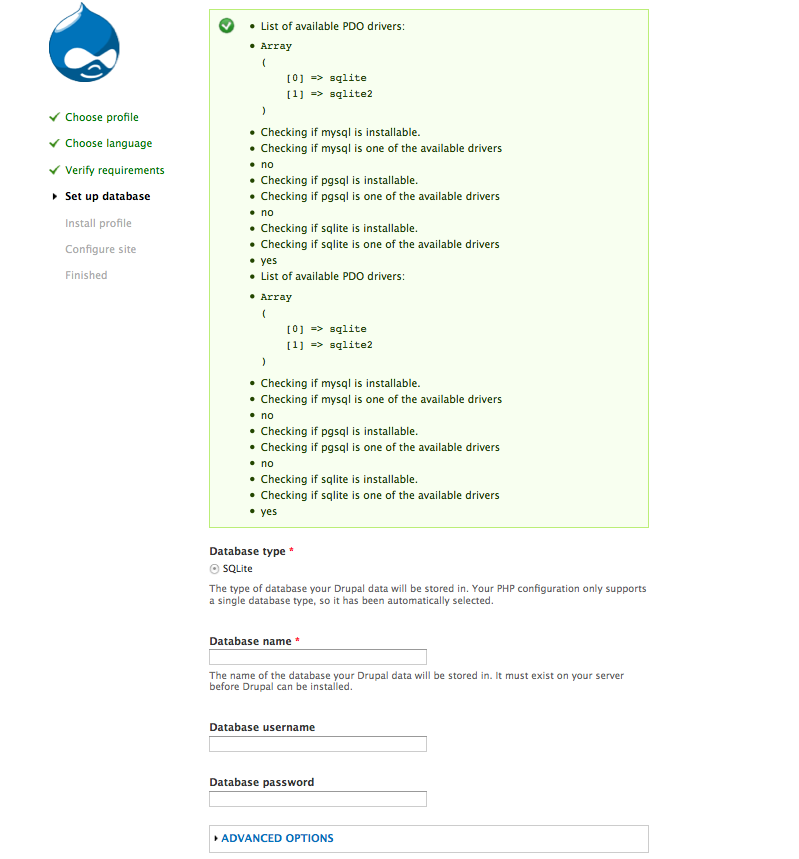
When installing Drupal 7.0-beta1, during the "Set up database" step it has a single, inactive radio button for SQLite as the database type choice. This is on a FreeBSD 8.1 system with Apache 2.2.16, PHP 5.3.3 and MySQL 5.1.51. I run several php/mysql apps on this server, including Drupal 6.19. I have attached the php.ini file from the above server and a screenshot of the web installer.
| Comment | File | Size | Author |
|---|---|---|---|
| #15 | beta3.png | 106.78 KB | jenlampton |
| #14 | rc2.png | 41.34 KB | jenlampton |
| #12 | debug-beta-3.patch | 1.27 KB | David_Rothstein |
| #12 | debug-rc-2.patch | 1.23 KB | David_Rothstein |
| #10 | sqlite.png | 67.58 KB | jenlampton |

Comments
Comment #1
spomerg commentedI found (I think) the relevant code in includes/install.inc and it seems like it should work:
The comments suggest that the compatible databases are detected from PHP settings, but the code seems more like it checks the sub directories in includes/database directory for the database.inc & install.inc files.
Comment #2
David_Rothstein commentedPlease see http://drupal.org/requirements and in particular the section on "Php Data Objects (PDO)". You need to make sure that pdo_mysql is installed for Drupal 7 to be able to use MySQL.
Comment #3
spomerg commentedAh, I missed that. Thank you. I will try to be much more thorough next time I read the requirements.
Comment #4
David_Rothstein commentedOK, thanks - I'm going to mark this "fixed" then.
I do wonder whether more people will run into this (actually I think a few have run into it already). Maybe we should look into adding a note to that part of the database configuration form that says something like:
"See the system requirements page for information on how to make other databases types available."
We don't want to crowd the page too much, but at least for people who do not have MySQL showing up on the list it seems like a common reason might be this kind of issue, not the fact that they do not have MySQL at all.
If you feel like that's a good idea and would have been helpful in your situation, perhaps you can either reopen this (or create a separate issue) proposing it?
Comment #6
jenlamptonI am running 7.0-beta3 with no problem, but with rc1 my only Database option during installation is SQLite. I'm running MAMP with PHP 5.3.2. Not sure how to resolve this so I'll keep using beta3 for the time being, but I'd love to start testing rc1 if someone can point me in the right direction.
Comment #7
jenlamptonThis problem is my environment, but I thought I'd use this issue to note what I find. So far, I've been able to generate an error! I guess that's progress. :/
Comment #8
David_Rothstein commentedHm, it's kind of disconcerting if something which worked in 7.0-beta3 no longer works in 7.0-rc1 in the same environment... The way the database configuration page works did change a lot between those two releases (due to #346494: DB drivers need to be able to change the configure database form during install) but that wasn't supposed to change the driver detection itself. If we can figure out what happened we should change this to a bug report.
What did you do to generate the above error? (When using SQLite, the database file does need to be writable by the webserver in order to work correctly. However, the installer is supposed to warn you when it isn't and prevent you from going further; it looks like maybe that didn't happen?)
Comment #9
condor575 commentedI am having the same problem but on a Macbook pro. I have configured the PHPadmin exactly like my tower ( which has drupal/mamp on it ) but for some reason the macbok pro is limited to only SQlite.
How do I extend the option to the regular MYSQL database?
Thanks
Comment #10
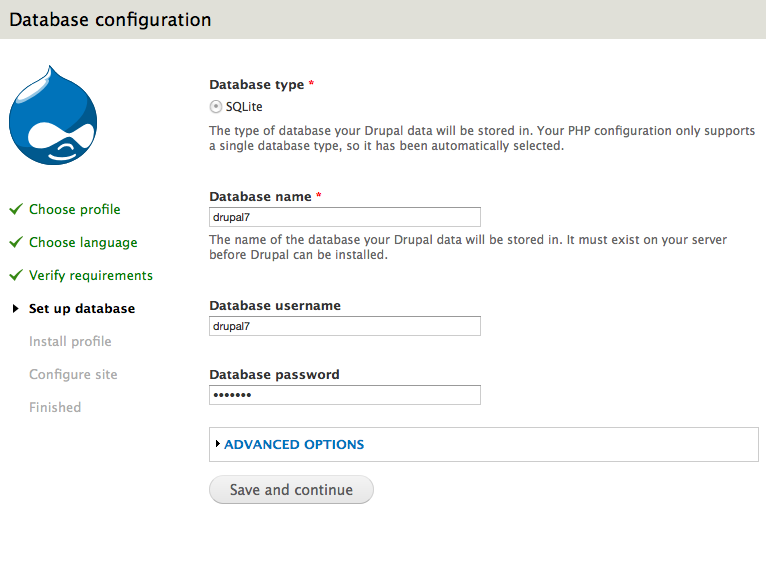
jenlamptonMy steps to reproduce are as follows:
1) download RC2
2) untar RC2
3) update my virtual hosts to point at RC2
4) visit the install page
5) select standard install
6) select English language
7) BAM - only SQLite option available. :(
I would prefer not to use SQLite - and I don't think the problem is with permissions on that file. The steps above are for a brand new Drupal install in a new location - no history here to confuse things :(
Comment #11
jenlamptonupdating to latest version.
Comment #12
David_Rothstein commentedSo where in the steps from #10 does the error message from #7 occur?
I'm looking at the differences in the code between beta3 and RC2 and having trouble figuring out what would have made the list of available database drivers change. In any case, here are a couple simple debugging patches that might help track it down.... Maybe if you install with these it will help figure out what the difference between beta3 and RC2 is.
Comment #13
jenlamptonThe screenshot in #10 appears at step 7 (same steps, same problem in RC4), but the error from #7 - I think - is unrelated. That happened after several attempts to install Drupal 7, so I think one of those times Drupal was looking for my sqlite file, which wasn't there since it was a fresh install.
Comment #14
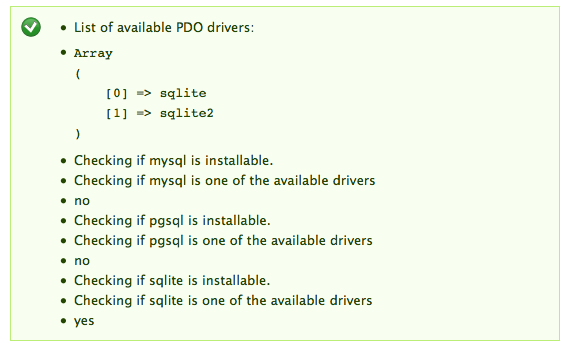
jenlamptonHere's a screenshot of RC2 with the patch
It's unable to recognize MySQL
Comment #15
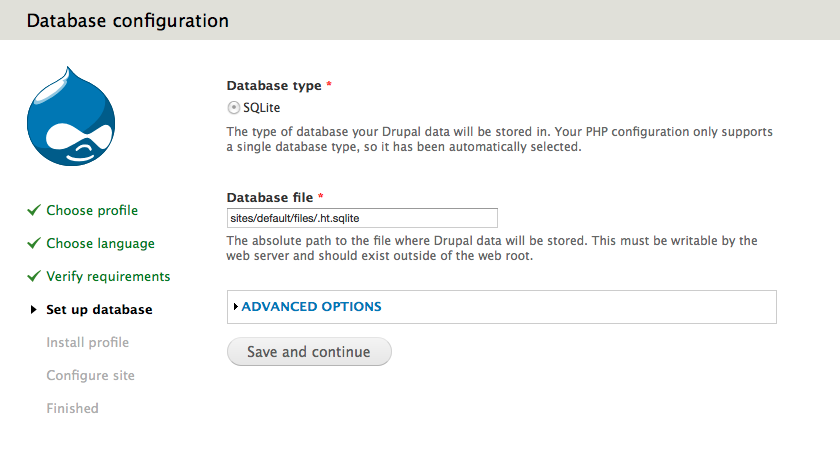
jenlamptonAnd here's what i see with the patch on beta 3. Strange - the results are the same but I still get fields to add my database information - and when I enter real MySQL info it it works as intended.
Comment #16
jenlamptonComment #17
jenlamptonOkay, so I was able to fix the problem and now I can use Drupal 7! :) yay.
The issue was that even though I had PDO activated (and my php.ini file indicated as much) PHP was somehow not aware of that - so when Drupal tried to check if I had the drivers installed - it failed - even though when just plugging in the db information in settings.php everything worked as intended.
I was running an older version of MAMP which had the php.ini file located in Applications/MAMP/conf/php5 but PHP was looking for an ini file in Applications/MAMP/conf/php5.3 - which did not exist. (I wonder how things were still working at all?)
The solutuion was to download a newer version of MAMP - but instead of upgrading or installing, I just extracted the files and copied the php5.3 directory out of conf, and added it into my current Applications/MAMP/conf where PHP was expecting to find it. Then I restarted MAMP and now PHP kows PDO is enabled :)
Comment #18
kyle.vh commentedJen, I'm in your boat: can you help? I am trying a clean install of drupal 7.10 and 7.x-dev. In either case I get the error you posted in #10. I'm on MAMP 2.0.5, PHP 5.3.6., OSX 10.6.8). In #17 which version of MAMP did you use (you mention two versions, but neither specifically), also did you use the patch to resolve the issue in #17 or not?
Thanks for any help!
Comment #19
jenlamptonHi Kyle,
No, I didn't use any patches to solve my problem. I'm currently running Version 2.0.2 - but with the config files from something newer than that (I don't remember which, and I threw out/archived the other files)
The way I figured out what was going on was to look at the resutls of the phpinfo() function, and see where PHP thought it's INI file was located. That's what clued me in to something being missing.
Comment #20
kyle.vh commentedhmm. I can only access MAMP version 2.0.5. I can't get past this error and can't install drupal. Pretty frustrating. I'm not sure what to do. phpinfo() file shows that it is pointed to the correct php.ini file which includes the following PDO extenions: extension=pdo_pgsql.so extension=pdo_mysql.so
Comment #21
kyle.vh commentedwell, I just switched to Aquia, as opposed to MAMP. That worked perfectly. https://network.acquia.com/downloads/7.x
Just wanted to post this in case anyone else needs help getting started.
Comment #22
jienckebd commentedIn my case, it was because I hadn't installed the PDO package for PHP. My set up:
Drupal 8
Centos 7
Apache
MariaDB
PHP 5.6
Corrected by running:
yum install php56w-mysql