
Configure the "About" Page
The About section provides a way to add content pages that may be useful in conjunction with the aggregation tools. These pages can include anything from information about the organization running the site to useful reference material.
You can add as many pages as you would like to the About section, as well as organize and re-organize pages in a hierarchy. To begin creating content for the About section, click the About tab (1) at the top of the page. If you have not created any pages yet, there will be some default text on the first page:
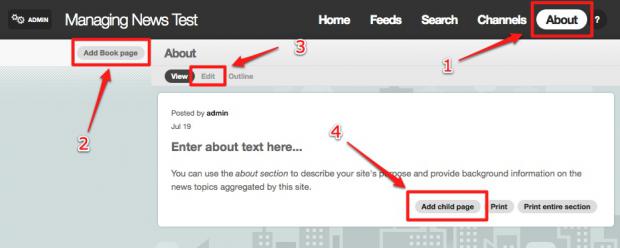
To change the existing text, click the Edit link (3), input the content you would like for the title and body, and finally click the Save button.
To add a new page, you can either click the Add Book page link (2) to add a page in the same level as the page you are currently viewing, or the Add child page link (4) to add a page that is below the current page in terms of structure.
You can re-organize your pages at any time by doing the following:
- Navigate to the page you would like to change the order of
- Click the Edit button
- Expand the Book outline section by clicking on the (+) sign next to the section title
- Change the parent page, the weight (which determines the order of pages with the lowest number displaying first), or both.
Help improve this page
You can:
- Log in, click Edit, and edit this page
- Log in, click Discuss, update the Page status value, and suggest an improvement
- Log in and create a Documentation issue with your suggestion
