

Closed (fixed)
Project:
Node Gallery
Version:
6.x-2.0-alpha12
Component:
Lightbox2 Contrib
Priority:
Normal
Category:
Support request
Assigned:
Unassigned
Reporter:
Created:
2 Apr 2010 at 14:14 UTC
Updated:
14 Jul 2011 at 09:23 UTC
Jump to comment: Most recent file

Comments
Comment #1
dbeall commentedI don't know how your caption is not centered, unless something has changed in your css or your theme has something going on.
here is one of my sample lightbox galleries
http://www.davebeall.com/node-gallery-gallery2/buckeye-lake-park
Comment #2
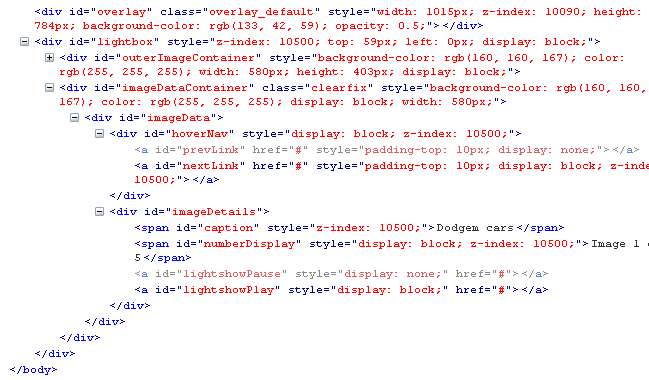
dbeall commentedfrom firebug
Comment #3
dbeall commentedscreen shot
yours might be a little different because I have a lighbox patch to display the caption for the image.
Comment #4
sahuni commentedThanks for your reply,
I don't understand, my gallery is not at all like yours.
Do I have really lightbox unable? Debugs bar does not at all shows lightbox classes.
Here is a link with real theme, and a test gallery : http://www.musee-des-bisses.ch/gallery-bisse-do
When I gave Garland theme to my user, I saw exactly the same, text on left
Comment #5
sahuni commentedHi,
So even with garland, I don't get an id=caption, it's just a
<p>mytexte</p>, as in the link of 2nd of April.Can you give me a suggestion?
Comment #6
sahuni commentedWell I suceeded to center a cck field I added to content type gallery image.
The problem with caption field is that it has no class.
I'll use my proper fields, no problem.
All the best
Comment #7
dddave commented