

Closed (fixed)
Project:
Views (for Drupal 7)
Version:
6.x-3.x-dev
Component:
User interface
Priority:
Normal
Category:
Support request
Assigned:
Unassigned
Reporter:
Created:
28 Mar 2010 at 14:33 UTC
Updated:
16 Apr 2010 at 00:45 UTC
Jump to comment: Most recent file




Comments
Comment #1
dawehnerCan you please provide more informations. Screenshots etc. I don't know whats wrong here.
Comment #2
merlinofchaos commentedEvery time I've seen this happen it's been one of two things:
1) IE stylesheet limits causing the stylesheet not to evaluate because there are > 30 stylesheets in the list. This only happens under IE but it happens under all versions.
2) The theme accidentally overriding or removing the .css file.
A screenshot and a cut & paste from source of all stylesheets added in the header might be helpful.
Comment #3
jlane commentedComment #4
jlane commentedThanks for replying guys.
1) IE stylesheet limits causing the stylesheet not to evaluate because there are > 30 stylesheets in the list. This only happens under IE but it happens under all versions.
Answer - I have tried it under multiple browsers and have always had the same result.
2) The theme accidentally overriding or removing the .css file.
A screenshot and a cut & paste from source of all stylesheets added in the header might be helpful.
Answer - I have tried multiple themes... stock themes... customer themes...etc. However, in my opinion I think the CSS file isn't being applied some how. The problem is that I don't know how to validate it or fix it. I also don't know how it occurred.
Thanks,
jlane
Comment #5
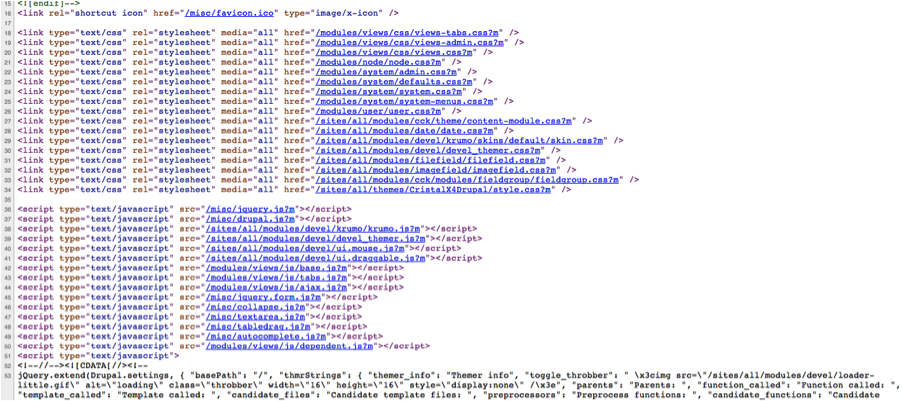
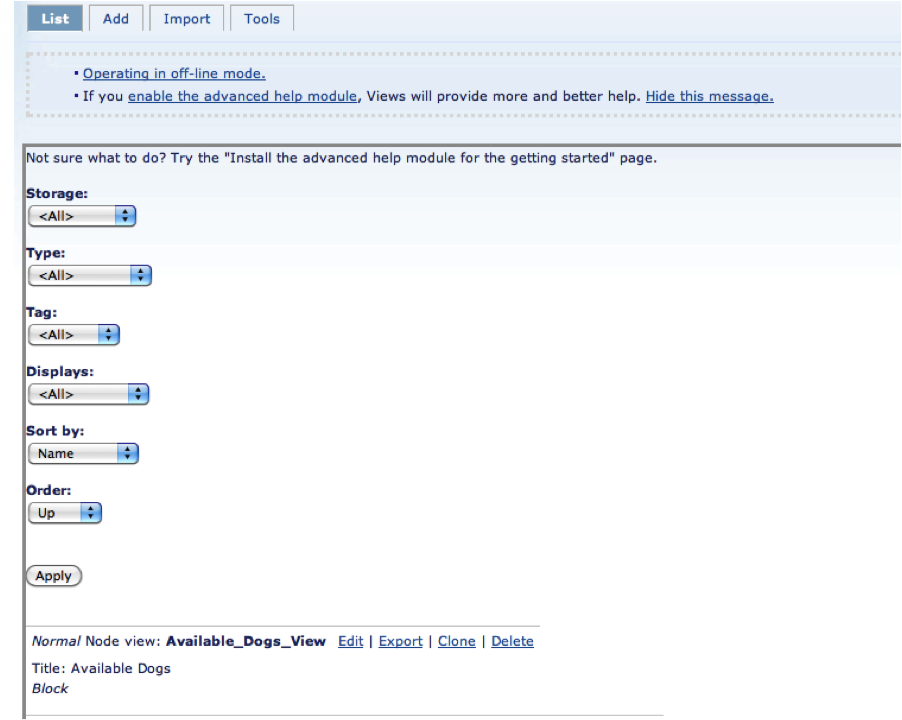
jlane commentedI am attaching a couple more screens. The first one is of the edit view page and the second one is the source of that page. I hope this helps.
-jlane
Comment #6
jlane commentedComment #7
dawehnerSo i hope you tryed it with garland once.
Comment #8
merlinofchaos commentedWell, the .css file is mentioned in the HTML, but the CSS is clearly not being attached at all.
Does the file exist? Is your install missing those files? Try clicking on the link to views-admin.css in source and see if it actually pulls up CSS.
One minor note: You have views installed in /modules -- it should be in /sites/all/modules
Comment #9
jlane commentedHi Merlinofchaos,
I appreciate your feedback. When I click on the link... it doesn't pull up the CSS file. But it does on the old site. So do I just need to copy the file over to the correct path or is it a permissions issue. Also, thanks for the minor note. It was originally in the /sites/all/modules and I moved it to /modules. It was my original attempt to fix it.
Update: I verified the CSS file is in the correct location. However, when I try to navigate to the path it just pulls up a normal blank page from my main template. So it doesn't seem like the CSS file has the correct permissions or something. Any ideas?
Update: I changed the permissions of all of the CSS files to 755 vs. 700 and it works. Is this a good idea? I forget the correct permissions set for CSS files.
Thanks,
JL
Comment #10
dawehnerThe only thing which is needed that the apacheuser can read the css file. Thats it.
Comment #11
jlane commentedThanks for everyone's help. It was a permissions issue on the CSS file.