

This project is not covered by Drupal’s security advisory policy.
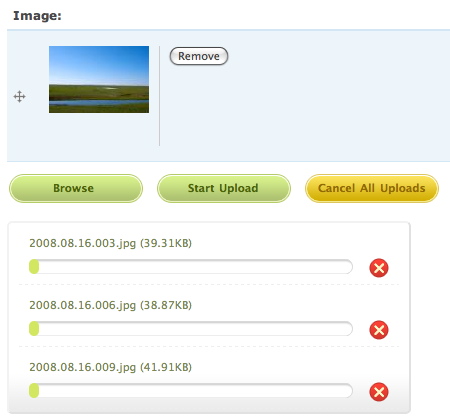
Integrate the Uploadify JS library with CCK (Drupal 6).
Support list
- CCK Filefield (http://drupal.org/project/filefield)
- CCK Imagefield (http://drupal.org/project/imagefield)
Quick install
- Download as usual.
- Download Uploadify library from http://www.uploadify.com/download/ and install the library (check the section below).
- Install the module: http://drupal.org/documentation/install/modules-themes.
Uploadify library
- Requires version 2.1.0. Details:
- Version 2.1.0 requires jQuery 1.3.2. You need jQuery Update module for Drupal 6 to work.
- Versions after 2.1.0 (2.1.3, 2.1.4, etc.) require jQuery 1.4.2. We cannot support them for Drupal 6.
- You shouldn't remove any files from the downloaded package.
- The directory name of the library must be "uploadify". After uncompressed the downloaded package, you got a folder like "jquery.uploadify-v2.1.0". Rename it to "uploadify".
- Put the Uploadify library with/in one of the following:
- With Libraries API.
- In "sites/all/libraries/uploadify".
- In "{module-path}/uploadify".
Configurations
The settings of Uploadify is per CCK widget. There's currently no stand-alone settings page. For example, to change settings for the field "field_image" of the node type "album", goto path "admin/content/node-type/album/fields/field_image".
Known issues / TODOs
Thank everybody for the responses. This module is not finished. There are some known issues:
- It only supports "unlimited" field for now.
- It doesn't hide or remove empty fields after removing a file.
- I haven't implemented any validation.
- JS needs to be optimized.
Credits
- Uploadify, the jQuery file upload plugin is built by http://www.uploadify.com/.
- Stingna Zhou built the default theme for this module.
Project information
- Project categories: Media, Developer tools
 17 sites report using this module
- Created by makara on , updated
 This project is not covered by the security advisory policy.
Use at your own risk! It may have publicly disclosed vulnerabilities.


