Closed (fixed)
Project:
Category
Version:
master
Component:
Code
Priority:
Critical
Category:
Bug report
Assigned:
Reporter:
Created:
25 May 2006 at 06:49 UTC
Updated:
13 Jun 2006 at 04:00 UTC
Jump to comment: Most recent file


Running Drupal 4.7.0. MySQL 4.1. Installed category-4.7.0 (and also CVS -- same issue). Ran Taxonomy wrapper.
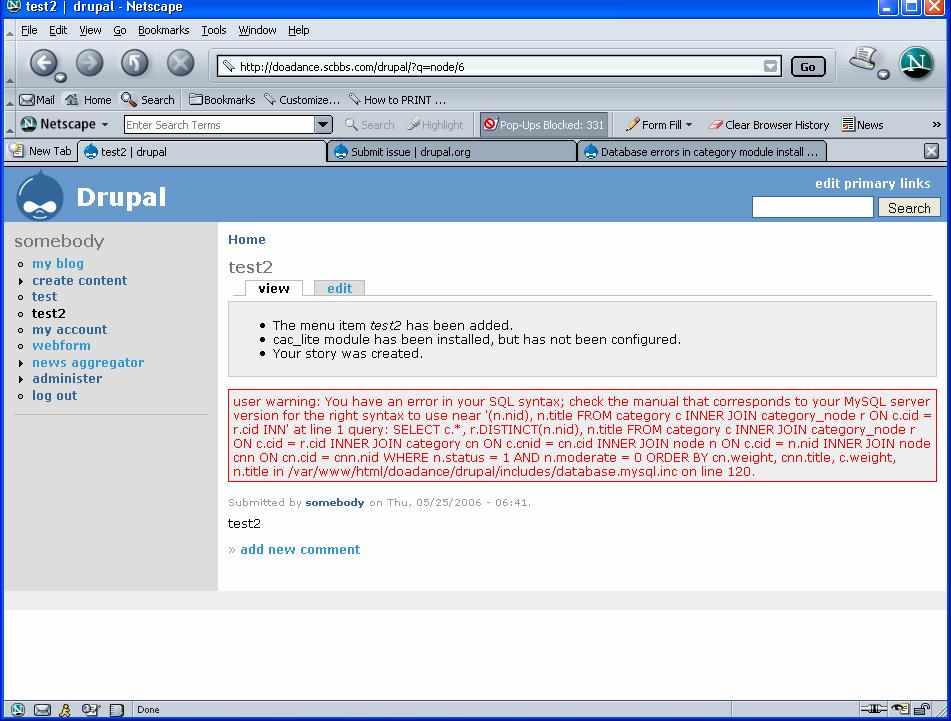
When adding content (such as story), get this syntax warning:
You have an error in your SQL syntax; check the manual that corresponds to your MySQL server version for the right syntax to use near '(n.nid), n.title FROM category c INNER JOIN category_node r ON c.cid = r.cid INN' at line 1 query: SELECT c.*, r.DISTINCT(n.nid), n.title FROM category c INNER JOIN category_node r ON c.cid = r.cid INNER JOIN category cn ON c.cnid = cn.cid INNER JOIN node n ON c.cid = n.nid INNER JOIN node cnn ON cn.cid = cnn.nid WHERE n.status = 1 AND n.moderate = 0 ORDER BY cn.weight, cnn.title, c.weight, n.title in /var/www/html/doadance/drupal/includes/database.mysql.inc on line 120.
Also get similar syntax errors every time content is viewed, modifed or deleted.
De-activate category module and problem goes away. Problem is, I really, really need category module.
Unlike the other issues I've seen, the tables are there, but the database is reporting a syntax error in the code. I can only think it might be a bug, but haven't seen anyone else report it.
Thanks.
-ron
| Comment | File | Size | Author |
|---|---|---|---|
| #2 | DrupalError03.jpg | 164.35 KB | somebodysysop |
| DrupalError01.jpg | 114.64 KB | somebodysysop |

Comments
Comment #1
betsyj commentedFYI - I saw exactly the same problem two days ago and was about to report it. Also simply going into Edit and the pressing Submit on a primary menu item produced an error indicating an attempt to create a database item with a duplicate ID. We restored the database and the problem went away. Sorry I don't know what user steps introduced the problem.
Comment #2
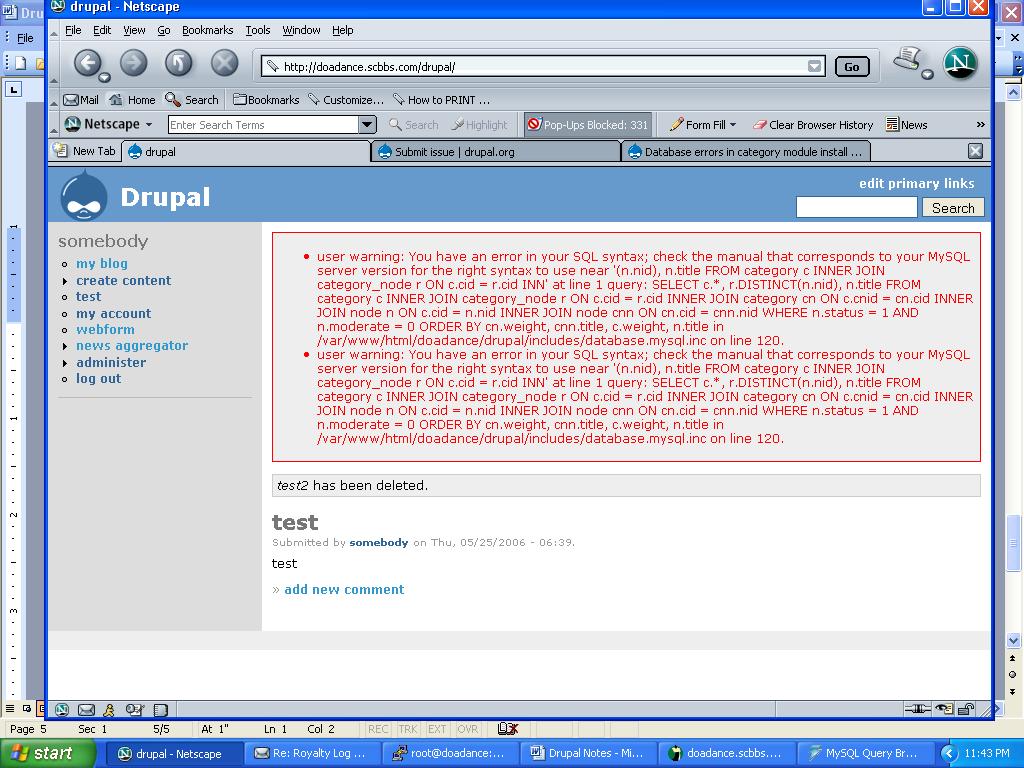
somebodysysop commentedI don't have a restore option because I started all over from a clean database and still get the same syntax errors. Any manipulation of content gives me MySQL syntax errors related to category tables so long as category is enabled. Attached is example of errors on content deletion.
• user warning: You have an error in your SQL syntax; check the manual that corresponds to your MySQL server version for the right syntax to use near '(n.nid), n.title FROM category c INNER JOIN category_node r ON c.cid = r.cid INN' at line 1 query: SELECT c.*, r.DISTINCT(n.nid), n.title FROM category c INNER JOIN category_node r ON c.cid = r.cid INNER JOIN category cn ON c.cnid = cn.cid INNER JOIN node n ON c.cid = n.nid INNER JOIN node cnn ON cn.cid = cnn.nid WHERE n.status = 1 AND n.moderate = 0 ORDER BY cn.weight, cnn.title, c.weight, n.title in /var/www/html/doadance/drupal/includes/database.mysql.inc on line 120.
• user warning: You have an error in your SQL syntax; check the manual that corresponds to your MySQL server version for the right syntax to use near '(n.nid), n.title FROM category c INNER JOIN category_node r ON c.cid = r.cid INN' at line 1 query: SELECT c.*, r.DISTINCT(n.nid), n.title FROM category c INNER JOIN category_node r ON c.cid = r.cid INNER JOIN category cn ON c.cnid = cn.cid INNER JOIN node n ON c.cid = n.nid INNER JOIN node cnn ON cn.cid = cnn.nid WHERE n.status = 1 AND n.moderate = 0 ORDER BY cn.weight, cnn.title, c.weight, n.title in /var/www/html/doadance/drupal/includes/database.mysql.inc on line 120.
Comment #3
bejam commentedI have been getting something like this too, but the sql had a php function call in it before the r.DISTINCT. Looks like a missing delimiter somewhere but I couldn't find it. I rolled back a few versions and it went away but now my category outlines page is empty. Think I may have to delete all categories and restart.
Comment #4
somebodysysop commentedMore. I again started from scratch and began enabling modules one at a time. I began with the category module, then:
taxonomy
taxonomy_access
flexinode
views
views_ui
I noted that I could create content without error UNTIL I activated taxonomy_access. I verified that taxonomy wrapper was currently installed.
Is this a bug, or category does not work with taxonomy_access and views, or have I missed some configuration step somewhere?
-ron
p.s. In case this helps:
When I loaded cac_lite, I get this error at administer >> access_control >> cac_lite:
warning: Invalid argument supplied for foreach() in /var/www/html/doadance/drupal/includes/form.inc on line 637.
Comment #5
bejam commentedok I got it again with cvs latest. It happens when I add a new organic group that I have allowed to be a category (not transformed, instead used the setting under admin->settings->content-types->group and set category in container x.
The error I get is:
user warning: FUNCTION r.DISTINCT does not exist query: category_node_get_categories SELECT c.*, r.DISTINCT(n.nid), n.title FROM category c INNER JOIN category_node r ON c.cid = r.cid INNER JOIN category cn ON c.cnid = cn.cid INNER JOIN node n ON c.cid = n.nid INNER JOIN node cnn ON cn.cid = cnn.nid WHERE n.status = 1 AND n.moderate = 0 ORDER BY cn.weight, cnn.title, c.weight, n.title in /home/httpd/vhosts/httpdocs/includes/database.mysql.inc on line 120.
Comment #6
somebodysysop commentedTrying to troubleshoot: I downloaded Drupal-4.7.1 and installed on Linux server running MySQL 4.1 database. Enabled taxonomy, taxomony_access. Then category. Created test page and got this:
user warning: You have an error in your SQL syntax; check the manual that corresponds to your MySQL server version for the right syntax to use near '(n.nid), n.title FROM category c INNER JOIN category_node r ON c.cid = r.cid INN' at line 1 query: SELECT c.*, r.DISTINCT(n.nid), n.title FROM category c INNER JOIN category_node r ON c.cid = r.cid INNER JOIN category cn ON c.cnid = cn.cid INNER JOIN node n ON c.cid = n.nid INNER JOIN node cnn ON cn.cid = cnn.nid WHERE n.status = 1 AND n.moderate = 0 ORDER BY cn.weight, cnn.title, c.weight, n.title in /var/www/html/doadance/drupal01/includes/database.mysql.inc on line 120.
Does taxonomy_access even work with category?
Comment #7
Jaza commentedThanks for reporting this issue, guys. This problem is due to a recent change that I made, to improve the performance of the category module when using category_display and TOC. I had to put this change through urgently, without doing very thorough testing. I anticipated that it would cause some problems, so this is no surprise to me.
I will be debugging and fixing this issue as soon as I can. Thanks.
Comment #8
somebodysysop commentedAny ETA for this fix because not only can I not use taxonomy_access, but just discovered to day that there is a problem with forums and elements of the category module.
When I click on Forums (with category module installed), I get this error:
warning: Invalid argument supplied for foreach() in /var/www/html/doadance/drupal/modules/category/category.module on line 489.
I got rid of the error by disabling: category_export, category_legacy, and category_transform.
Thanks!
-ron
Comment #9
venkat-rk commentedAnd, I have all the three disabled too, but the error still occurs:-)
The content type (page or whatever) is created, though.
Comment #10
Jaza commentedFix for this committed to HEAD and 4.7. Please report any additional SQL errors that you may encounter.
Comment #11
somebodysysop commented"Fix for this committed to HEAD and 4.7."
Could someone please tell me what this means and what I do about it? I mean, I know I'm supposed to download something, but what? And, since I have a site running now that I've put quite a few hours into, how do I implement the update? I'm a little new to all this.
Oh, and thanks to Jaza for the fix!
-ron
Comment #12
venkat-rk commentedIt means that this bug has been fixed. Normally, the fix will make it to the category module download in a day or so (I think), so one to download the new module and use it.
But, I was going to ask the same question you did- since you can't disable category or the taxonomy wrapper modules, I am not sure how to go about using the updated category module. Just upload it and overwrite the old module? Or upload and overwrite the old module and then run update.php?
Comment #13
Jaza commentedTo update your installation of the category module, download the latest version from the category module page. The file that you can download here is called a 'tarball' (a .tar.gz file), and it is regenerated from the latest source code every 8 hours (I think?). I just checked the tarball now, and it hasn't yet been regenerated with the bug fix.
Alternatively, you can checkout the latest source from CVS (for more advanced users). This always contains the latest up-to-date code.
You do not need to run update.php for this change - I generally announce when this needs to be done. Also, the wrappers do not need to be re-installed, as there were no bugs in them that needed fixing.
Comment #14
somebodysysop commentedDownload the gzip, unzip and untar it, and simply copy it over my existing category directory.
Correct?
Also, what's the date to look for?
Thanks!
-ron
Comment #15
inforeto commentedI got it working using the cvs version using the ssh command to grab the contrib folder.
The link in the "latest version" wasn't updated at that time, so check the date (it isn't the one from may 24th).
It complained that i had restored taxonomy.module.old, removing the wrapper while it was enabled.
But i had a backup and it worked.
Thank you for the fast response and fix.
Comment #16
somebodysysop commentedYes, I found and downloaded category-4.7.0 which had date of 2006-05-28. Simply copied this directory over existing directory (not, of course, before making backup). Enabled and activated taxonomy_access. Entered content, no complaints (which was the original problem).
Haven't done anything beyond this yet, but I too appreciate the fast turnaround. Thanks so much!
-ron
Comment #17
somebodysysop commentedUh, oh! This just might be a configuration issue that I don't understand, but I've run into a problem with the new category module.
I downloaded category update and replaced the existing one. I also enabled and activated taxonomy_access (the source of the original conflict). I no loger get sql warnings.
However, authenticated and anyonymous users can no longer access content located under category hiearchies (like the one you create in the tutorial). I can access the content while logged in as administrator, but not if I am logged out, or logged in as a regular authenticated user. For example, if I have a story content type page located under articles / news / stories, anonymous and authenticated users get a permission denied error when trying to access the page.
When I turn off (deactivate in settings) taxonomy_access, the problem goes away. Please forgive me if this is what is supposed to happen, because if it is, then does that mean I can't use taxnomy_access and category at the same time?
Please advise. Thanks.
-ron
Comment #18
venkat-rk commentedThanks, Jaza for fixing this problem so quickly.
Comment #19
venkat-rk commentedRon, I think your problems are either a configuration issue with taxo_access or have something to do with the fact that taxo_access is only semi-compatible with category module as per this post:
http://category.greenash.net.au/node/146
Comment #20
somebodysysop commentedThank you for the link. I read up on it and found this:
"Taxonomy access is the recommended access module to be used in conjunction with category"
Unless the behaviour I reported is true for all, I suspect that you are right that it is either a configuration issue or another bug that has cropped up. I'm just trying to eliminate the possibilities. So, if it is a configuration issue, what should I be looking at to resolve it?
Thanks.
-ron
Comment #21
venkat-rk commentedUnfortunately, I can't help you there because I only tried taxonomy_access once and it crashed my site; so like a cat on a hot tin roof, I backed away from the module despite its promise.
I think the key word/phrase to remember in Jaza's post is "semi-compatible". Your problem might well have something to do with the non-compatible part.
Comment #22
somebodysysop commentedThanks.
I did locate this thread: http://drupal.org/node/49715
This fellow had the same exact problem with taxonomy_access, although it must have been with a different access module. What resolved his issue was the following sql:
truncate table node_access;
insert into node_access VALUES(0, 0, 'all', 1, 0, 0);
I don't know beans about the inner workings of this code, so does this sound to anyone who does know like a reasonable thing to try and resolve this?
-ron
Comment #23
somebodysysop commentedOk, I did make some progress.
I went to administer > views and "enabled" taxnonomy_term.
I was still having problems accessing content as anonymous. So, I went to administer > access_control > category_permissions, and voila, there it was. The ability to determine what role has what access to content. So, I set the access to "List" for the content in question, and that has resolved the issue.
I'm sorry for dragging this out, but just didn't have a clue. So many nooks and crannies.
So, I think all my issues with respect to Category and taxonomy_access have been resolved.
Thanks so much to Jaza and all the others for your help and guidance. I've learned a lot!
-ron
Comment #24
somebodysysop commentedThere is one more small problem, and I don't know whether it is a bug or a feature:
When I turn on the taxonomy wrapper, the taxnonomy "categories" menu item which has the "edit vocabulary" tab goes away and is replaced by the category "categories" page which has only list/add containers and bulk edit. At this point, I cannot add or edit taxonomy vocabularies.
Is this supposed to happen?
Comment #25
(not verified) commented