Closed (fixed)
Project:
Vertical Tabs Default Tab
Version:
6.x-1.x-dev
Component:
Code
Priority:
Normal
Category:
Bug report
Assigned:
Unassigned
Reporter:
Created:
7 Dec 2009 at 15:59 UTC
Updated:
27 Dec 2009 at 13:20 UTC


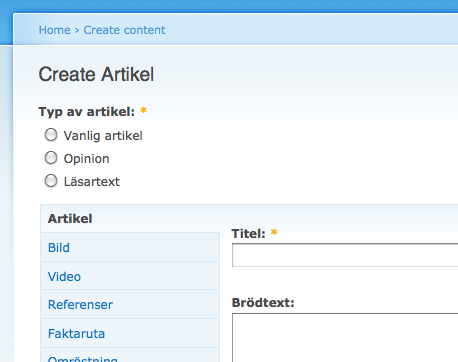
Whenever I create an integer field, no matter if it's a drop down list or radio buttons, it doesn't get into the default tab but lays above it instead. Se attached screenshot.
Any pointers as for why this is? Let me know if you need additional information of debugging.
| Comment | File | Size | Author |
|---|---|---|---|
| integer.png | 33.17 KB | EmilOberg |

Comments
Comment #1
crea commentedGood catch. There were only default form element types supported, so I changed behavior: now instead of using list of supported form element types, we use exclusion logic same as with form keys.
Comment #2
crea commentedShould be fixed in next dev snapshot. Please reopen this if there are problems with this approach.
Comment #3
EmilOberg commentedFastest patch I've seen. Working as a charm. Thank you.