

Closed (cannot reproduce)
Project:
Drupal core
Version:
7.x-dev
Component:
theme system
Priority:
Normal
Category:
Bug report
Assigned:
Unassigned
Reporter:
Created:
25 Aug 2009 at 07:35 UTC
Updated:
5 Mar 2012 at 14:10 UTC
Jump to comment: Most recent file


Comments
Comment #1
vip_sa commentedDoesn't matter what it does it on the base system as well even if you have no modules installed. Drupal does not work with IE8
Comment #2
vip_sa commentedDoesn't matter what it does it on the base system as well even if you have no modules installed. Drupal does not work with IE8. It works on different server so my question is what can be wrong and how do I fix this. It's really a big problem.
Comment #3
Nada Abou Dehn commentedDrupal work on all browsers
its a css compatibility matter
take some time to check the css files (use IE Dev Toolbar to encouter the problem faster!)
Comment #4
vip_sa commentedOk but even with the base system and nothing installed I still get the same screen. How do I fix it since I have no clue. I am a battling Newbie
Comment #5
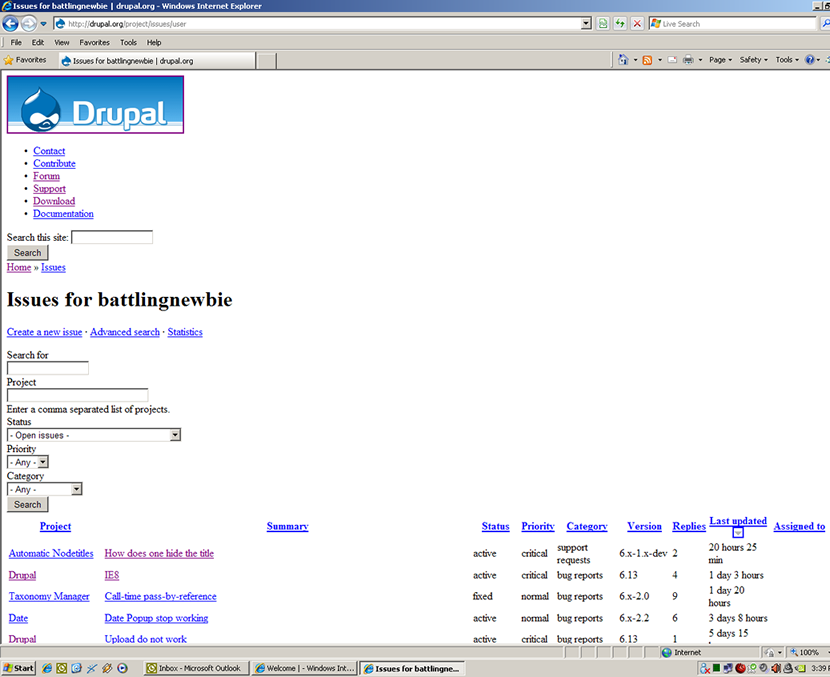
vip_sa commentedOk so if Drupal works on all browsers then why am I seeing this (attachment) This is on the Drupal.org website and I used it on three computers running Windows XP. Drupal does not work on IE8 so maybe someone might want to look at this.
Comment #6
stacie_a commentedIt doesn't look like it's including any css in your screenshots. what doctype are you using?
Comment #7
Drake commentedHi
You need the IE Unlimited CSS Loader http://drupal.org/project/unlimited_css.
IE can handle max 30 css files and this is the problem when you use more modules.
Comment #8
stacie_a commentedGreat link, drake!
Comment #9
vip_sa commentedThank you very much. Can someone at Drupal.org also install it because I see it happening on Drupal.org as well.
Comment #10
EvanDonovan commentedI've looked at Drupal.org on IE8 before & have not seen this error. I suspect there is a problem with your system configuration.
Comment #11
vip_sa commentedTry and test it on a very slow connection and see if you get the error
Comment #12
stacie_a commentedError not Bakery related.
Possible solution for IE8 css issue here http://drupal.org/project/unlimited_css
Comment #13
gr33nman commentedThe CSS limit thing is only part of the problem, and is thankfully taken care of by the unlimited CSS plugin.
Eric Meyer wrote about one major problem with IE8 here:
http://www.alistapart.com/articles/fromswitchestotargets
In essence, if a site does not recognize IE8 using the X-UA-Compatible feature, the site will render as if through IE6 in IE5 mode - in essence breaking your nice css. The ironic thing is that IE8 is capable of displaying the css correctly. It just won't because you haven't specified in your DOCTYPE that the site is designed for IE8. So you have to implement yet another browser sniffing hook in your scripting in order to make things pretty on IE8.
Barb Mosher gives a list of incompatible sites - including microsoft's own site here:
http://www.cmswire.com/cms/web-cms/popular-websites-incompatible-in-inte...
Scott Dickens attempts to defend the decision by microsoft here:
http://blogs.msdn.com/ie/archive/2009/02/16/just-the-facts-recap-of-comp...
They've taken a flagrant step backward with standards compliance when they could have just made it work right. Consider this post:
http://www.456bereastreet.com/archive/200802/doctype_switching_for_ie_8/
If everyone else starts adopting X-UA-Compatible, it means we're right back where we were before with standards - more work-arounds for different browsers. Enough already. This is just a sorry attempt by MS to keep relevant - because they can.
That said, we still have to kowtow to MS. Has anyone developed a project that enables X-UA-Compatible just for IE8? It could probably just be added to the theme, but I'd rather not reinvent the wheel if someone has already done this on a module level.
Comment #14
alexanderpas commentededit: read on
Comment #15
EvanDonovan commentedNot 100% sure if this is true, but according to this article by Sam Ruby if you use the HTML 5 doctype
<!DOCTYPE html>, then IE8 will render your site in its standards mode.Comment #16
Jared Scott commented@alexanderpas
You will have to strip the conditional tags from this statement otherwise this states that it will only activate if the browser mode is already set to IE8.
Check this link for more information about IE Document Compatibility:
http://msdn.microsoft.com/en-us/library/cc288325(VS.85).aspx
Comment #17
alexanderpas commentedit is pretty unclear how IE Document Compatibility and conditional comments work toghether, so i made a best guess based on the question in #13, especially because he said just IE8 with just underlined.
Comment #18
EvanDonovan commentedI think this is fixed now in IE8. Please reopen if I am wrong. I changed version since if it's a bug still, it should be fixed in 7.x and backported.
If the code from #14 is necessary, you could use drupal_set_html_head() (I think that's the name) to add it, in your THEMENAME_preprocess_page() function.
Comment #19
droplet commented