CVS edit link for coreyp_1
I have written a utility module called Tab Tamer. It allows the user (properly permissioned, of course) to (1) override the default order of Drupal tabs, (2) hide tabs from view while leaving the path accessible, and (3) completely disable a tab and its path.
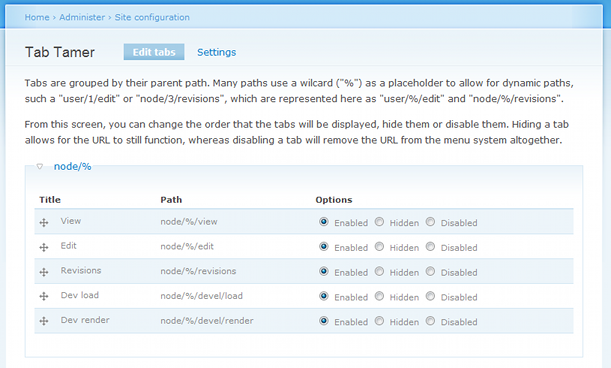
Administration is done through the module's administration page, making use of Drupal's drag ordering. The code uses hook_menu_alter() and makes use of Drupal's cache system when appropriate.
There is no module that provides for this functionality. The question of how to "turn off" "hide" or "change" the tabs in Drupal (core and contrib) comes up fairly regularly, and the common response is to either write a custom module to handle it for you, or to do a hackish theme override comparing string parts, etc.
Personally, I have found several situations where contrib module developers have not been careful in where they put tabs, resulting in a cluttered interface and, consequently, disgruntled customers. I have used several different approaches to handle the problem, but none of them are clean, and none of them are easily reproducible for novice Drupal users. This module fills the gap, in that it is simple and effective.
-Corey



Comments
Comment #1
coreyp_1 commentedScreenshot of the Admin Page included.
Comment #2
coreyp_1 commentedI've received some feedback, so I've added the tab Title to the list, improved the default sorting to match Drupal's default sorting methods, and fixed a few typos.
New Screenshot attached, too.
-Corey
Comment #3
ajk commentedComment #5
avpaderno