Closed (fixed)
Project:
Nice Menus
Version:
6.x-1.3
Component:
Miscellaneous
Priority:
Normal
Category:
Support request
Assigned:
Unassigned
Reporter:
Created:
1 Mar 2009 at 15:30 UTC
Updated:
1 Jun 2009 at 21:00 UTC


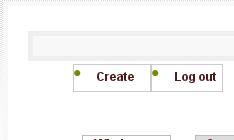
Im trying to create a drop down menu but the menus always get displayed to low. When I used right and left menus, the menus would be displayed inside the box. But when I used down menus the parent item always shows below where I'd expect it to be.
On the attached, create and log out are the menu items, and theyre suppose to be in the shaded area just above
How do i fix this?
Thanks
| Comment | File | Size | Author |
|---|---|---|---|
| menu.JPG | 3.6 KB | StarPower-Com |

Comments
Comment #1
add1sun commentedAny progress?
Comment #2
add1sun commentedComment #3
tstermitzSince I had a similar problem, I'm guessing that you are trying to put your nice-menu in the navbar, but the nice-menu is showing up below where you expect it to be. Also, maybe you see the words "Primary Links" in the navbar.
Solution: Configure the nice-menu block in admin/build/block and be sure to put in the block title section. Then the nice-menu won't shift down below. The class .nice-menu-hide-title {display: none;} css doesn't seem to fix this.
Also, be sure NOT to make a nice-menu in the sidebar before the nice-menu in the navbar or else you can lose the ability to click links inside your pages.
There are other configuration problems with zen, namely the hidden overflow. Also, you probably want to edit page.tpl.php to remove the sections that print primary_links and secondary_links into the navbar.
Comment #4
add1sun commentedNo response from OP, assuming answer given fixes.
Comment #5
StarPower-Com commentedsorry for not responding.
Didnt no what was wrong, I ended up changing my theme