

The Vale module checks the prose in your text fields against a style guide, with the Vale linter. An error stops the save and is marked on the field. Warnings and suggestions are shown to the author, and the content saves.
Vale applies rules for style, tone and terminology. Write your own, or use a published style such as Microsoft, Google, write-good or proselint.
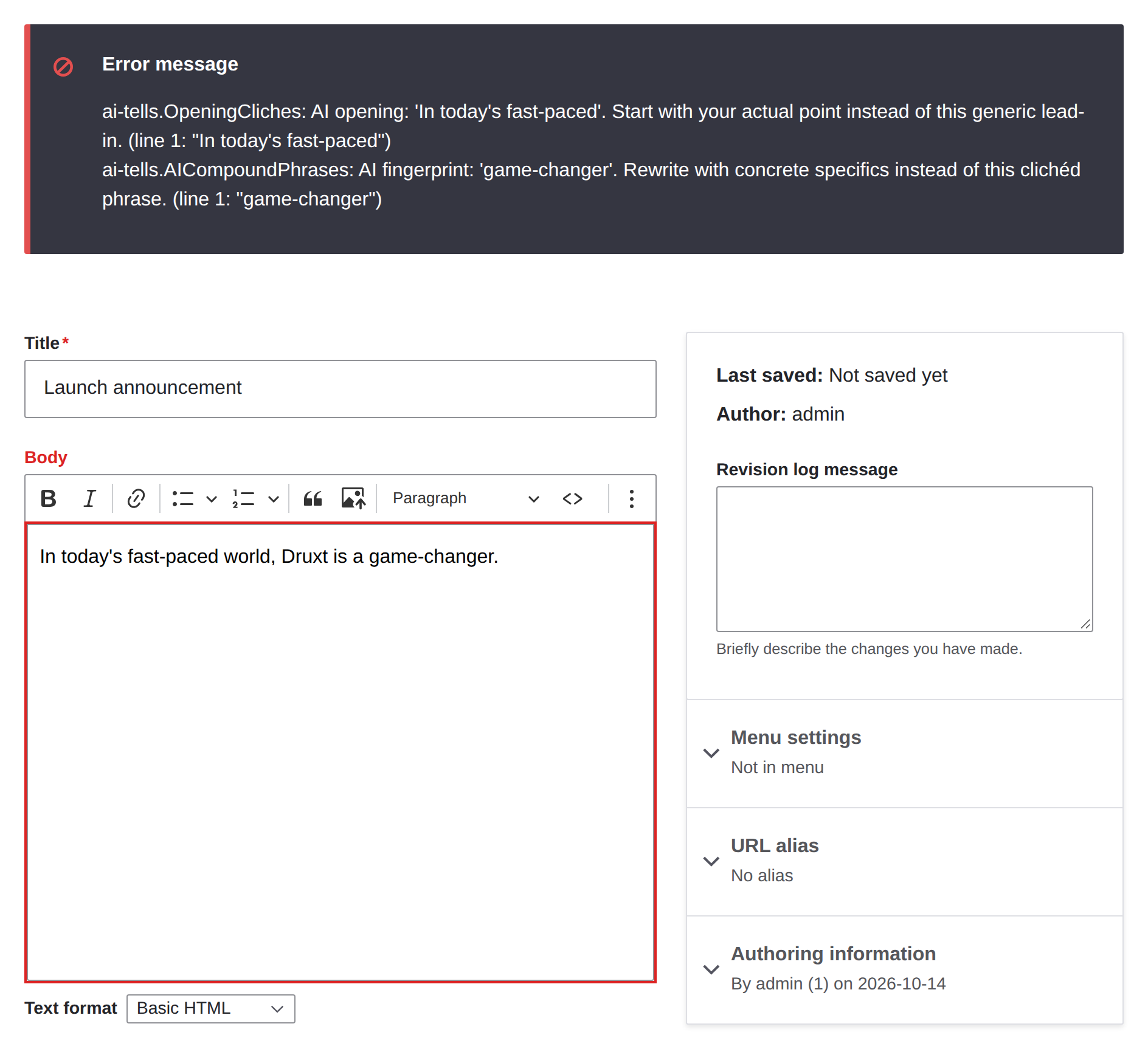
Features:
- Checks every save that validates: forms, JSON:API, REST and workspace publishing.
- Lists every error in a value at once, each starting with its field's label.
- Reads Markdown as Markdown and HTML as HTML, so code is not checked as prose.
- Per field: a minimum level, a level for any rule, and a profile that
.vale.inisections match. - Publish-only mode, so drafts save with their errors. It follows Content Moderation.
- Checks a workspace's changes before it is published, and can block the publish.
- A report of the alerts in stored content, with filters and a CSV export.
- Drush commands for CI:
vale:lintexits with 1 on an error. - A check endpoint that returns the alerts a save would give, for editors and frontends.
- Paragraphs: opted-in fields on paragraphs are checked, and publishing a page checks its paragraphs.
drush vale:installdownloads Vale and checks it against the release's checksum.
Requirements:
- PHP 8.3 or later
- Drupal 10.3, 11 or 12
- Vale 3 on every web server and in the CLI container, with the styles your
.vale.iniuses
Usage/Configuration:
Install Vale with drush vale:install, add a .vale.ini beside your web root, and run vale sync to download its styles. Point the site at both in settings.php:
$settings['vale_binary'] = $app_root . '/../bin/vale';
$settings['vale_config'] = $app_root . '/../.vale.ini';
Then turn on Check with Vale for each field you want checked.
Example: Structure > Content types > Basic page > Manage fields > Body > Prose checks
The README covers the site settings, permissions, the content report, Drush, JSON:API and the check endpoint.
Frequently Asked Questions:
-
Why are the paths in settings.php and not in the admin UI?
Vale's script rules run code, so a ruleset belongs in your codebase. The module never accepts a binary path or a ruleset through the site. -
Does it detect text written by AI?
No. It checks style. Some Vale styles flag phrases that AI tools overuse, and the module applies them like any other rule. -
What happens if Vale is missing, times out or fails?
Content saves, and the author is told it was not checked.drush vale:lintand workspace blocking fail instead, so an unchecked deploy does not pass. Setfail_closedto refuse the save too. -
Does it check Canvas pages?
No. Canvas keeps a page's text in component props, not in fields you can opt in. Node fields on a Drupal CMS site are checked, including node text that Canvas renders through a content template.
Project information
- Project categories: Content editing experience, Developer tools, Integrations
 10 sites report using this module
- Created by deciphered on , updated
 Stable releases for this project are covered by the security advisory policy.
Look for the shield icon below.

