Problem/Motivation
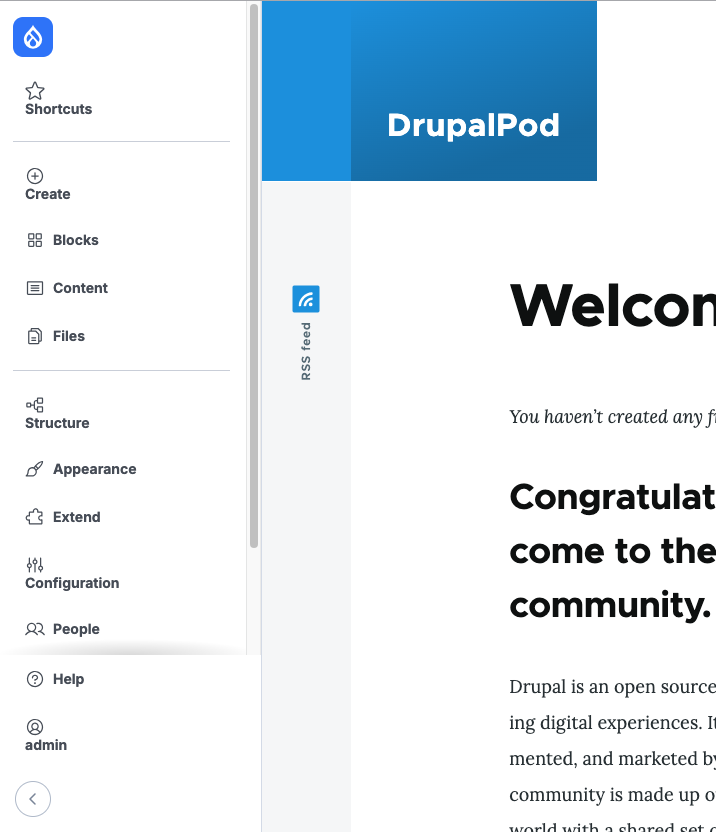
When using the new navigation bar, everything looks ok in the admin theme (claro or gin for example), but when the navigation bar is viewed with the front/public theme, and these theme has very simple styles for button, then the navigation links and icons start looking weird and out of place.
Steps to reproduce
Create a super basic front theme that has a different display for the button element, for example:
button {
  display: inline-block;
}
Then, when you view the navigation bar, it looks like this (username removed from the screenshot):

But, it should look like this:

Proposed resolution
In this thread https://drupal.slack.com/archives/C7AB68LJV/p1731068262842939, we talked about some options.
It seems that the most sensible for this case was:
Mike Herchel: IMO the solution for this is either web components or a proper CSS reset like we do within the off-canvas tray
Remaining tasks
Implement a CSS reset for navigation elements that can be shown in the front-end.
User interface changes
It will look consistent when switching between the front theme and the admin theme.
Introduced terminology
-
API changes
-
Data model changes
-
Release notes snippet
-




Comments
Comment #2
saurav-drupal-dev commentedtried with logged in logged out but unable to reproduce please add more info on how to reproduce.
Comment #3
saurav-drupal-dev commentedComment #4
fjgarlin commentedDid you follow the steps I added to reproduce it, specially the one where the CSS of the
buttonelement is altered?Also, are you using just gin's toolbar or the new core navigation toolbar, which is what this issue is about?
Comment #5
fjgarlin commentedI could reproduce again with Olivero following the instructions in the issue summary, so I'm removing the tag.
See the attachment here https://www.drupal.org/files/issues/2024-11-12/Screenshot%202024-11-12%2...
Comment #6
finnsky commentedThere are many ways to break the navigation module. But on the other hand, the example you gave can break many other integrations
It violates at least two basic BEM rules:
1. Uses a tag as a selector
https://en.bem.info/methodology/css/#selectors
2. Adds external geometry to the block
https://en.bem.info/methodology/css/#external-geometry-and-positioning
The basic reset work was done here, but we are open to suggestions on how else we can preserve good components in the navigation. There are no web components in the core yet.
https://www.drupal.org/project/drupal/issues/3446357
Comment #7
fjgarlin commentedI think the main point that I'm trying to raise is that some basic styling from the front-theme is bleeding into the navigation bar and therefore affecting how it looks.
Not all themes (even heavily used Drupal ones) follow BEM rules.
Comment #8
m4oliveiClosing this one as a duplicate of #3511280: Front-end theme styles can bleed into Navigation. We've seen this recently on a handful of sites. There is some discussion in the issue about how to mitigate. Likely first step will be to mimic the way off-canvas dialog protects against style bleedthrough by shipping CSS with higher specificity in the navigation module.
Thanks all!
Comment #9
m4olivei