

Needs work
Project:
Drush
Version:
8.x-6.x-dev
Component:
Base system (internal API)
Priority:
Normal
Category:
Bug report
Assigned:
Unassigned
Reporter:
Created:
1 Jun 2024 at 18:11 UTC
Updated:
18 Mar 2026 at 03:16 UTC
Jump to comment: Most recent


Comments
Comment #2
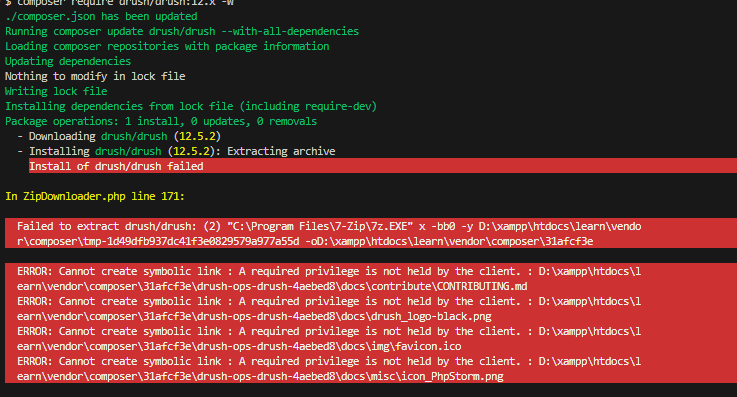
lic_moruaThe error message indicates that your current user does not have the requisite privileges to create symbolic links when inserting Drush with Composer. The lack of privileges could be due to your user account type, or you might be running the command prompt without administrative rights.
You could try running the operation as an administrator to overcome this error. Below are the steps:
If you're facing challenges with the manual installation of Drush and other elements of a Drupal development environment, you might consider using DDEV. DDEV is an open-source tool that uses Docker to build a pre-packaged environment containing everything you need for Drupal development.
With DDEV, you don't have to worry about setting up Apache, Nginx, PHP, MySQL, Solr, or other services. Plus, it comes with Drush and other useful tools preinstalled.
To install DDEV on your machine, follow the instructions in the official DDEV documentation (https://ddev.readthedocs.io/en/stable/).
Comment #3
lic_moruaComment #4
kumar ashutosh commentedthanks @GafgarionMorua
Works fine.
Comment #5
gawalin commentedI am also facing the same issue. I tried installing Drush by running Command Prompt as an administrator, but it didn’t work.
Is there a solution other than using DDEV?
Comment #6
kumar ashutosh commented@gawalin
Use Git Bash or Windows Powershell Run as administrator. It will work.
Comment #7
sk_10 commentedThe issue is still reproducible in Drupal 10.4.5 when running
composer require drush/drush ^12.I resolved it by following these steps:
extension=zipAfter this, the command worked successfully.
Thanks.