

Closed (fixed)
Project:
Navigation
Version:
1.x-dev
Component:
User interface
Priority:
Normal
Category:
Bug report
Assigned:
Unassigned
Reporter:
Created:
19 Mar 2024 at 19:06 UTC
Updated:
15 Apr 2024 at 12:29 UTC
Jump to comment: Most recent, Most recent file

 Show commands
 changes




Comments
Comment #3
tirupati_singh commentedComment #5
kostyashupenkoConfirmed described problem is really exist.
Because here https://git.drupalcode.org/project/navigation/-/blob/1.x/templates/top-b... we have "data-offset-top" attribute added no matter if top bar is rendering local_tasks or not.
And no matter if this block is hidden by some CSS rules or not -> core's displace() is still measuring height of this block https://git.drupalcode.org/project/drupal/-/blob/11.x/core/misc/displace... (you can google how jquery outerHeight() is working) and creating --drupal-displace-offset-top CSS property in style attribute of html tag. That's the reason why table header have top offset.
This issue requires 2 fixes:
1. first fix is already provided in MR - now we are not rendering "data-offset-top" attribute if no local_tasks in render.
2. and another fix should be done in core. I have created new ticket in core for Claro theme https://www.drupal.org/project/drupal/issues/3432298 which i have fixed already . Reason is simple - once i have kicked "data-offset-top" attribute - there is no anymore css property "--drupal-displace-offset-top" defined, which breaks stickiness of table header (read description of core task i have created to understand better)
Important note for reviewers
You have to apply patch from https://www.drupal.org/project/drupal/issues/3432298 also
Comment #7
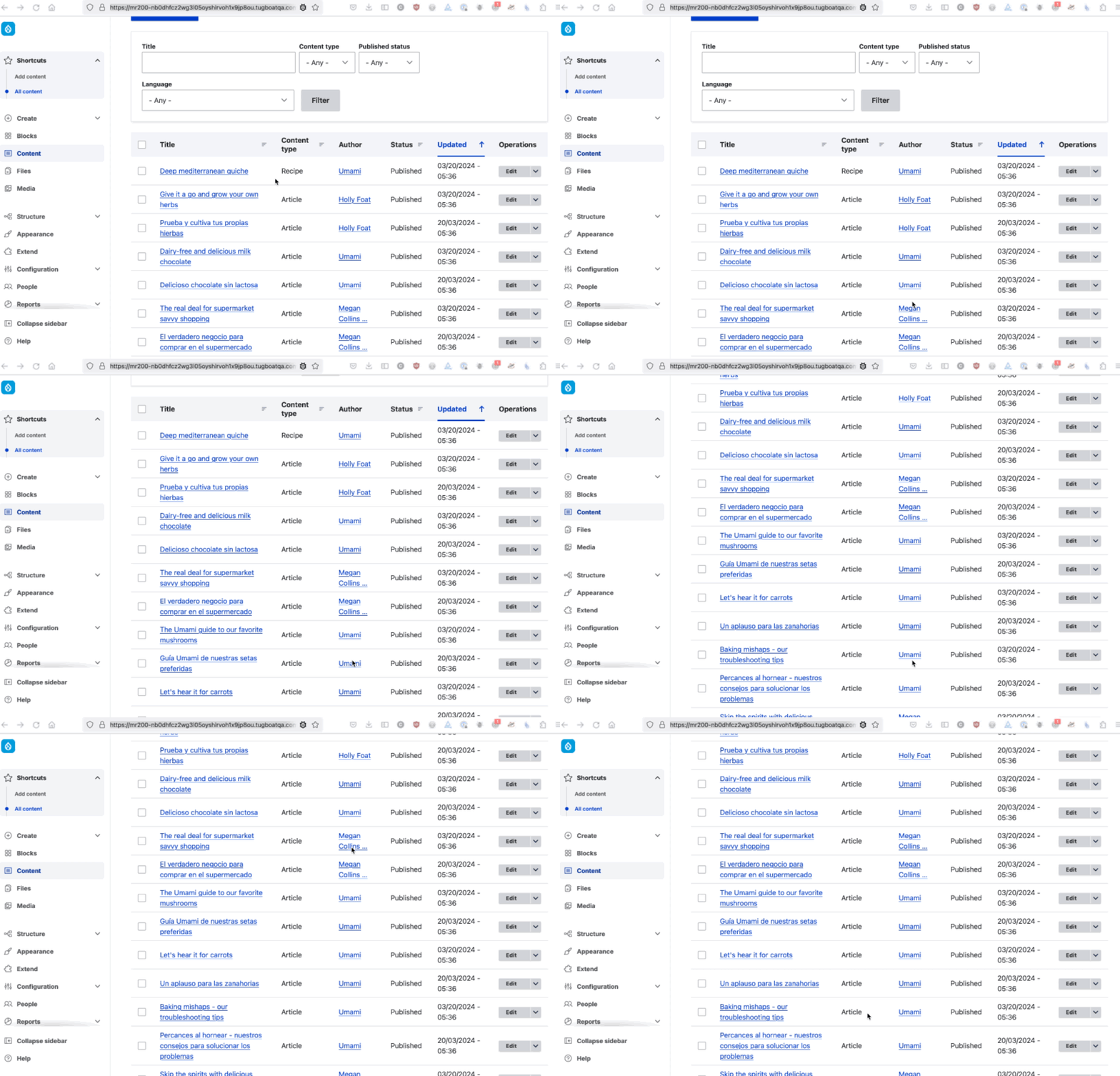
tirupati_singh commented@kostyashupenko, fixed the sticky header issue. Please review the MR! 201, attaching a screenshot for reference.
I've reviewed the MR! 200 the issue still exits. So, I've created new MR! 201.
Comment #8
finnsky commented@Tirupati_Singh it is usually bad practice to use !important in css.
Lot of articles about it. This is first found https://www.linkedin.com/pulse/using-important-css-generally-considered-...
Comment #9
tirupati_singh commented@finnsky, I've removed the !important css property.
Comment #10
rkollernice thank you! I've just manually retested with #3432298: Sticky table header is not sticky if --drupal-displace-offset-top is not defined and only MR200 for this issue applied (tested also with both MRs applied before the Claro issue went in) on a fresh install of 11.x-dev, the sticky headers both on
/admin/contentand/admin/people/permissionsare correctly shown without any offset sticking to the top of the page. I've also tested with MR201, visually the same effect, the sticky table header is shown without any offset.Comment #11
kostyashupenkoYes but resolving table problems should not be done in the scope of navigation module
Comment #12
tirupati_singh commented@kostyashupenko,
The changes made in the CSS property should be done in this module because if the Navigation module is enabled then only the top Navigation toolbar will be hidden and the sticky header issue will be there. If the changes done in CSS property should not be in the scope of Navigation module then other issue will be there in the active theme.
Comment #13
finnsky commented@Tirupati_Singh we had same disqussion in
https://www.drupal.org/project/navigation/issues/3402592
Module styles should only describe the module.
In other matters, such as the positioning of global elements on the page, we are guided by how the core works.
This is drupalDisplace.
Comment #14
kostyashupenko@Tirupati_Singh The displace functional described in core here https://git.drupalcode.org/project/drupal/-/blob/11.x/core/misc/displace... so no matter what we are building - module or theme, we should respect core displace functionality.
This task have 2 problems:
1. Table header in Claro theme (see https://www.drupal.org/project/drupal/issues/3432298 and btw this task is already fixed)
2. "data-offset-top" html attribute in Navigation module - was added always, but instead should be added when top bar is really rendered (this is what was fixed in 200 mr)
Please re-test it, because you said that 200 mr is not working in #7, but i think it should work
Comment #15
kanchan bhogade commentedHi
I've tested MR !201 on Drupal 10.2
The patch was applied successfully...
Adding files for the references
Comment #16
finnsky commented@Kanchan Bhogade could you please test 200 MR in current 11.x core context?
Comment #18
ckrinaHiding MR 201 as the approach to follow is the one in MR 200, as explained in #14and #16.
Thanks for the attempt with the alternative approach in 201, but the direction is defined in 200.
Comment #19
kanchan bhogade commentedHi @finnsky,
I've tested MR !200 on Drupal 11.x
ThePatch applied successfully...
Test Result:
The header is sticky at the top of the table
adding files for the reference
Comment #20
ckrinaSorry @kostyashupenko but I just tested 200 (FF and Chrome) and the header of the table doesn't stay sticky, so moving it back to NW.
Comment #24
joaopauloc.dev commentedHi folks.

Nice work here, this module will increase a lot the usability of Drupal admin UI.
I found this issue because @rkoller mentioned this one in another issue.
Fixed the typo and works fine. See the image below.
Comment #27
ckrinaThanks for the catch @joaopauloc.dev! Then I guess this MR only needs to be updated with the latest changes to be tested&merged. Moving to Needs Work to give some visibility to it.
Comment #28
joaopauloc.dev commentedmerge requested updated with the latest changes in 1.x branch.
Comment #29
ckrinaThanks again @joaopauloc.dev! I can't see it working as in your GIF now. I wonder if it has something to do with the new drawer that we just merged?
Comment #30
rkolleri've applied the MR200 to the navigation module with latest changes in including the drawer issue, and in my case sticky is working
Comment #33
joaopauloc.dev commentedIt's working for me too.

Try to clear the browser cache since we have CSS files changed.
Comment #34
ckrinaSorry I messed up with the commits 🤦♀️
Anyway, I checked it locally too with FF and Chrome and I still can't see it working. I've pushed the changes from 1.x (in the wrong way), but the Tugboat link is working now. Do you see it working there? Or I am missing something?
Comment #35
javitan commentedThe changes of the branch didn't work for me, so I overridden the CSS value to useWrong patch, sorry, this is to fix Claro theme.top: 0instead. This is working for Drupal 10.2.4.Comment #36
javitan commentedComment #37
joaopauloc.dev commented@ckrina the current link on the Tugboat at the moment that I'm accessing is redirecting to another website.
Comment #39
kostyashupenkoLet's test it with Drupal starting from version 10.2.x-dev or above https://git.drupalcode.org/project/drupal/-/blob/10.2.x/core/themes/clar...
On <= 10.2.4 MR in this ticket will not work with Claro admin theme
Comment #40
kostyashupenkoHere is screenshot from 10.3.0-dev
Comment #41
ckrinaGood catch @kostyashupenko! Now we know why we were seeing different things :)
I've tested it locally with 10.3 and works, so setting the auto-merge for when the checks are ready. Thanks!
Comment #42
ckrinaAdded credits.