

 Come together with the global Drupal community in Rotterdam, 28 Sept – 1 Oct 2026. Sessions, contribution, connection, and Early Bird savings until 8 June.
Problem/Motivation
Here's an interesting one!
I have many 'pages' that use a left-hand Table of Contents (Toc) and which are made up of two-level (i.e. nested) Paragraphs (Paragraphs module) and that seems to be causing trouble when using Front End Editing.
Let me explain with illustrations...
Setting the scene
Here is an example of such a page where LEARN is a top level Paragraph and:
- Primary keys (2)
- ALTER TABLE (3)
- AUTO_INCREMENT (4)
...are nested Paragraphs

Hover
When I hover over any of these Paragraphs on the main page, I get the expected behaviour...
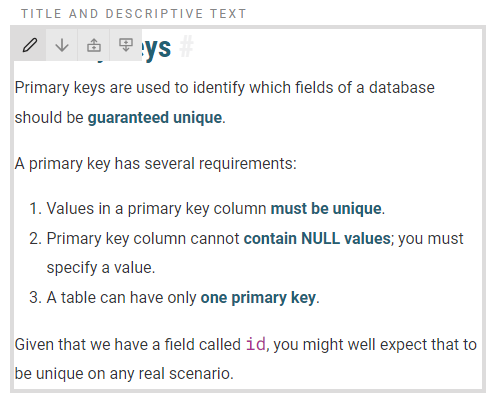
Performing the off-canvas edit
I can perform the off-canvas edit as expected...

But as soon as I save and the main page refreshes, all of the embedded Paragraphs collapse to nothing! ...

There does not seem to be anything page-specific about this; it happens on all pages, all of the time.
Can anyone suggest any thing to try to attempt to debug what's going here?
I am happy to spend the time trying this all out on a clean Drupal 10 site but I thought I would juts throw the question out there to see if it chimes with anyone else.
Thanks
Issue fork frontend_editing-3427666
 Show commands
Start within a Git clone of the project using the version control instructions.
Or, if you do not have SSH keys set up on git.drupalcode.org:
 changes




Comments
Comment #2
sirclickalotComment #3
a.dmitriiev commentedAre you using web-components in those nested paragraphs that are rendered with Javascript? Is there any html markup at all for the collapsed paragraphs? Could you please send the screenshot of the developer console ("Inspect") from the browser for this collapsed paragraphs?
Comment #4
sirclickalotI'm not entirely sure what you mean in this context in relation to web-components - the embedded Paragraphs are really just Entity references to internal nodes that are rendered in a particular view mode that makes them look right when embedded.
Here is the screenshot again after the off-canvas editing but this time using v1.60 of the module so cosmetically a little different...
You are quire right, there is some other JavaScript at play here - the excellent Paragraphs Table of Contents (
ptoc) module (https://www.drupal.org/project/ptoc) which creates a separate block containing anchors to each Paragraphs on the page and then wraps' each paragraph in a <div> with anIDright above where each Paragraph normally lives on the page.This might be a bit long-winded but let me first show you the actual markup taken from the browser inspector and at the bottom you can see where the actual Paragraph should have been rendered but it has disappeared.
You can see the Paragraphs Table of Contents module doing it's job at
LINE 6by wrapping the affair in a <div> with aid='para...'....<div class="frontend-editing paragraph paragraph--type--text paragraph--view-mode--default" id="paragraph-6013">the actual inspector output
The
ptocmodule 'knows' where Paragraphs should be an correctly inserts the <div> with theidbut the actual Paragraph is a gonna! and all that exists in the Front End Editing wrapper :-( ...The markup of the entire embedded Paragraphs is omitted.
Comment #5
a.dmitriiev commentedTry to exclude that field from being wrapped with frontend editing, there is a setting here `/admin/config/frontend-editing/ui-settings` "Do not modify the following fields for ajax content update:". You will need to add something like this `paragraph.
.field_content`.
I think this TOC module relies on some structure of the markup that is now broken with frontend editing, and it is also only for editors.
Comment #6
sirclickalotI notice that the guidance says to use the pattern...
entity_type.bundle.field_nameNot the sort of JQuery-esque pattern I'm used to using in situations like these?
So I have gone for various different attempts like these - the first for the outmost (enclosing) Paragraph and the second for the first of the (enclosed) inner ones ...
But nothing seems to make any difference.
Comment #7
a.dmitriiev commentedBundle is not
paragraph--type--sections, it is justsections, so you need to add to that settingparagraph.sections.<field_name_here>. From your markup it seems that your machine name of the field isfield_content, so tryparagraph.sections.field_contentComment #8
sirclickalotAh, I see now!
The
.doesn't mean 'class'.Might I make the suggestion to use a pipe (|) instead to avoid the confusion?
I've been able to make the editing of the page work now by adding the following exemptions...
However, as you can see, I have ended up having to include every type of paragraph on the page which essentially takes me back to same behaviour as when disabling the whole AJAX feature.
Plus, we have 50 different Paragraphs in our build, many of which work alongside the Paragraphs Table of Content module.
I suppose this begs the question, what should I look into next here in order to try to uncover quite what is that might be causing difficulty for the Paragraphs Table of Contents module?
Comment #9
a.dmitriiev commentedparagraph.sections.field_contentthis is the machine name of the field config, how it is stored in Drupal. So I think this is more common than a pipe.It seems that the Paragraphs Table of Contents module is very sensitive to markup. So if it is possible, please write down what module are you using for that and what version, so that it is possible to reproduce this. Maybe there will be need to change your theme templates, so that the markup fits both frontend editing and table of contents module.
Comment #10
sirclickalotSure.
I am using the latest version of the 'ptoc' module...
As far as I can see, templates supplied as part of module only have a part to play in the shaping of the actual ToC block whihc is not where the problem lies.
I've got to be honest, I've never really understood quite how this module does what it does but I think the magic lies withing the
ptoc_preprocess_paragraphfunction in theptoc.modulecode which alters the various paragraphs on the main page.Comment #11
a.dmitriiev commentedIs this issue now fixed? Taking into account that this issue is fixed now https://www.drupal.org/project/frontend_editing/issues/3428005 ?
Comment #12
a.dmitriiev commentedComment #13
sirclickalotI am testing 1.63 today and I don't see this is 'fixed' as per the release note.
The behaviour is different for sure but certainly not fixed ;-)
Here is a step-by-step illustration...
1) I edit the Paragraph via the FEE link...
2) I save in the FEE off-canvas popup...
3) The RESULT
The result of the AJAX re-draw is to re-draw each of the paragraphs using the
ptocDisplay mode which is not correct...The
ptocDisplay mode is the one responsible for fashioning the ToC (in my case in the sidebar) not the main page paragraphs.Comment #14
a.dmitriiev commentedOk, it seems that it happens, because you have the same paragraphs rendered on the same page in 2 different view modes.
This was not part of 1.6.3 and was not mentioned in release notes. I will check this again.
Comment #15
sirclickalotMy apologies @a.dmitriiev you are quite correct, it was not mentioned in the release notes, I was ahead of myself!
Comment #17
a.dmitriiev commentedI have checked this issue again. Before the view mode of the field was not taken into account. Now everywhere where content is updated automatically the view mode is respected. So, if like in your case, there is the same paragraph on the same page rendered in different view modes, the update will replace the paragraph with the view mode that was edited or moved up/down.
Please check MR
Comment #18
sirclickalotI have installed the DEV module but it has made no difference at all; I am still seeing the wrong (the
.ptocview mode on the main page.Comment #19
sirclickalotI can confirm that the MR completely fixes the remaining problems with the Paragraphs Table of Contents module.
The net result of all this back and forth dialogue is a vastly improved content editor experience; a subtlety-presented yet fast and extremely powerful addition to our not-for-profit educational project...
A very good experience collaborating with the 1xINTERNET team!
Comment #20
a.dmitriiev commented