
Submodules
Tagify module incorporates the following submodules designed to elevate user interaction and experience with the Tagify component:
👥 Tagify User List
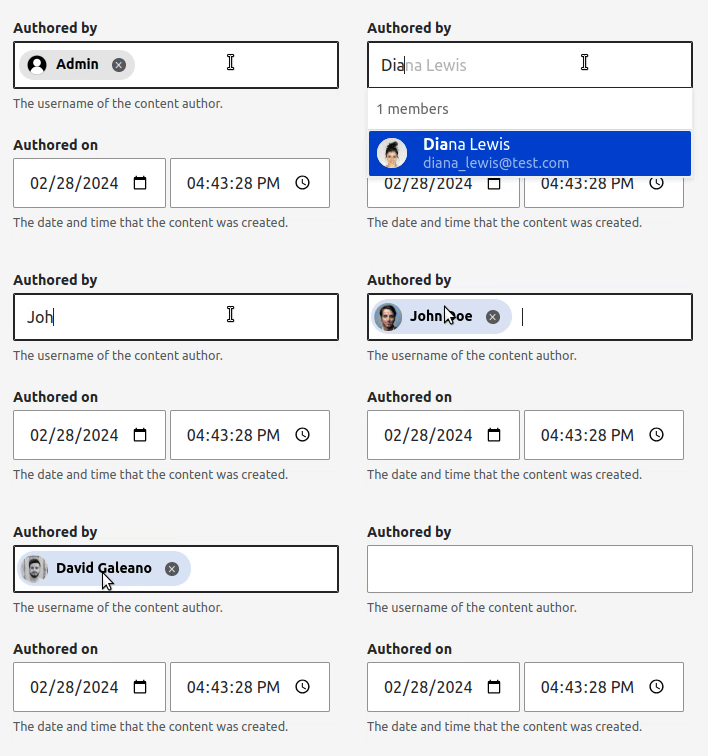
Tagify User List module enhances the display of user reference fields by using the Tagify User List widget. It transforms the user reference fields into a beautiful, user-friendly list, making it easier to manage and view.
Installation
Option 1
Via Drush:
drush en tagify_user_listOption 2
Via Admin UI:
- As admin user, go to
/admin/modules - Filter by Tagify User List and install the module.
🔎 Tagify User List Preview
Example of entity reference field user type using the Tagify User List widget.
🔢 Tagify Facets
Tagify Facets module integrates Tagify component with Facets module by using the Tagify Facets widget. It transforms the Facets into a beautiful, user-friendly list, making it easier to manage and view.
Installation
Option 1
Via Drush:
drush en tagify_facetsOption 2
Via Admin UI:
- As admin user, go to
/admin/modules - Filter by Tagify Facets and install the module.
🔎 Tagify Facets Preview
Example of Facets using the Tagify Facets widget.

⭐ Tagify Iconify Icons (it will be deprecated on Drupal 11.1 or higher)
Tagify Iconify Icons module provides an alteration to generate Iconify Icons based on icon name.
Installation
Option 1
Via Drush:
drush en tagify_iconify_iconsOption 2
Via Admin UI:
- As admin user, go to
/admin/modules - Filter by Tagify Iconify Icons and install the module.
🔎 Tagify Iconify Icons Preview
Example of Tagify widget using Iconify Icons info label.
Token added to info label: [term:field_icon:icon]

🚀 Tagify Icons
Tagify Icons module provides an alteration to generate Icons based on icon name. It is coming from the new Icon management API included on Drupal 11.1. See: https://www.drupal.org/node/3490350.
Installation
Option 1
Via Drush:
drush en tagify_iconsOption 2
Via Admin UI:
- As admin user, go to
/admin/modules - Filter by Tagify Icons and install the module.
🔎 Tagify Iconify Icons Preview
Example of Tagify widget using icons info label.
Token added to info label: [term:field_icon:target_id]
This token will be provided by UI Icons Field module.
Help improve this page
You can:
- Log in, click Edit, and edit this page
- Log in, click Discuss, update the Page status value, and suggest an improvement
- Log in and create a Documentation issue with your suggestion

