Problem/Motivation

  • All content should be contained within landmark roles
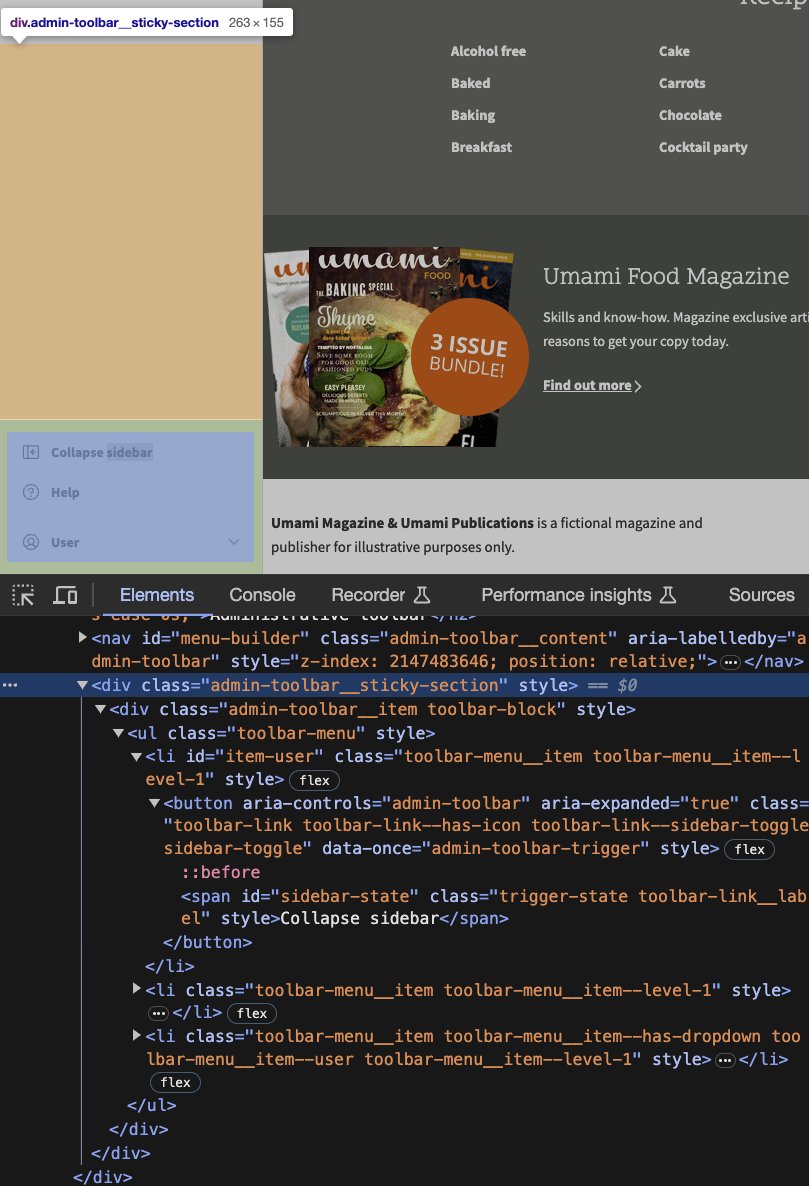
  • The sticky toolbar menu is a navigation menu, so it should live within a Navigation Landmark

Steps to reproduce

  1. Go to site to see sidebar navigation
  2. Inspect the page and search for CSS class admin-toolbar__sticky-section
  3. Verify that the menu contains a "ul" element, but it’s not contained within a "nav" element

Code snippet

<div class="admin-toolbar__sticky-section" style="">
  <div class="admin-toolbar__item toolbar-block" style="">
    <ul class="toolbar-menu" style="">

Screenshot

https://www.drupal.org/files/issues/2023-10-20/sticky-nav.png

Proposed resolution

  1. Change sticky toolbar menu from "div" to "nav" element
  2. Add "h2" heading with id
  3. Add aria-labelledby attribute to "nav" element
<nav class="admin-toolbar__sticky-section" style="" aria-labelledby=”toolbar-menu”>
  <div class="admin-toolbar__item toolbar-block" style="">
    <h2 id=””>Toolbar Menu</h2>
    <ul class="toolbar-menu" style="">

Issue fork navigation-3395708

Command icon Show commands

Start within a Git clone of the project using the version control instructions.

Or, if you do not have SSH keys set up on git.drupalcode.org:

Comments

katannshaw created an issue. See original summary.

katannshaw’s picture

Issue summary: View changes
StatusFileSize
new300.83 KB
katannshaw’s picture

Issue summary: View changes

kostyashupenko made their first commit to this issue’s fork.

kostyashupenko’s picture

Status: Active » Needs review
StatusFileSize
new52.66 KB

test

ckrina’s picture

Status: Needs review » Needs work

The name of the region has changed after merging #3395813: Rename bottom region to sticky, so this needs to be rebased.

kostyashupenko’s picture

Status: Needs work » Needs review
ckrina’s picture

Status: Needs review » Fixed

That was fast, thank you!

Status: Fixed » Closed (fixed)

Automatically closed - issue fixed for 2 weeks with no activity.