

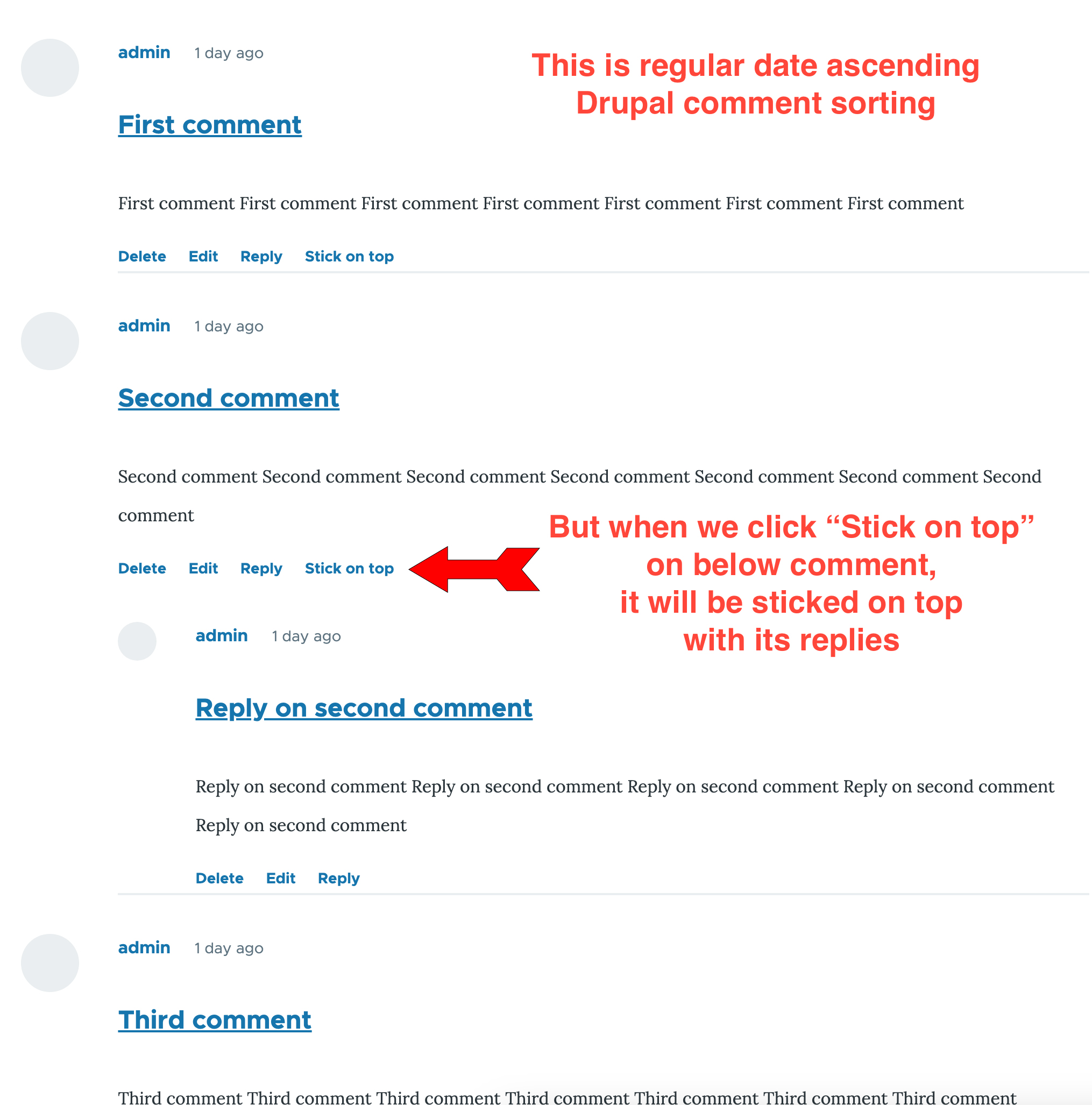


The Comment on top module enables users to pin their preferred comment in a node to the top, where it will be displayed alongside its replies.
Features
Drupal's default sorting of comments is by date ascending, but with this module, you can extract one comment with its replies and stick it on top. It alters comment links and adds the button "Stick on top" under every comment that is not reply.
So if you want to stand out with your favorite comment above all others, this module is for you.
Version 2 is available now!
Now more liked comment can be automatically sticked on top.
Post-Installation version 1
The module is based on the Views block, which means that the default query display comments must be disabled.
So you need to follow the steps below. Or take a look at this video https://www.youtube.com/watch?v=_ffaI9N5B8U
After module installation, you'll get a new View block called "Comments with one sticked on top".
So you need to put it in the right place:
- Go to /admin/structure/block and in region "Content" click on the "Place block" button.
- Select block "Comments with one sticked on top", uncheck "Display title" and save it.
- If block is not placed under "Main page content", use drag'n'drop to move it under.
The next step is to disable the default query comment display, otherwise, you'll have doubled comments:
- Go to EVERY Content type where you have the Comment type field here /admin/structure/types/. In most cases, it will be an Article content type.
- Click on Article "Manage fields" and go to the tab "Manage display".
- Use drag'n'drop to move the "Comments" field under where the "Disabled" fields are, and save it.
- Repeat the last three steps for EVERY content type where you have Comments.
Setting permissions and using module:
- Set permissions for roles that have access to Stick comments on top, by checking it here admin/people/permissions/module/comment_on_top.
- Finally, go to the node where you have comments, for example /node/1.
If you are logged in as a user who has the role to Stick comment on top, you will now get the "Stick on top" button under every comment that is not a reply.
- When you click on "Stick on top" on a favorite comment, page will refresh, and that comment with its replies will be on top.
- If you want to change your favorite comment for that node, what will be on top, just click the below comment "Stick on top", and it will replace the current Comment on top.
- If you want default sorting, just click on the top comment "Remove from top".
Post-Installation version 2
If you want the most liked comment to be sticked to the top, there is a submodule called 'Comment on Top by Likes', which also needs to be enabled.
Also you need to follow all above from Post-Installation version 1 because version 2 require all configuration from first version.
This module doesn't have special configuration.
Firstly, you need to install and configure Like/Dislike module.
That means adding field_like_dislike in Comment fields .
That gives Like and Dislike buttons on every comment.
The submodule Comment on top by likes calculates the most liked comment by subtracting dislikes from likes and sticks it to top.
There are two ways to select nodes where most liked comment will be sticked on top:
- Checkbox "Stick on top by likes" in node create/edit form under Comment settings;
- In /admin/config/system/content-type-comment-on-top-by-likes-settings you can choose content types where all nodes will have comments sticked on top by likes;
Requirements for version 2
If you use submodule Comment on top by likes, you need contribute module Like/Dislike
Uninstallation version 1
To uninstall Comment on top module and return all to default, please follow the below steps.
Or take a look at the video from this time https://youtu.be/_ffaI9N5B8U?t=293
Remove block "Comments with one sticked on top"
- Go to /admin/structure/block/ and under the "Content" region, there is a "Comments with one sticked on top" block.
- Click on the down arrow near Configure on that block and click "Remove". Confirm the removal in the pop-up window.
Remove the Stick on top field from Comment type:
- Go to /admin/structure/comment/ and click on "Manage fields".
- On "Stick on top" field, click on the down arrow near Edit and click on Delete.
- Confirm deletion in the pop-up window.
Uninstall Comment on top module:
- Go to /admin/modules/uninstall to uninstall the module.
- From all modules, check "Comment on top" and click the Uninstall button. Confirm it on the next screen.
Returning the default query, displaying comments:
- Go to EVERY Content type where you disabled the Comment type field here /admin/structure/types/.
- For example, click on Article "Manage fields" and go to the tab "Manage display".
- Use drag'n'drop to move the "Comments" field above the "Disabled" fields to enable it and save it.
- Repeat last three steps for EVERY content type where you have Comments.
Uninstallation version 2
Comment on top by likes uninstall as every other module. Go to /admin/modules/uninstall to uninstall the module.
Then you need to proceed with all steps above from Uninstallation version 1.
Similar projects
Best reply and Comments order are similar but they can't stick comment to top.
Setting up on Drupal minimal installation or without comment type
Please take a steps described here.
Project information
 Minimally maintained
Maintainers monitor issues, but fast responses are not guaranteed.- Project categories: Content editing experience
 2 sites report using this module
- Created by drale01 on , updated
 Stable releases for this project are covered by the security advisory policy.
Look for the shield icon below.


