

Closed (works as designed)
Project:
Commerce Kickstart
Version:
3.x-dev
Component:
Code
Priority:
Major
Category:
Bug report
Assigned:
Unassigned
Reporter:
Created:
12 Aug 2023 at 12:59 UTC
Updated:
8 Nov 2023 at 07:40 UTC
Jump to comment: Most recent, Most recent file



Comments
Comment #2
manav commentedComment #3
keshavv commented@manav You can remove the patch as module Bootstrap Basic Image Gallery already released for Drupal 10.
Comment #4
webengr commentedApologies but something in this procedure is NOT working.
Unable to try the 3.0 kickstart demo.
Maybe go to github and download and edit the json?
don't use 1.5 but "drupal/bootstrap_basic_image_gallery": "^1.6"
and don't patch???
This issue is more than a month old.
Comment #5
jsacksick commentedI just reviewed this, Kickstart installs properly for me. And we do need the patch as there was no 1.7 version release so it's still needed for the 1.6 version.
Also this issue belongs to the wrong project.
Comment #6
jasonmacer commentedI am getting this issue as well.
I am attempting to install Commerce Kickstart from scratch using the following commands:
$ composer create-project -s dev centarro/commerce-kickstart-project portal4 --ignore-platform-req=php <-- ignore is due to square/square having a php requirement of up to 8.2 and i'm running 8.2.12 -->
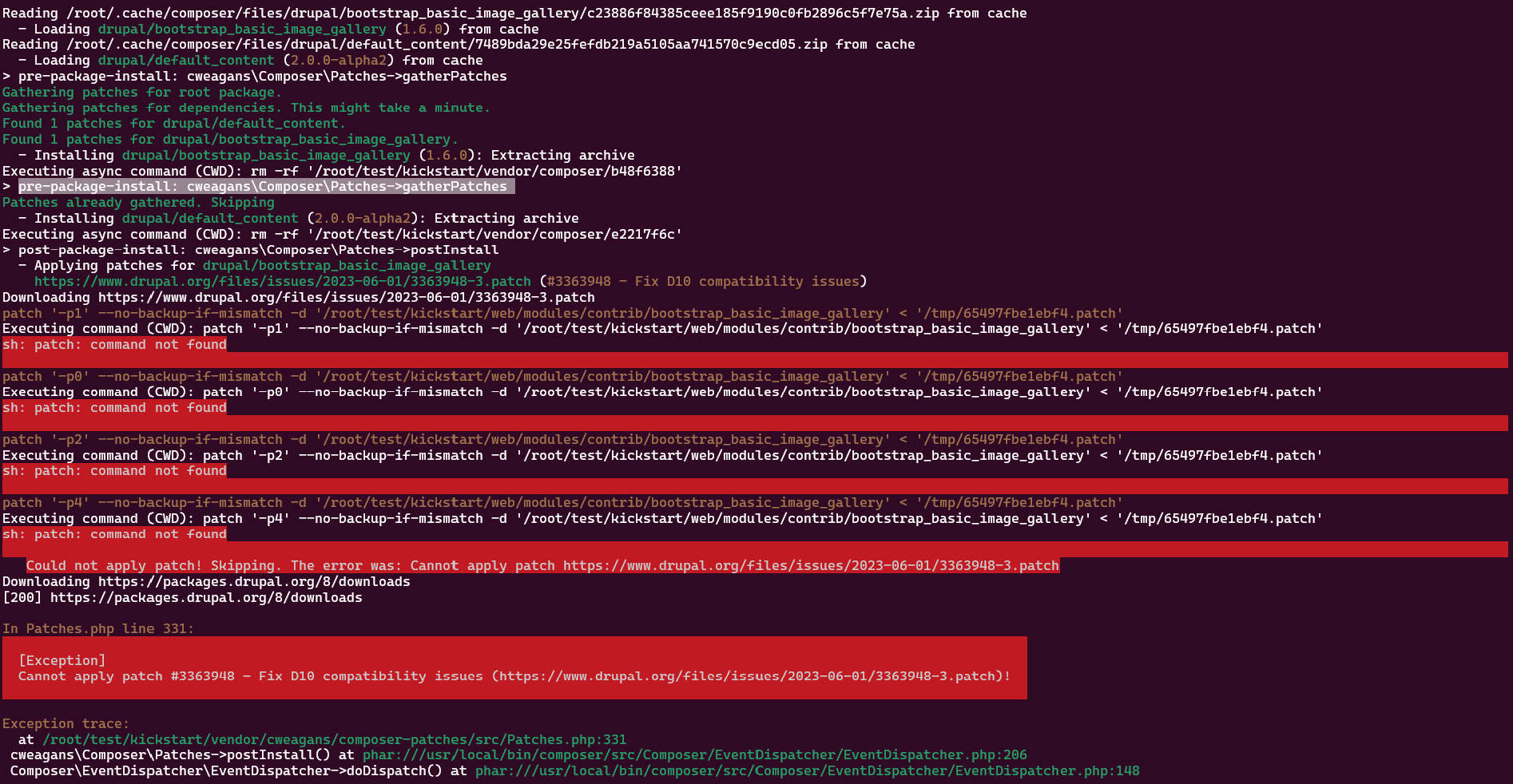
it starts the install and at the end of this I receive the following error for "Applying patches for drupal/bootstrap_basic_image_gallery"
Could not apply patch! Skipping. The error was: cannot apply patch https://www.drupal.org/files/issues/2023-06-01/3363948-3.patch in pathces.php line 331: cannot apply patch #3363948 - Fix D10 compatibility issues ...
$ cd portal4
$ composer require drupal/commerce_demo:^3.0 --ignore-platform-req=php <-- same reason as above -->
it starts the install and again at the end i get the same error as above stating it cannot install the patch.
Then when i visit domain.com/portal4/web/ i only get the file listing when I then try to go to domain.com/portal4/web/core/install.php i get a 500 error.
When i compare a default drupal composer install to the kickstart one, there seems to be quite a few files missing and I have a feeling it is due to the error not applying the patch and killing the install. OR am i missing something here?
Comment #7
stizzi commentedIf the error occurs on an Oracle Linux (8) (and Fedora?), one possibility for the error could be this.
Try this in project folder:
Run
composer install -vvvLook for:
sh: patch: command not foundIf the error message can be confirmed...
Run
dnf install --assumeyes --quiet patchI don't know if
--assumeyes --quietare necessary, I don't know anything about this OS, but I would think they can be dispensed with, but it works with them anyway. The problem is not on Ubuntu, but may be other distros are missing this "patch installation".Comment #8
jasonmacer commented@Stizzi is correct, and his suggestion did correct the issue. By running
sudo dnf install -y patchthe issue was resolved and I was able to run both commands.Now i'm just working to resolve the issue of a timeout!
Thank you @Stizzi.
Comment #9
jasonmacer commentedFor some reason it did not do the update for the "reviewed & tested by the community" on my last comment.
To reiterate, the installation of the patch (at least on fedora based systems) resolves the issues.
Jason
Comment #10
jsacksick commented