Problem/Motivation
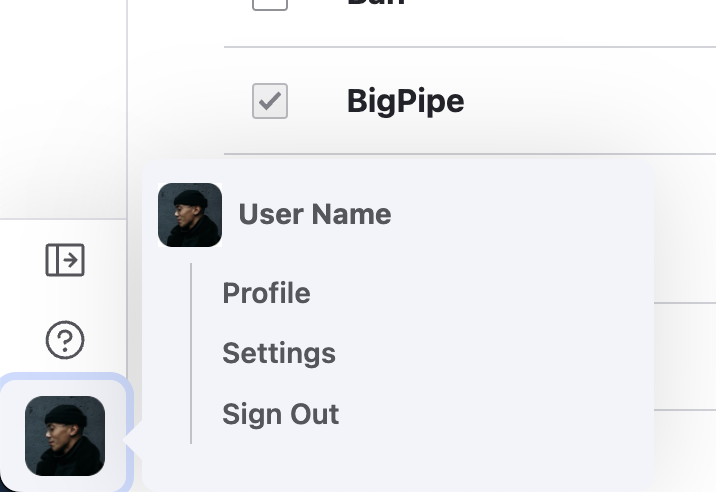
The flyouts are not currently centred to their parent, as shown in designs. They are flowing either from the top/down or top/up, depending on if the parent link is in the upper or lower half of the viewport.
Steps to reproduce
Observe the positioning of the "content" flyout compared to the user flyout. One flows down and one flows up.

Proposed resolution
As a general rule, position the flyouts in the centre of the parent link as seen in designs. Add some javascript to listen if the submenu will flow offscreen. If so, re-position the flyout so it's always visible.


 Show commands
 changes




Comments
Comment #2
claireristow commentedComment #3
claireristow commentedComment #4
claireristow commentedComment #5
claireristow commented@mherchel suggested using the Floating UI library which should be in core when the Splitbutton issue is merged. Since it's not in core yet, we can add the library to this module and use it for the placement of the flyout menus.
Comment #7
utkarsh_33 commentedComment #9
utkarsh_33 commentedComment #10
utkarsh_33 commentedComment #11
mherchelThanks for the work on this. There are several things wrong.
floating-ui.dom.umd.js?v=10.1.1:157 Uncaught (in promise) TypeError: Cannot read properties of null (reading 'getBoundingClientRect')Comment #12
utkarsh_33 commentedI have addressed some of the feedbacks mentioned in #11.I think we need to handle flyout's position using some css.For now i have removed the offset used in the floating UI library which solves the problem of flyout closing quickly.
Comment #13
claireristow commentedThanks for addressing that feedback @Utkarsh_33!
I just took a look and I'm seeing the following two bugs:
Comment #14
hooroomooworking on this
Comment #15
hooroomooFlyout menus are vertically centered now and addressed the two bugs in comment #13.
Comment #16
utkarsh_33 commentedAttaching the screen shots demonstrating that the arrow element is attached to the flyouts.
Comment #17
utkarsh_33 commentedComment #18
utkarsh_33 commentedComment #19
hooroomooComment #20
claireristow commentedHi @hooroomoo, thanks for your work on this. It's looking great!
I'm just seeing one more bug. When you hover over the user menu (see screenshot), there is some funky formatting and the flyout is showing in the middle of the screen.
Comment #21
hooroomoo#20 should be fixed now
Comment #22
mherchelThis is looking really good! Setting to RTBC because the goal of this is testing. A couple notes
Excellent work. Than you!
Comment #23
mherchelSetting credits
Comment #26
ckrinaMerged this so the improvements can used on the testing and the missing parts and @todos can be worked in follow-ups with smaller MRs.