Problem/Motivation
If you have a required "Number" field in your webform, when you make a submission using the webform_rest_submit resource (/webform_rest/submit) and pass the integer 0 as the value of that field in the payload, you will get a "field is required" error.
Actually zero (0) should be an allowed value, even for required numeric fields. It works if you input a zero in the numeric field when submitting the webform from the Drupal interface (the numeric inputted value is formatted as a string ("0") at some point of the form submission process, what is interpreted as a valid non-empty value, see below). But, when using the REST resource and an integer (0) or double (0.0), it fails.
The problem occurs because the following evaluation made in WebformSubmissionConditionsValidator::validateFormElement() only admits the string "0" as a non-empty value, whereas any other format for a number (integer, double) will not pass the empty() validation, then WebformElementHelper::setRequiredError() will be called.
$is_empty = (empty($value) && $value !== '0');
$is_default_input_mask = (TextBase::isDefaultInputMask($element, $value));

// If required and empty then set required error.
if ($is_empty || $is_default_input_mask) {
  WebformElementHelper::setRequiredError($element, $form_state);
}
See: https://git.drupalcode.org/project/webform/-/blob/6.1.4/src/WebformSubmi...
Of course I do not want to force all the API consumers to always format these numbers as a string. The handling must be in the backend.
Steps to reproduce
Make a POST request to the endpoint /webform_rest/submit setting the integer zero to a numeric field in the payload:
{
  "webform_id": "your_webform_id",
  "some_text_field": "Lorem Ipsum",
  "some_number_field": 0,
}
Result:
{
    "message": "Submitted Data contains validation errors.",
    "error": {
        "some_number_field": "Your ABC field is required."
    }
}
Proposed resolution
There could be 3 options:
- Check the submitted values for the webform "Number" fields in the data received in
Drupal\webform_rest\Plugin\rest\resource\WebformSubmitResource::post(), before the data is sent to validation. If an empty numeric value is detected, convert the value to a string
- Change the logic in the method
WebformSubmissionConditionsValidator::validateFormElement() in the Webform module. But I think it's serving its overall purpose well. Not only number fields are being evaluated there and number fields submitted from the Drupal webform UI are not falling into this issue
- Force all API consumers to format the numbers as strings


Comments
Comment #2
camilo.escobar commentedComment #3
camilo.escobar commentedComment #4
camilo.escobar commentedComment #5
camilo.escobar commentedComment #6
nsalves commentedHey camilo,escober, thanks for the feedback
I'm trying to replicate the issue you mentioned and using the newest dev version I'm not able.
I guess the change made in #3165659 fixed the issue
Comment #7
nsalves commentedComment #8
camilo.escobar commentedI had to update the module to version 4.2.0 (using Core 10.4.3) and encountered the same issue.
In my project, the patch is still necessary, so I rerolled it for Core 10.4.
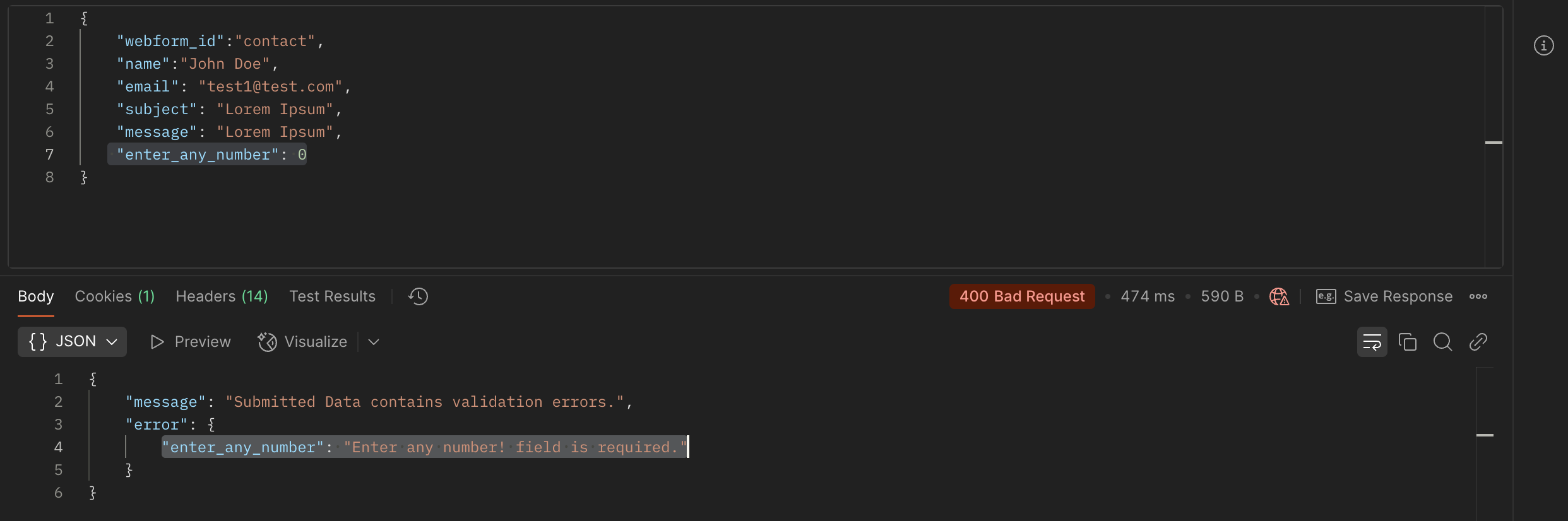
@nsalves, here are more evidences of the issue:
Passing
0as an integer in theenter_any_numberfield returns a validation errorPassing
"0"as a string is supported and works finePassing other numbers as integers (even negative numbers) works well (it only fails for
0, as shown in the case 1)A better solution should likely be implemented within the validation handlers of the Webform module. However, for now, I am using the same approach: converting numeric values to strings before they pass through Webform's validation and submission process.