

 The 2026 Drupal Business Survey is open. Your response will help shape the future of the Drupal business ecosystem.
Raison d'être
We're wanting to run Drupal 11 or Drupal 10 with both Ckeditor5 and ckeditor4 and we want to do so without losing ckeditor4 functionality such as codemirror markup (we love codemirror!).
This project was originally forked from ckeditor_codemirror, to be complementary to ckeditor_codemirror for ckeditor 5.
Screenshot of codemirror in action:
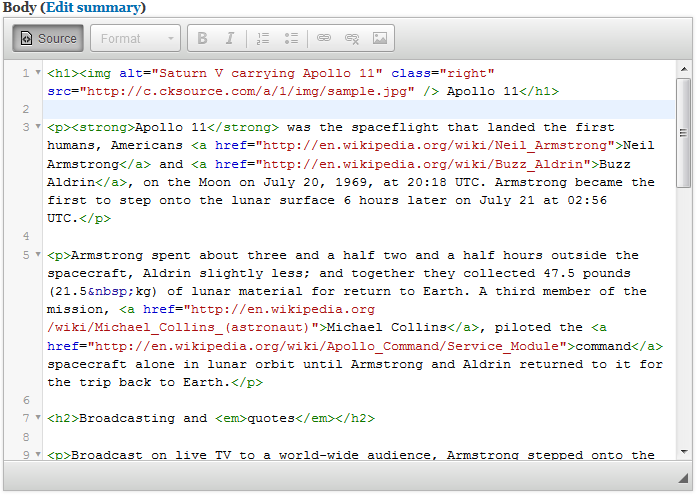 Code mirror
Features
Codemirror with Drupal 10 for ckeditor4 which does not interfere with codemirror support for Drupal 10 ckeditor_codemirror with ckeditor5. This module is for those that want to have codemirror for ckeditor4 and still use ckeditor_codemirror 3.x which only supports ckeditor5 so you end up with two modules ckeditor4_codemirror and ckeditor_codemirror 3.x.
Dependencies
CKEditor-CodeMirror-Plugin library (external)
Installation
For Composer-managed Drupal installations, the recommended method is to use
the Composer Merge Plugin and this module's composer.libraries.json file. From a Composer project root:
-
Download and install CKEditor4 CodeMirror module.
composer require drupal/ckeditor4_codemirror -
Install the CKEditor-CodeMirror-Plugin library
For Composer-managed Drupal installations, the recommended method is to use
the Composer Merge Plugin and this module'scomposer.libraries.jsonfile. From a Composer project root:-
Execute
composer require wikimedia/composer-merge-plugin. -
Add the following to the
extrasection of the rootcomposer.json
file:"merge-plugin": { "include": [ "{DOCROOT}/modules/contrib/ckeditor4_codemirror/composer.libraries.json" ] },Note: Remember to replace
{DOCROOT}with the appropriate root folder for the Drupal installation -- this is likelywebordocrootorhtml. -
Execute
composer install(or, in some cases,composer update --lock). -
composer require "w8tcha/ckeditor-codemirror":"^1.18.5"
-
That's it! Composer should install the CKEditor CodeMirror plugin in the appropriate place (/libraries/ckeditor_codemirror).
- Go to "Administration » Configuration » Content authoring » Text formats and editors" (
admin/config/content/formats) page. - Click "Configure" for any text format using CKEditor as the text editor.
- Under "CKEditor plugin settings", click "CodeMirror" and check "Enable CodeMirror source view syntax highlighting". Make sure that the current toolbar has the "Source" button. Adjust other settings as desired.
- Scroll down and click "Save configuration".
- Go to node create/edit page, choose the text format with CodeMirror plugin. Press the "Source" button.
Post-Installation
Additional Requirements
Rebuild caches, make sure the codemirror library gets loaded, open a support issue with this project if you need assistance.
Recommended modules/libraries
https://drupal.org/project/ckeditor
Similar projects
codemirror_ckeditor is similar , this module is very similar to codemirror_ckeditor version 2.x dev however it is a different namespace to not conflict with ckeditor_codemirror 3.x.
Community Documentation
Please refer to the README.md in this modules folder.
Supporting organizations:
Provide hosting and development resources
Project information
 Minimally maintained
Maintainers monitor issues, but fast responses are not guaranteed.- Maintenance fixes only
Considered feature-complete by its maintainers. - Project categories: Content editing experience, Developer tools
- Ecosystem: CKEditor 4 - WYSIWYG HTML editor
 197 sites report using this module
- Created by joseph.olstad on , updated
 Stable releases for this project are covered by the security advisory policy.
Look for the shield icon below.

