

 The 2026 Drupal Business Survey is open. Your response will help shape the future of the Drupal business ecosystem.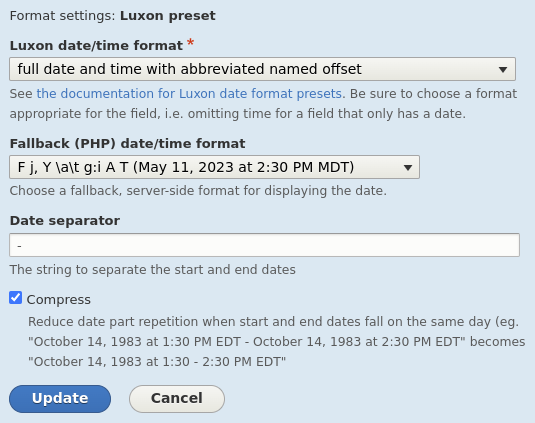
Use Luxon to localize datetime field output, client-side, showing dates and times in the visitor's local timezone.
Localizing dates client-side allows a site to display localized dates and times for all visitors (anonymous included) while keeping page cache enabled.
This module does not attempt to geo-locate visitors. It takes a less complex and arguably more accurate approach to date and time localization.
The visitor's browser already knows the visitor's timezone and language. Drupal knows what date/time you're trying to show. This module simply passes that date/time to the browser and asks the browser to do the work of localizing it for the visitor, showing the date/time in the visitor's local timezone, in a format of your choosing. Some format choices (presets) will go one step further and even show the date/time in the visitor's local language, with date parts ordered as is customary for that language.
Most of this is possible today in pure JS, but Luxon brings us an impressive array of formatting options, fallbacks for older browsers, a more simplified module codebase, and an excellent developer experience.
Datetime, datetime range, and timestamp field formatters
- Luxon preset
- Select a Luxon preset format
- Select a fallback / server-side Drupal datetime format
- For date ranges, optionally turn on compression to reduce repeated date parts in start and end dates (eg. "October 14, 1983 at 1:30 PM EDT - October 14, 1983 at 2:30 PM EDT" becomes "October 14, 1983 at 1:30 - 2:30 PM EDT"')
- Luxon custom
- Enter a custom Luxon datetime format using luxon tokens
- Enter a fallback / server-side datetime format using PHP tokens
- For date ranges, optionally turn on compression to reduce repeated date parts in start and end dates (eg. "October 14, 1983 at 1:30 PM EDT - October 14, 1983 at 2:30 PM EDT" becomes "October 14, 1983 at 1:30 - 2:30 PM EDT"')
Requirements
Built copy of Luxon 3.x in libraries folder, such that luxon.min.js is available at sites/../libraries/luxon/build/global/luxon.min.js.
Supporting organizations:
Development
Project information
 Minimally maintained
Maintainers monitor issues, but fast responses are not guaranteed.- Project categories: Content display, Site structure, Multilingual
 2 sites report using this module
- Created by chrisolof on , updated
 Stable releases for this project are covered by the security advisory policy.
Look for the shield icon below.

