

 Come together with the global Drupal community in Rotterdam, 28 Sept – 1 Oct 2026. Sessions, contribution, connection, and Early Bird savings until 8 June.
Problem/Motivation
If I set a number of slides per view in an horizontal slider, I see only one slide at time
Steps to reproduce
Use a view of content teaser, set swiper formatter for horizontal with 3 slides per view
Proposed resolution
Try to remove the css configuration
.swiper-container .swiper-slide {
width: inherit !important;
}
from swiper_formatter.css
| Comment | File | Size | Author |
|---|---|---|---|
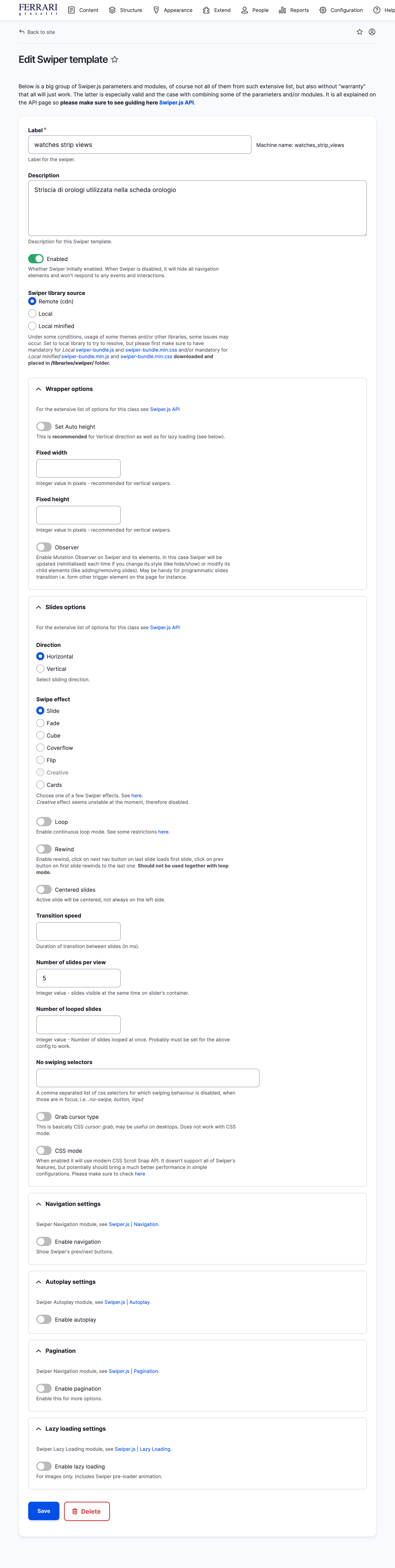
| #3 | swiper view configuration.png | 1.25 MB | coolest |

Comments
Comment #2
nk_ commentedHi there, thanks for a feedback!
The case you are mentioning is not supposed to be covered, amongst several at least that are also documented, if I understand well Steps to reproduce. As stated in Readme "Note that combinations of some particular ones are not meant by Swiper.js design." so that may be the reason for failing too (a combinations of options on Swiper config entity template).
As for the CSS part - it is definitely not possible to have that works "globally", targeting all kind of layouts and themes (that is why it is minimal) and it's up to the end user to adjust it in CSS. Same with proposed solution which I appreciate as a find! Cannot recall at the moment but there was a good reason why it is there, so please just override in your own CSS if it works.
Comment #3
coolest commentedTo be clear, this is the result I would like to get https://swiperjs.com/demos#slides-per-view
Configuration screenshot image is attached.
Could you help me with the css override? The width of each slide is set at runtime.
Thanks!
Comment #4
nk_ commentedI think I can help here but first off - did you try setting Number of looped slides value, it is just below Number of slides per view field. Please read what is in the description for that field and check on Swiper's pages about these two settings in particular. Then, if it is not resolving I can check perhaps about CSS.
Comment #5
coolest commentedFrom the documentation of Swiper
loopedSlides
If you use slidesPerView:'auto' with loop mode you should tell to Swiper how many slides it should loop (duplicate) using this parameter
In my case slidesPerView is set to 5
Not resolving.
Comment #7
nk_ commentedOk, so I added extra classes in template and previous setting for slide width: inherit !important will now only apply when slides per view is set to 1. I tested with setting 3 as a value in Number of slides per view field yet leaving empty value for Number of looped slides.
It is enclosed in dev version now so feel free to test. The other option that you probably always have is to copy swiper_formatter.css file somewhere in your theme and then override as per need in that file that should overwrite.
Comment #8
nk_ commentedAnd I had a chance to double check - Swiper does a lot of calculation for size and positioning upon initialising and it turns out that, in case of multiple slides per view, it needs either fixed width on most parent element like:
.swiper-container { max-width: 1280px; }which is not what I am going to put in module's CSS because it is sort of hardcode in context of all kind of various layouts that may be on various websites.
OR setting Fixed width value on the template configuration.
I tried both and it behaved well. Note, this module is not doing anything extra than Swiper itself, but only collecting values from config and passing those to JS where Swiper inits with it. Meaning that in that part it's all up to it and not this module.
Comment #9
nk_ commented