

Active
Project:
Drupal core
Version:
main
Component:
install system
Priority:
Normal
Category:
Bug report
Assigned:
Unassigned
Reporter:
Created:
31 May 2022 at 12:35 UTC
Updated:
17 Sep 2022 at 16:47 UTC
Jump to comment: Most recent, Most recent file


Comments
Comment #2
rkollerThe experience for none native speakers with the installer was one of the main talking points during our discussion in #3280390: Drupal Usability Meeting 2022-05-20. After the meeting I've started to explore how other CMSes and OSes build their installer experience. Unfortunately I never found the time to write everything up. This will be made up now. I'll limit myself for this comment to the localization related aspects. At first what are the problems in the current installer in Drupal:
1) The auto-detecting and auto-setting of the correct language is not working properly for every browser. I've tested in the following browsers:
Firefox 104.0.2 & Microsoft Edge 105.0.1343.33 -> The selection is the default English even though it should be switched to German.

Safari 15.6.1 -> the selection is correctly switched to German.

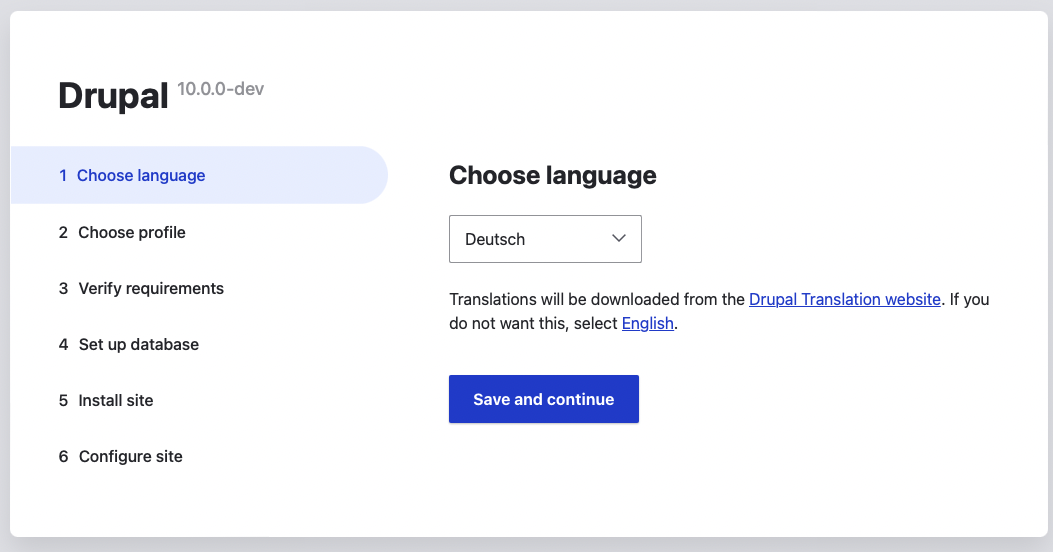
2) If you have selected or you got auto-selected a language other then English then you still have the steps in the sidebar, the
choose languagetitle, thesave and continuebutton label and in particular the description for the select element explaining the consequences of choosing another language than English in English. If you have a user unable to understand english then this is quite problematic and troublesome. A situation that should be avoided at any cost.And how other CMSes and OSes are dealing with languages in their installation process?
a) WordPress (6.0.2)

In WordPress the first page of the installer consists of the WordPress logo, a list of available languages, and a continue button. Per default English (United States) is selected.
There is no auto-detection and you have to manually change to another language.

Via the

get_available_languages()function thelanguage nameand thecontinuenoun translation gets pulled.b) Joomla (4.1.4)

On the first page in the Joomla installer you have a select element which is auto-detecting the language (working in Safari and Chrome but failing in Firefox) and the site name. The available list of language name options is localized.
On page five you get a list of available languages so you are able install additional for a multilingual site setup:

Pn page six you are able to decide which of the now installed languages should be your default in the Joomla admin interface and which the default in the Joomla frontend:

c) Typo3 11
There weren't any options to configure or install anything language related. The installer was in english only.
d) iOS
After an initial "hello" you directly get to a list of available languages you are able to choose one to use in the installer and on your system in general.
https://support.apple.com/en-us/HT202033
e) Android
Android seems to have a similar approach (never had an Android device the observation is solely based on the screenshots in the article).
https://www.techadvisor.com/article/727255/how-to-set-up-android.html
A few ideas how to improve the localization part in the Drupal installer
1. Have a select element and a "continue" button on the first page. If it is possible to get the language auto-detection working for all browsers is might be ok to stick with the select element that is currently in place in the installer. If not it might be worth a thought to apply a pattern similar to the one used in WordPress or iOS by showing more than the currently selected option but more of the available other options as well. That way the users understand more quickly what the page is about without any description necessary.
In regards of the
continuebutton label a function could be added alongside thegetStandardLanguageList() to theLanguageManager.phpfile providing a list of translated labels for the noun Continue for each language available ingetStandardLanguageList(). That way you would avoid the need for extra translation work for the steps, title and description and the first page is still comprehensible for every language available.2. Since the idea in https://www.drupal.org/project/drupal/issues/3085219#comment-14532814 and https://www.drupal.org/project/drupal/issues/3085219#comment-14533605 was to remove the steps (#3283371: Remove steps from installer) in the sidebar and take the user by the hand and make the experience more conversational on the second page it could be clarified that the language selected on the previous page will be used for the rest of the installer as well as be the default language in the Drupal admin interface.
3. I am not sure if it would be technical possible. But either on page two it could be displayed right after the aforementioned explanations or at a later point. right after a checkbox with the label "do you want to install other languages alongside the one you are currently using" is checked it could be dynamically displayed and show up.
The point is usually you know from the start that you wanna have a multilingual installation. cCrrently the steps are you install Drupal in a certain language, then you go to the extend page (
/admin/modules), install at least the language module, and then one by one each language you need (/admin/config/regional/language/add). Problem there, the displayed option list is again based on theLanguageManager.php. If you have for example a German user only speaking German then that person has a hard time to figure out the desired language name - the language list isn't localized in Drupal.The approach Joomla provides is close to the one i had in my mind. If the user is checking the checkbox and wanting to install other languages a localized list of available languages is dynamically displayed and the user would be able to check all the languages that should be additionally installed. That would be way more convenient, clear and might speed up the process to set up a multilingual installation. But in contrast to the Joomla approach i wouldn't use the columns
language,language tagandversionbut instead uselanguage,language tagandcompletion(if possible). The version number doesn't provide any value (if there is something like a version number for translations in Drupal anyway) but the level of completion does. Would you install a localization for a language that is missing 20% or 40% of the strings and therefor has a patchwork with English strings?In that context it could also be asked if the initially chosen language should remain the default language or any of the newly added ones should become the new default. That would be basically the setting found at
admin/config/regional/language. Joomla also offers the option to select the default language for the frontend. But that would require thatAccount administration pagesis enabled on/admin/config/regional/language/detectionper default.p.s. i wonder would it make sense to open up a new parent meta issue for this issue and #3283371: Remove steps from installer? With #3085219: Installer is not very usable in Claro, the parent issue, fixed and closed it feels odd to have both children right at the beginning. I think it might make sense to open a new meta parent?
Comment #3
aaronmchaleThank you for your detailed write up and research @rkoller.
I would broadly agree with everything you have written. I think it is clear that the less elements/text we have on the first page of the installer the better.
For the ideas you have proposed, I fully agree with 1 and 2, I think having the Continue button text adapt in real time makes a lot of sense, and being clear with the user that the language they selected will be used going forward. Idea 3, I think that's a very good idea, might be worthwhile opening a follow-up issue for that one, as it's potentially quite a task in itself.
Having a parent issue to better organise this set of related issue makes sense, something like "[meta] Improve the usability of the installer". Maybe an appropriate issue already exists that we could adopt, I'm not sure but if one doesn't exist then creating one sounds like a sensible idea.