

 Come together with the global Drupal community in Rotterdam, 28 Sept – 1 Oct 2026. Sessions, contribution, connection, and Early Bird savings until 8 June.
Problem/Motivation
Claro has minimally updated the Tour styles and it currently has important accessibility issues, among other design improvements that could be done:

Steps to reproduce
- Enable the Claro theme and set it as the Administration theme
- Enable Language module
- Visit /admin/config/regional/language/add
- Click Tour in the upper right hand corner
- Navigate to the third Tour item. This item has a link.
Proposed resolution
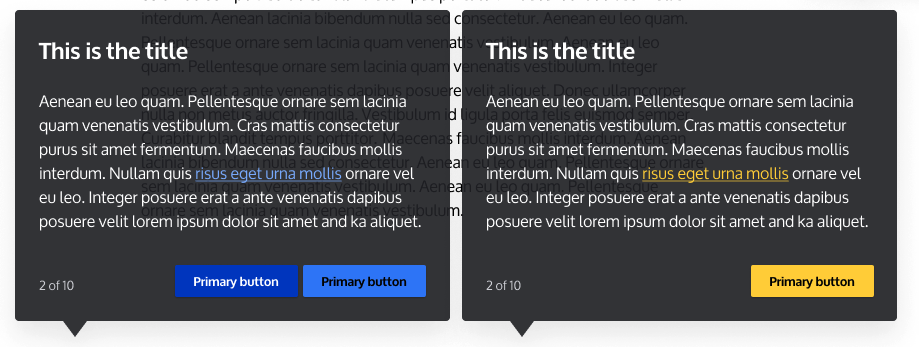
Design a new palette that solves this issues. It will be broadly done in #3251278: [META] Designs for dark background layers and its color palette and will need to be adapted for the Tour module specifically. Some of the current explorations can be seen here:
Remaining tasks
User interface changes
API changes
Data model changes
Release notes snippet
| Comment | File | Size | Author |
|---|---|---|---|
| #6 | Screenshot 2024-07-01 at 6.44.26 PM.png | 51.6 KB | smustgrave |
| #6 | Screenshot 2024-07-01 at 6.44.21 PM.png | 21 KB | smustgrave |
| #6 | Screenshot 2024-07-01 at 6.44.17 PM.png | 21.5 KB | smustgrave |
| tour-explorations.png | 131.79 KB | ckrina | |
| tour.png | 27.2 KB | ckrina |




Comments
Comment #5
quietone commentedThe proposed resolution states that the solution is specific to Tour so this should move to the Tour project, which is now in contrib.
I am sure someone will correct this move if it is incorrect.
Comment #6
smustgrave commented@ckrina we've already done some work on the 2.0.x branch updating the look. We have it always displaying with a different color if it's disable(no tours) and added a simple previous button. Think that covers the concern ?
Comment #7
smustgrave commentedGoing to close as outdated for now but if more is needed for 2.0.x we can reopen.