
 Come together with the global Drupal community in Rotterdam, 28 Sept – 1 Oct 2026. Sessions, contribution, connection, and Early Bird savings until 8 June.
How to Configure
Initial Steps
This module is quite easy to setup and use.
NOTE: Before getting started you should ensure you have all the necessary modules, languages and paths setup.
Pick your definition
The first thing you'll see if the Language Configuration panel. In this section you can choose between KEY or JSON definitions for the matrix.
If your Drupal installation is already using the key module, you can setup an environment type key for the matrix of paths-to-languages. You can follow the instructions on how to work with the key module from its documentation.
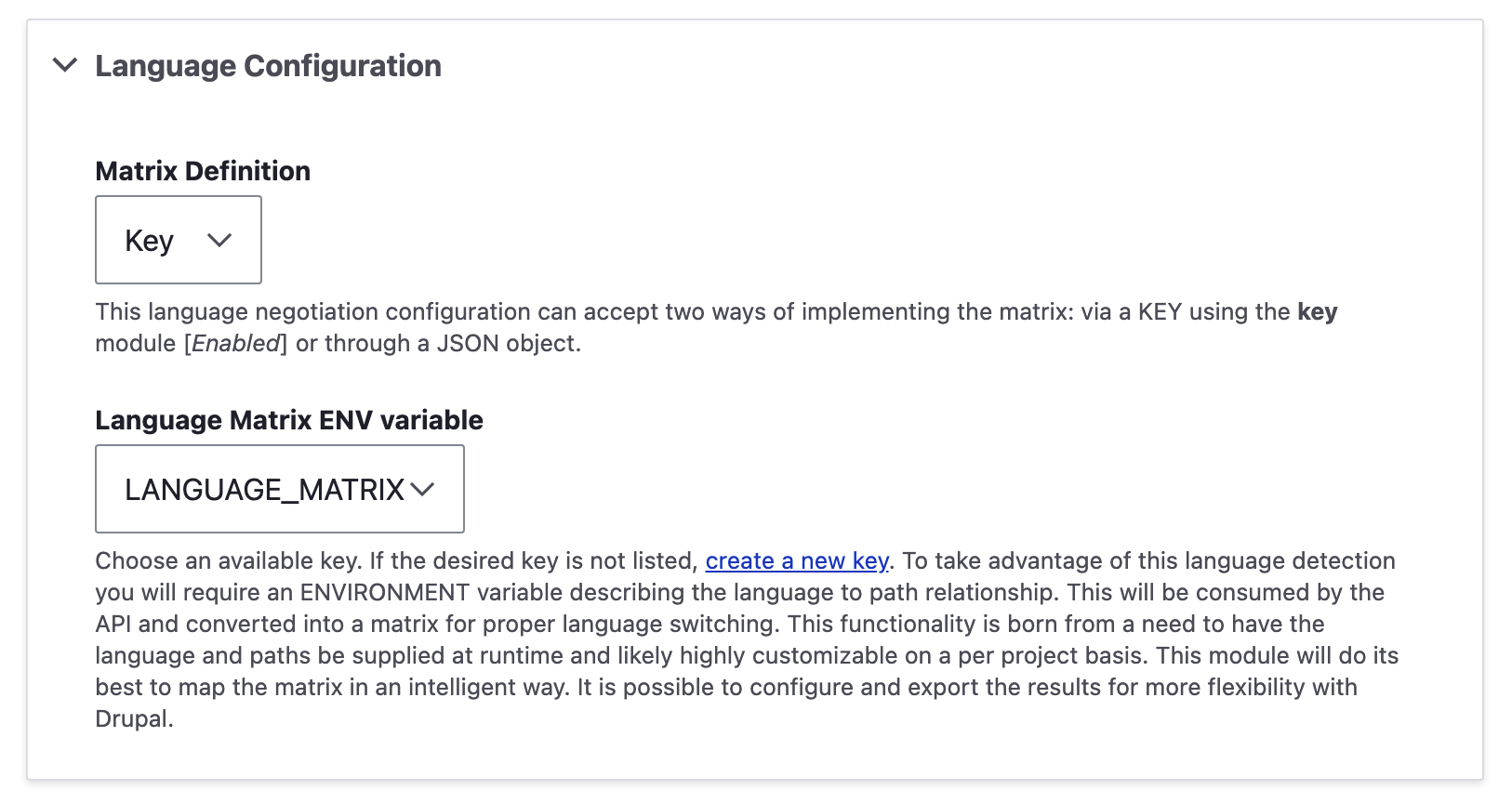
If you would rather put the matrix directly into your module configuration, you can do so by selecting the "JSON" matrix definition and pasting a properly formatted JSON object in the textarea.
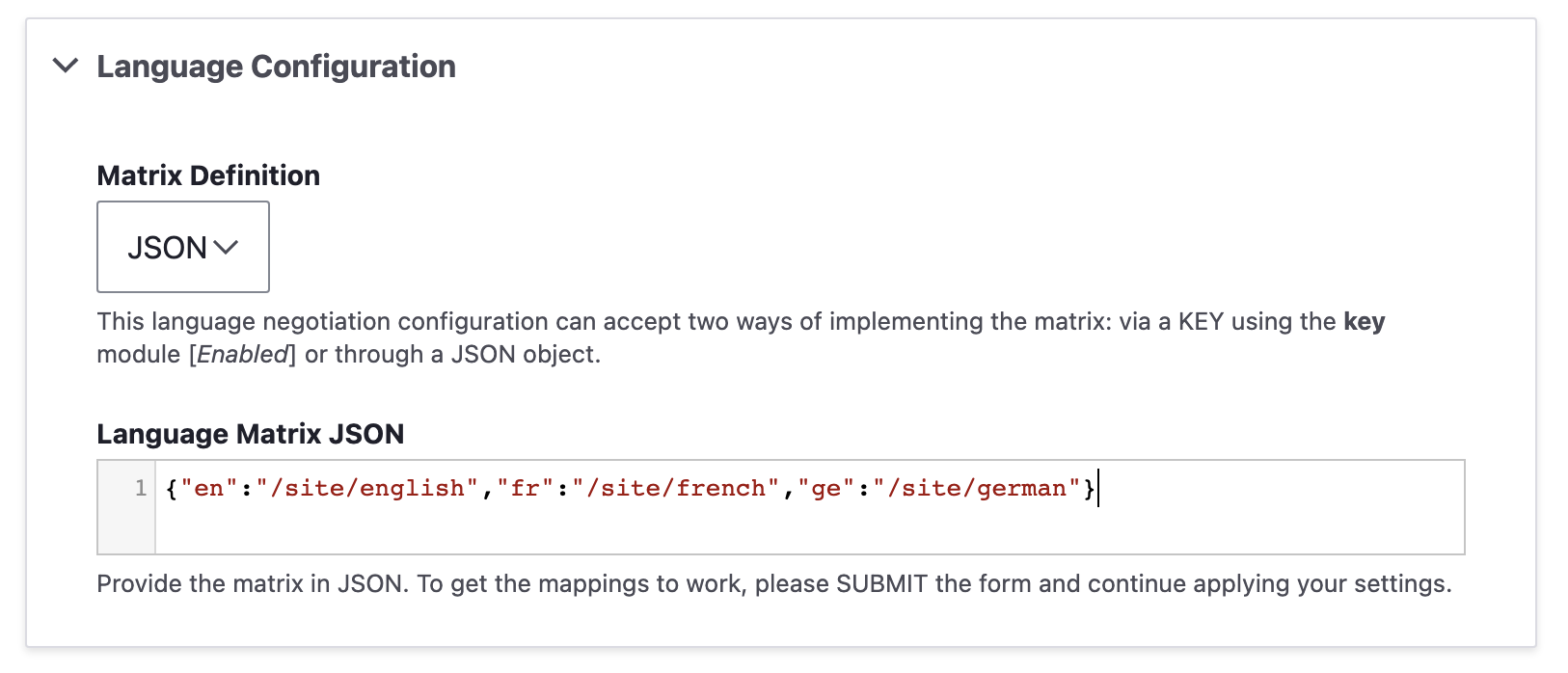
Whether you include leading slashes or not, the paths will be normalized before being used. In the example above, they were included for clarity.
Select the part of the URL that determines the language
This is quite similar to the language negotiation URL option provided by core language options. The difference comes in HOW the matrix maps these to each language.

N.B.: You can only have one or the other. But if you wish to combine the effects of the path prefix with the domain negotiator of the core URL method, you could give that a try. Choosing the order of processors will be up to you and which of these solutions has precedence.
Once you've made your selections, hit "SAVE CONFIGURATION" to get your initial configuration baked in. If you are lucky the module will have automatically made some predetermined selections based on what languages are setup in your site as well as what paths it found in the matrix provided. Do not worry if this doesn't make any matches. The next step will be to resolve any issues and make your final mapping choices.
This next section will have different outcomes depending on which choice you made above.
Path Prefix Configuration
This option really comes into play when a site has several sub-folders representing a location for the site on a per-language basis.

As can be evidenced by the example above, the site ised-drupal.docker.localhost has only two languages active. But in our examples JSON object, we are making reference to three paths and languages. Once the "german" language is added, the "Active Languages for Prefixes" section will reflect this and allow a prefix to be added for the new language. Until then, the "Language Mapping" will permit you to make a relationship but it won't be used.
Domain Configuration
This option serves a unique condition where not only are sub-domains reflecting the language, but a site has several sub-folders representing a location for the site on a per-language basis as well.
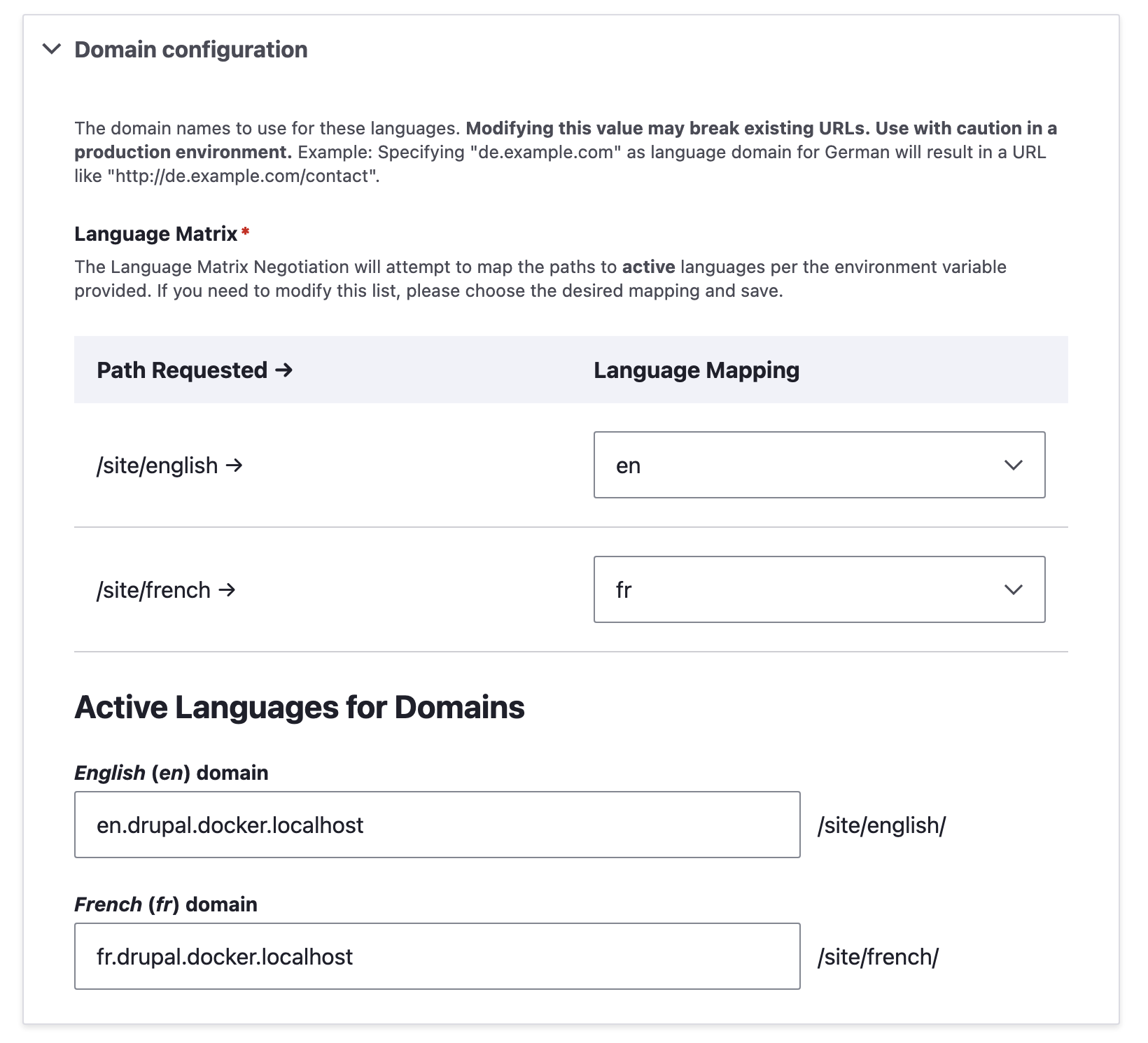
As can be seen in the example above, the sub-folder mapping on a per language basis as well as the domain setup will be key.
VERY IMPORTANT NOTICE: You cannot use different domains with cookies and have user sessions stay active between switches. Anonymous language switching will work fine, but if you wish to have a authenticated users be able to stay logged in between unique domains, you'll have to come up with a way to have sessions exists between different domains. SSO and various methodologies exist to resolve this. This module cannot do that for you.
Once you've got your configuration locked in by saving the page. Your language switcher should now properly reflect your new paths per language.
Caveats
As noted in the notice above, certain restrictions relating to cookies do apply, but for the most part, if you adhere to domain rules and use sub-domains for your languages, you can tell Drupal to keep sessions active between switches and thereby have authenticated users switch languages and remain logged in.
To do that, you'll need to setup your session parameters in the "services.yml" files. Further reading on this topic can be found here: https://support.acquia.com/hc/en-us/articles/360037119453-Drupal-session-cookie-attributes as well as https://developer.mozilla.org/en-US/docs/Web/HTTP/Cookies#Secure_and_HttpOnly_cookies
parameters:
  session.storage.options:
    cookie_domain: '.localhost'
    cookie_samesite: 'Lax'
The above values can be used to great affect.
parameters:
  session.storage.options:
    cookie_domain: 'drupal.docker.localhost'
This setup forces the cookie to adhere to the specific domain and its sub-domains but has no wildcard. This means that a url like en.drupal.docker.localhost would in fact use the cookie for drupal.docker.localhost allowing the french site above fr.drupal.docker.localhost to share that cookie as well.
The first example,
parameters:
  session.storage.options:
    cookie_domain: '.localhost'
though using a wildcard, will actual not serve you as you might like. The parameter is telling cookies to use ALL subdomains individually. Meaning, the following sub-domains:
fr.drupal.docker.localhosten.drupal.docker.localhostdrupal.docker.localhostdocker.localhostlocalhost
Would all be legitimate sites with each having their own cookies on the wildcarded domain. (or any permutation of the wildcard with sub-domains. The point being made here is: If you want to share a cookie across a specific domain and sub-domain, be explicit in your parameter.
Help improve this page
You can:
- Log in, click Edit, and edit this page
- Log in, click Discuss, update the Page status value, and suggest an improvement
- Log in and create a Documentation issue with your suggestion
